
Choose a header or footer
- Go to Appearance → Editor and select the header or footer on any template.
- In the toolbar, choose Replace.
- Pick a design and save.
Headers
| Header | Layout |
|---|---|
| Classic masthead (default) | An announcement strip, a masthead with book search, the wordmark centered, account and bag, then the genre navigation between fine rules. Becomes a compact bar once the page scrolls |
| Library bar | One slim row: wordmark, genre navigation, search, account and bag, so the books start sooner |
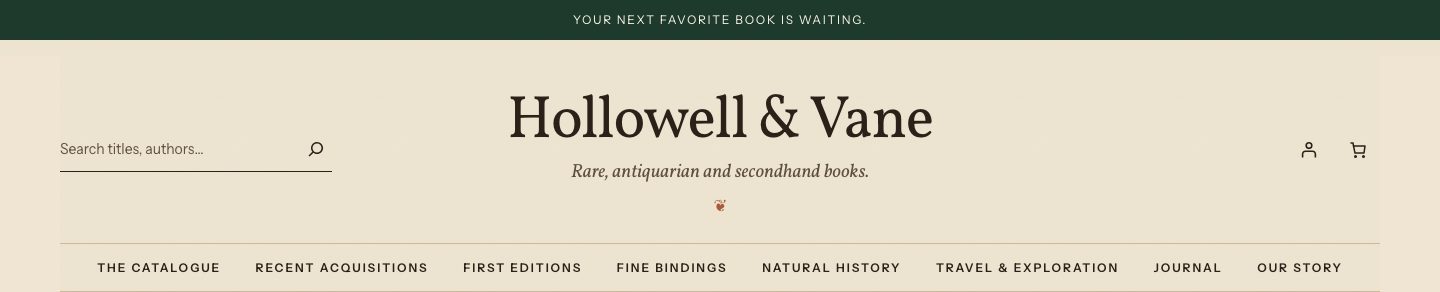
| Bookplate | Set like a title page: a large centered wordmark over the tagline and a fleuron, search and bag at the corners, the navigation in small capitals beneath. Stays at the top of the page rather than following the reader |
| Minimal | The menu button, the wordmark centered, then search and the bag. For small catalogs and publishers with a single list |
Classic masthead:

Library bar:

Bookplate:
Minimal:

Footers
| Footer | Layout |
|---|---|
| Deep forest (default) | Wordmark and a note about the shop, store, genre and help links, the newsletter (when a provider is set up) or the journal, social links and legal links |
| Colophon | A light footer set like the last page of a book: a fleuron, the wordmark and tagline centered, one line of links, social links and the copyright |
| Newsletter | A large newsletter band over compact store, genre and help links. Without a newsletter provider, the band invites readers to the journal |
| Minimal | A single ruled line: the copyright, a few help links, the privacy policy and social links |
Edit the logo, menu and announcement
- Logo: select the Site Logo block in the header and upload your logo, or keep the typographic wordmark.
- Menu: select the Navigation block in the header to choose or edit a menu.
- Announcement: the classic masthead and bookplate headers start with an announcement strip. Edit its text in the header, or delete it.
- Social links: add your profile URLs to the Social Icons block in the footer.
Checkout header
The checkout page uses a quiet header with the wordmark and a way back to the bag. Edit it under Appearance → Editor → Patterns → Header (Checkout header).