
Your licence enables plugin updates and support. All shipping features work without it.
1. Find your licence key
The key is in your purchase email and in your WPRuby account under Purchase history.
2. Activate it
Go to Canada Post → Settings → Licence, paste the key and click Activate licence. The status changes to Active and shows who the licence belongs to, when it expires and how many sites use it. The key itself is never shown again, only its last four characters.
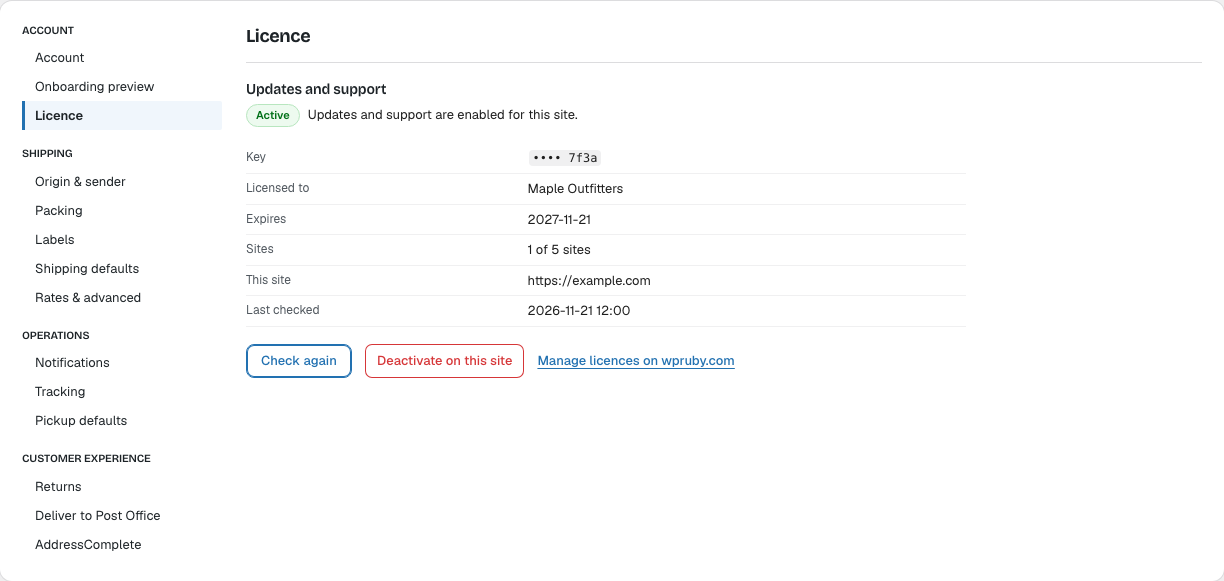
Updates then appear in Dashboard → Updates and on the Plugins screen like any other plugin, and you can turn on automatic updates. Until a key is active, the Plugins screen shows an Enter licence key link.
Moving to another site
Each activation uses one site of your licence. Click Deactivate on this site on the old site before activating the licence on the new one. Check again checks the licence without using an activation; the plugin also checks it once a week.
Note: If the licence cannot be activated, see Troubleshooting.