
Go to WooCommerce → Deep Insights → Settings. You need the Manage WooCommerce capability.
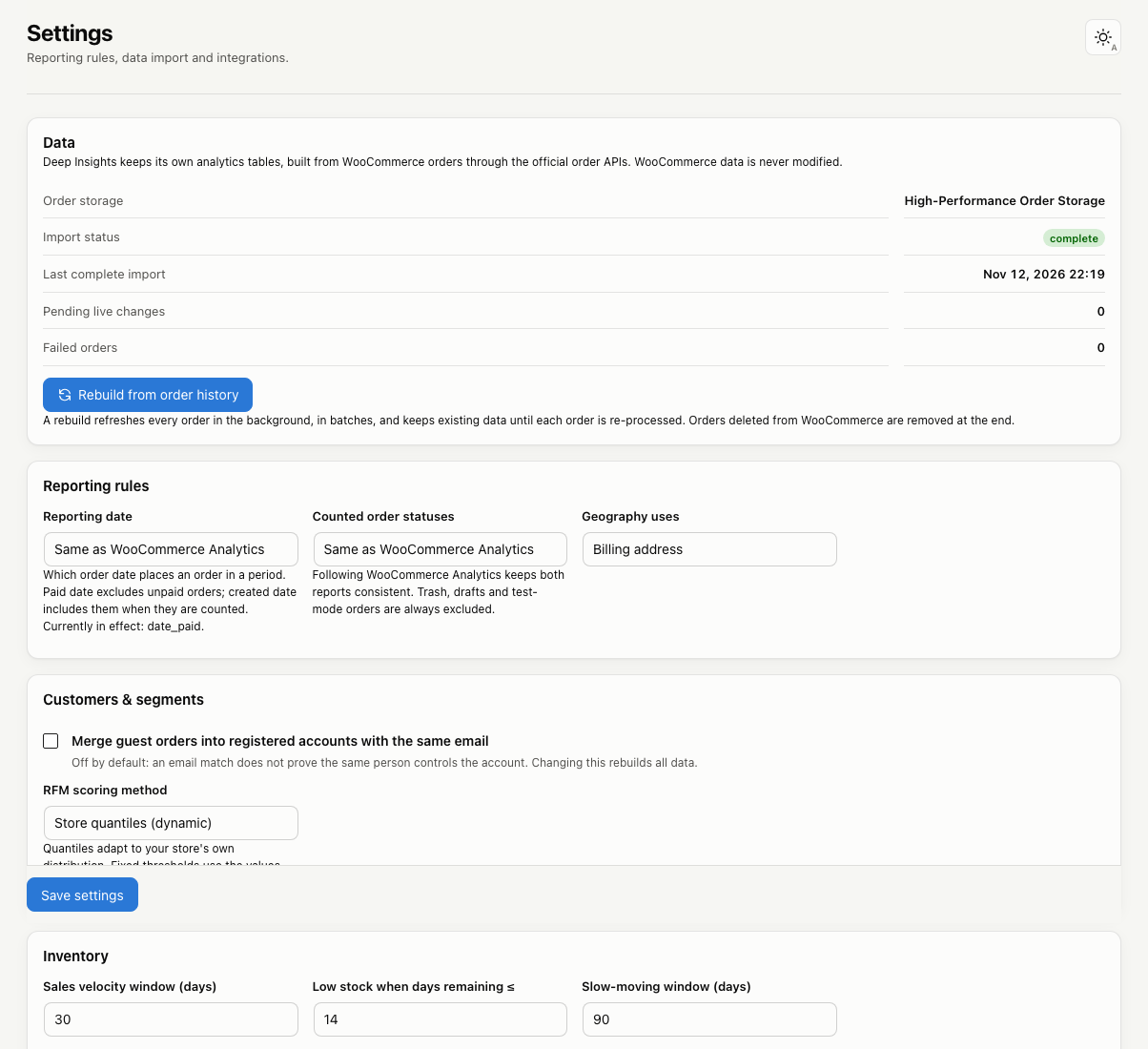
Data
Shows the order storage mode, import status, pending live changes and failed orders. Use Rebuild from order history to re-read every order. See Importing your order history.
Reporting rules
| Setting | Default | What it does |
|---|---|---|
| Reporting date | Same as WooCommerce Analytics (paid date) | Which order date places an order in a period: paid, created or completed. Orders without that date, such as unpaid orders under “paid date”, don’t appear in date-based reports. |
| Counted order statuses | Same as WooCommerce Analytics | Statuses left out of all totals. By default pending, failed and cancelled orders are excluded. Trash, drafts and test-mode orders are always excluded. |
| Geography uses | Billing address | The address used for countries and regions. |
Changing the reporting date or counted statuses recalculates figures in the background. No re-import is needed.
Customers & segments
| Setting | Default | What it does |
|---|---|---|
| Merge guest orders into registered accounts with the same email | Off | Treats a guest and an account with the same email as one customer. Changing it rebuilds all data. |
| RFM scoring method | Store quantiles | Quantiles adapt to your store. Fixed thresholds use the values you enter for recency, frequency and monetary. |
Inventory
| Setting | Default | What it does |
|---|---|---|
| Sales velocity window | 30 days | Recent sales used to estimate days of stock. |
| Low stock when days remaining ≤ | 14 days | When a product is flagged as low stock. |
| Slow-moving window | 90 days | Products with no sales in this window are flagged. |
| Record daily stock snapshots | Off | Builds a stock history from today onward. |
Lifecycle & insight thresholds
| Setting | Default |
|---|---|
| Lifecycle window | 90 days |
| Rising/declining threshold | 25% |
| Minimum units for lifecycle rules | 10 |
| High refund rate | 10% |
| Minimum orders per period for insights | 30 |
| Minimum change worth reporting | 15% |
Performance & data retention
| Setting | Default | What it does |
|---|---|---|
| Import batch size | 100 orders | Orders per import batch. Lower it if imports time out on slow hosting. |
| Report cache lifetime | 3600 seconds | How long a calculated report counts as fresh. |
| Refresh reports after order changes | 300 seconds | New orders sync right away; cached reports refresh at most this often. 0 refreshes after every change, which is slower on busy stores. |
| Delete all Deep Insights tables and settings when the plugin is deleted | Off | When on, deleting the plugin removes its data. WooCommerce data is never touched. |
Integrations
Shows which optional data sources were found: cost of goods, WooCommerce Subscriptions, order attribution and carrier shipping costs.
Click Save settings after making changes.