
The Retention & Cohorts report answers one question: do customers come back after their first order?
Go to WooCommerce → Deep Insights → Retention & Cohorts.
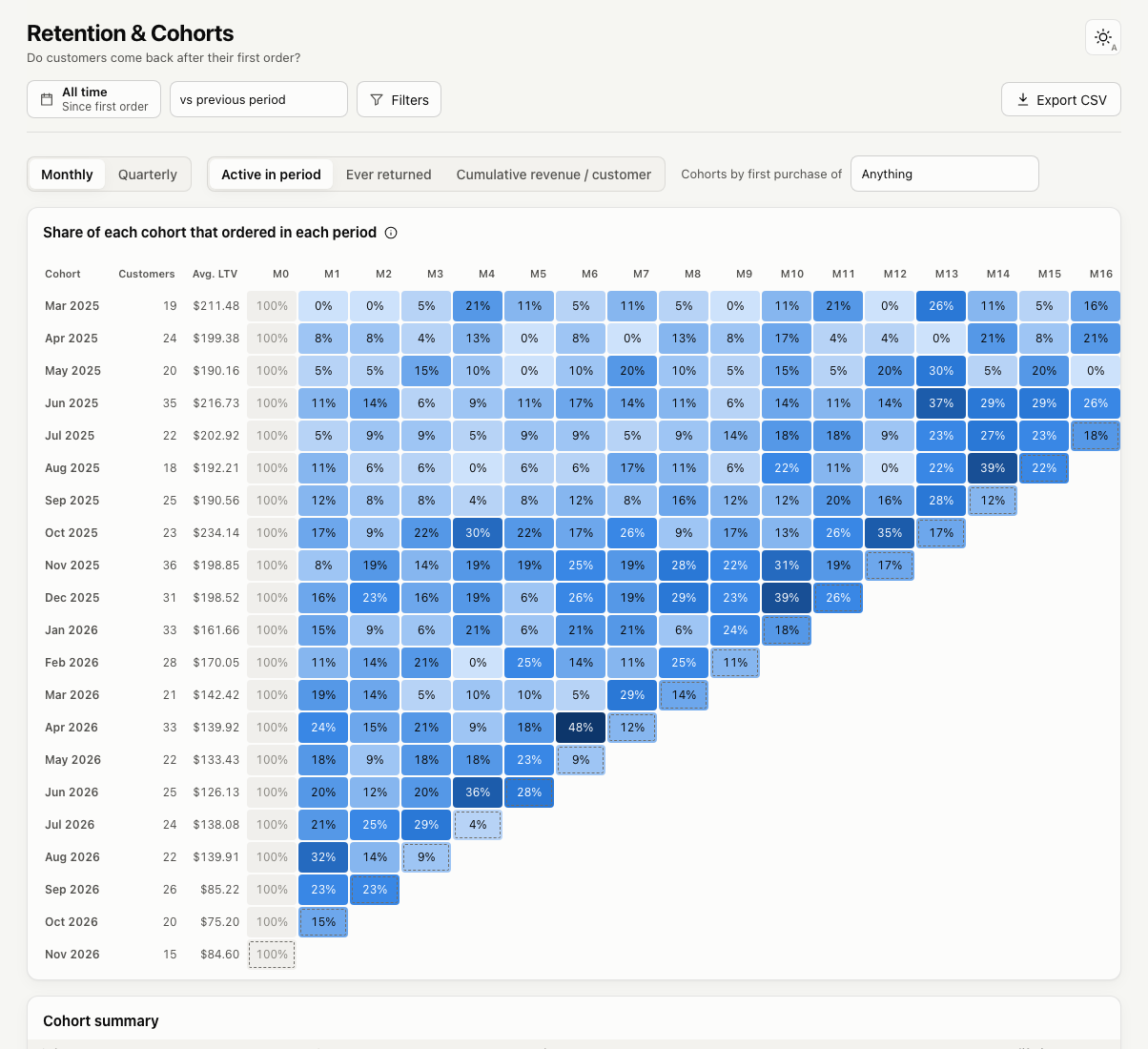
How to read the grid
- Each row is a cohort: the customers whose first order was in that month (or quarter).
- M0 is the month of the first order, so it is always 100%.
- M1, M2 and so on are the months after that.
- Darker cells mean a higher share.
The selected date range decides which cohorts appear. Activity after the cohort month is tracked up to today. Choose All time to see every cohort.
Blank cells are months that have not happened yet. A dashed cell is the current month, which is still in progress.
Views
- Active in period: the share of the cohort that ordered in that month.
- Ever returned: the share of the cohort that has placed a second order by the end of that month.
- Cumulative revenue / customer: total net sales per customer up to that month.
Switch between Monthly and Quarterly cohorts with the toggle on the left.
Cohorts by first purchase
Use Cohorts by first purchase of to compare customers by what they bought first. You can limit cohorts to customers whose first order contained a product or a category, or who came from a country.
Cohort summary
The summary table lists, for each cohort, the number of customers, average orders, repeat revenue and average lifetime revenue.