WPRuby Logo WPRuby
Log in Get started
  • Plugins
  • Themes
  • Docs
  • Blog
    • eCommerce
    • Plugins
    • How to
    • Coding
  • Affiliate Area
  • Contact Us
  • About Us
  • Plugins
  • Themes
  • Docs
  • Blog
    • eCommerce
    • Plugins
    • How to
    • Coding
  • Affiliate Area
  • Contact Us
  • About Us

WPRuby Account

4
  • How to upgrade your license
  • How to renew your license
  • How to change your plugin’s license domain
  • How to cancel your subscription.

WooCommerce Australia Post Shipping Method Pro

14
  • Installation
  • How to activate your Australia Post Pro license
  • How to Upgrade from Free to Pro
  • Australia Post Zone Settings
  • Australia Post Global Settings
  • Australia Post Tracking
  • Pre-Paid Satchels
  • How to Mark a Product to be Shipped Individually?
  • TroubleShooting and Common issues
  • Available WordPress Actions and Filters
  • [Labels Pro] How to connect the plugin with your MyPost Business account
  • [Labels Pro] How to connect Labels Pro with your eParcel account
  • [Labels Pro] How to print labels and create shipping orders.
  • [Labels Pro] How to Mark a Product as Containing Hazardous Materials?

WooCommerce Custom Payment Gateway Pro

11
  • Getting Started
  • Custom Payment Gateway Settings
  • Custom Checkout Field Builder
  • Conditional Display Rules
  • Sending Payment Data to an External API
  • How to Create a Pay by Invoice Payment Method
  • How to Create a Manual Payment Link or Review-Based Payment Method
  • Troubleshooting
  • Frequently Asked Questions
  • Security and Sensitive Payment Data
  • How to Upgrade from Free to Pro

WooCommerce Royal Mail Shipping Calculator Pro

4
  • Installation
  • Settings
  • TroubleShooting and Common issues
  • How to activate your plugin license

Controlled Admin Access Pro

3
  • Available Actions for a Restricted Admin
  • Installation
  • Settings

WooCommerce Address Guard Pro

7
  • Get Started
  • Configuring Address Providers
  • Configuring Checkout Validation
  • Creating Address Rules
  • Customizing Customer Messages
  • Using the Address Tester
  • Reviewing Address Quality Inside WooCommerce Orders

WooCommerce Simple Table Rates Pro

8
  • Installation
  • Settings
  • Rules and Actions
  • How to Setup Weight Based Shipping
  • How To Setup Shipping By Shipping Class
  • How to Setup Shipping by Cart Total
  • How to Setup Shipping by Product
  • How to Setup Shipping by Product Category

WooCommerce Pack IQ

5
  • Installation
  • How to activate your plugin license
  • How to add a new box
  • How to change the boxes weight and dimensions units
  • How to view the packing results

WooCommerce Restricted Shipping and Payment Pro

4
  • Installation
  • Setting Up Shipping Methods Conditions
  • Available Shipping & Payment Rules
  • Setting Up Payment Gateways Conditions

Affiliate Butler PRO

9
  • Installation and Upgrade
  • Quick Start Guide
  • Settings
  • Keywords Management
  • Installation
  • Frequently Asked Questions
  • Files Structure
  • Links Types
  • Statistics

WooCommerce Adyen Payment Gateway

2
  • Setup the Adyen payment gateway
  • How to configure Adyen Webhook notifications? 

WooCommerce Free Shipping Per Product

2
  • Installation
  • How to setup free shipping for a certain product

WooCommerce UPS Shipping Method Pro

4
  • Installation
  • UPS Zone Settings
  • UPS Global Settings
  • How to get the UPS Access Key?

Delivery Promise for WooCommerce

9
  • Getting Started
  • Understanding Processing Time vs Transit Time
  • Setting the Cutoff Countdown
  • Configuring Default Delivery Estimates
  • Creating Delivery Rules
  • Setting Working Days and Holidays
  • Using Rule Presets
  • Product-Level Lead Times
  • Why the “Order Within” Countdown Is Not Showing

Cartavera

16
  • Cartavera documentation
  • Install Cartavera
  • Activate your licence
  • Import a starter site
  • Styles, colours and fonts
  • Headers and footers
  • The homepage
  • Catalog and filters
  • The product page
  • Cart and checkout
  • Translation and right-to-left languages
  • Child themes
  • Hooks and filters reference
  • Troubleshooting
  • FAQ
  • Changelog

Candy Shop

14
  • Candy Shop documentation
  • Install Candy Shop
  • Activate your licence
  • Import a starter site
  • Set up your products
  • Food information and allergens
  • Shop pages and filters
  • Styles, colors and fonts
  • Headers, footers and menus
  • The homepage
  • Child theme
  • Hooks and filters
  • FAQ
  • Changelog

Foliowick

16
  • Foliowick documentation
  • Install Foliowick
  • Activate your licence
  • Import a demo store
  • Authors and author pages
  • Book details and editions
  • Genres, reading lists and the Editor’s Pick
  • Secondhand copies and forthcoming books
  • Shop pages, search and book pages
  • Styles, colors and fonts
  • Headers, footers and menus
  • The homepage
  • The journal and editorial pages
  • Hooks and filters
  • FAQ
  • Changelog

Gemelune

14
  • Gemelune documentation
  • Install Gemelune
  • Activate your licence
  • Import a starter site
  • Metals, sizes and swatches
  • Size guide, delivery and care pages
  • Shop pages, product cards and product pages
  • Styles, colors and fonts
  • Headers, footers and menus
  • The homepage
  • Child theme
  • Hooks and filters
  • FAQ
  • Changelog

Formafern

15
  • Formafern documentation
  • Install Formafern
  • Activate your licence
  • Import the demo store
  • Finishes and swatches
  • Dimensions, materials and care
  • Rooms and Shop the Room
  • Shop pages, product cards and product pages
  • Styles, colors and fonts
  • Headers, footers and menus
  • The homepage and editorial pages
  • Child theme
  • Hooks and filters
  • FAQ
  • Changelog

Pawtani

15
  • Pawtani documentation
  • Install Pawtani
  • Activate your licence
  • Install a starter site
  • Pets, sizes, flavours and product facts
  • Size & fit guides
  • Shop pages, filters and product pages
  • Repeat purchases, subscriptions and wishlists
  • Styles, colors and fonts
  • Headers, footers and menus
  • The homepage
  • Child theme
  • Hooks and filters
  • FAQ
  • Changelog

Deep Insights for WooCommerce

19
  • Getting Started with Deep Insights for WooCommerce
  • Upgrading from Woo Insights
  • Importing Your Order History
  • Dates, Comparisons and Filters
  • Revenue Report
  • Products Reports
  • Customer Reports
  • RFM Customer Segments
  • Retention and Cohorts
  • Profitability and Cost of Goods
  • Subscriptions Analytics
  • Inventory Intelligence
  • Shipping, Discounts and Refunds
  • Automated Insights
  • Settings Reference
  • Why Numbers Can Differ from WooCommerce Analytics
  • Troubleshooting
  • Privacy, Security and Updates
  • Developer Hooks
View Categories
  • Home
  • Knowledge Base
  • Deep Insights for WooCommerce
  • Customer Reports

Customer Reports

Waseem
Updated on November 13, 2026

1 min read

0:00 / 2:40
  • View as Markdown Open this page as plain Markdown (opens in a new tab)
  • Open in ChatGPT Ask questions about this page (opens in a new tab)
  • Open in Claude Ask questions about this page (opens in a new tab)
  • Open in Google AI Studio Ask questions about this page (Google account required) (opens in a new tab)

The Customers report shows who buys, how often and how much.

Go to WooCommerce → Deep Insights → Customers.

Table of Contents

Toggle
  • Overview
  • How customers are identified
  • RFM segments
  • Lifetime revenue
  • Geography
  • Acquisition

Overview

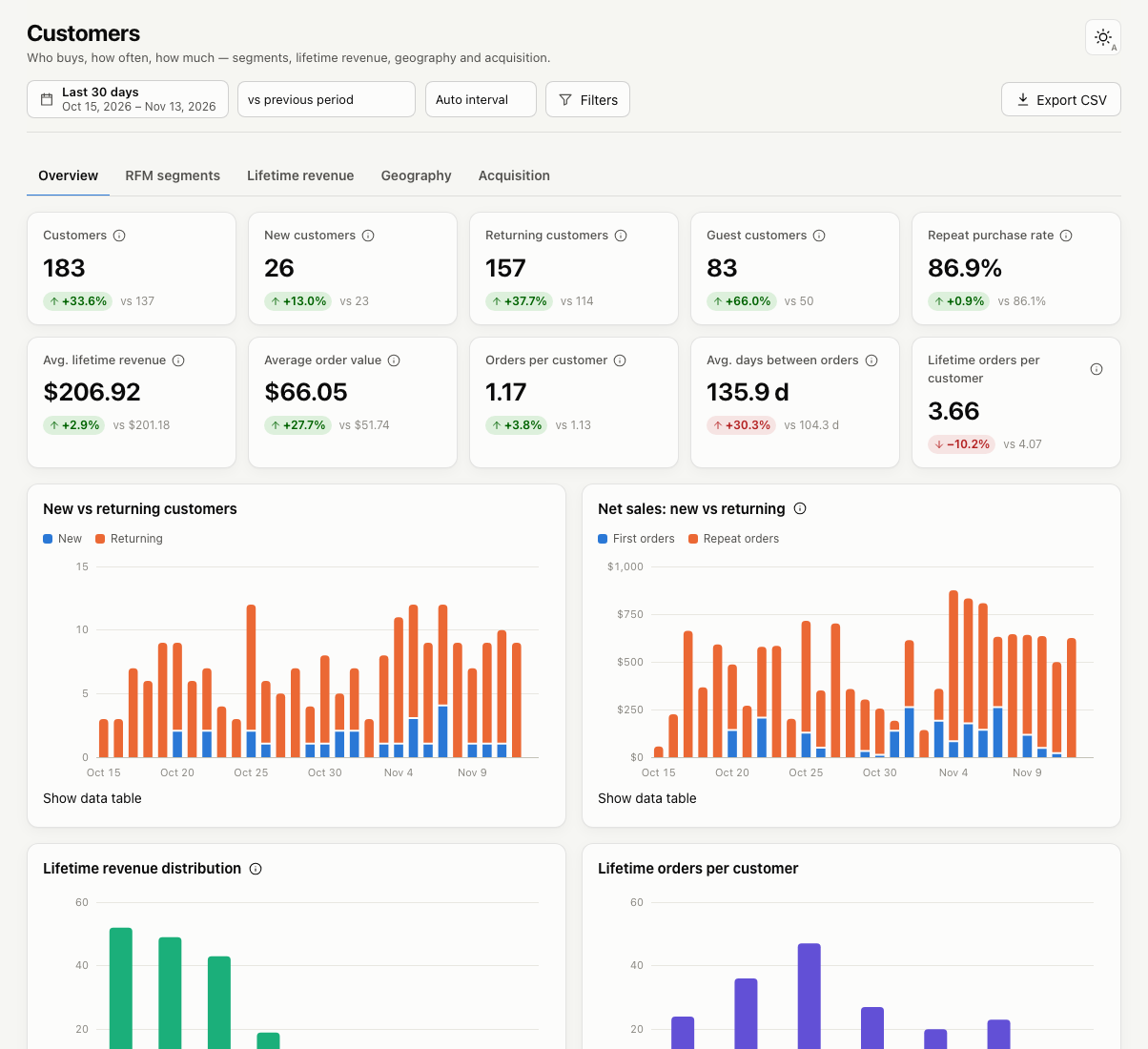
Customer overview
  • Customers: distinct customers who ordered in the range.
  • New customers: customers whose first ever order is in the range.
  • Returning customers: customers in the range whose first order was earlier.
  • Guest customers: customers who checked out without an account.
  • Repeat purchase rate: share of customers in the range who have placed at least two orders.
  • Avg. lifetime revenue: average net sales per customer, over their whole history.
  • Orders per customer, Avg. days between orders and Lifetime orders per customer

Charts compare new and returning customers over time, and show how customers spread across lifetime revenue and lifetime orders. The Top customers table lists your best customers in the period.

How customers are identified

  • Registered customers are identified by their account.
  • Guests are identified by their billing email, trimmed and lower-cased. Deep Insights stores a keyed hash of the email, never the email itself.
  • Guest orders without an email are each treated as a separate customer.

By default, guest orders are not merged into an account with the same email, because a matching email does not prove it is the same person. You can turn merging on in Settings.

RFM segments

The RFM segments tab groups customers by how recently and how often they buy. See RFM customer segments.

Lifetime revenue

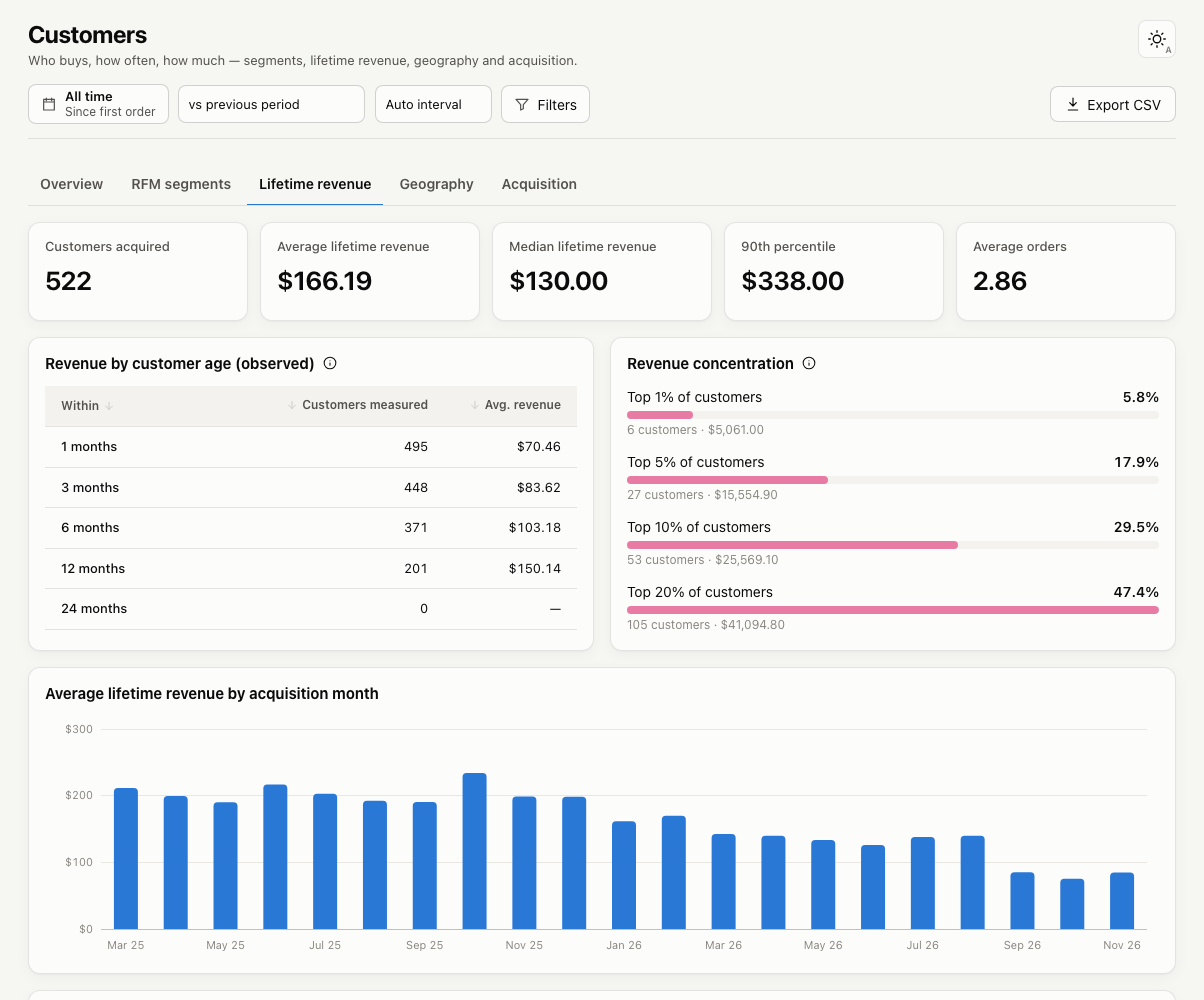
The Lifetime revenue tab looks at customers acquired in the selected range and what they have spent since.
Lifetime revenue
  • Average, median and 90th-percentile lifetime revenue
  • Revenue by customer age: average spend within 1, 3, 6, 12 and 24 months of the first order. Only customers who are at least that old are counted.
  • Revenue concentration: how much of the revenue comes from your top 1%, 5%, 10% and 20% of customers.
  • Lifetime revenue by acquisition month, country, first product, first category and first traffic source.

These figures are observed history, not predictions, and they are revenue, not profit. Choose a long date range (for example All time) to see meaningful results.

Geography

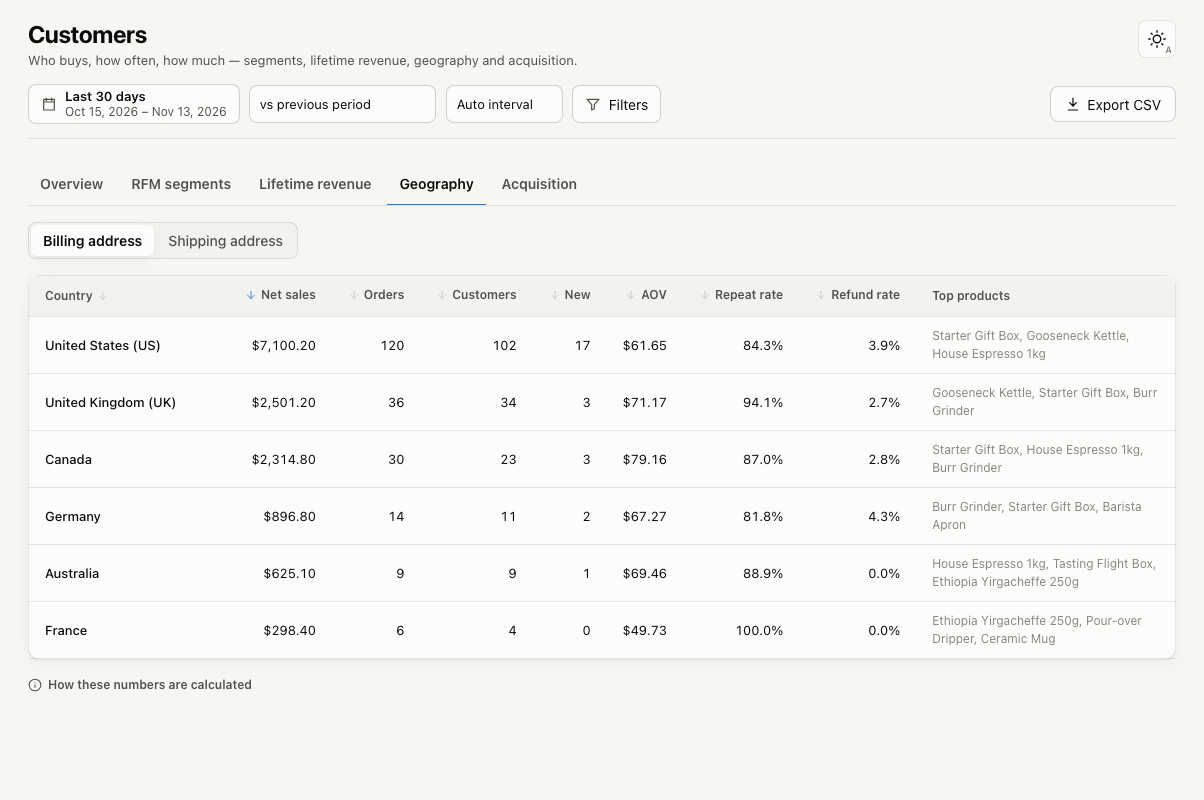
The Geography tab shows net sales, orders, customers, new customers, average order value, repeat rate, refund rate and top products for each country.
Sales by country

Switch between billing and shipping address. Click a country to see its states or regions.

Acquisition

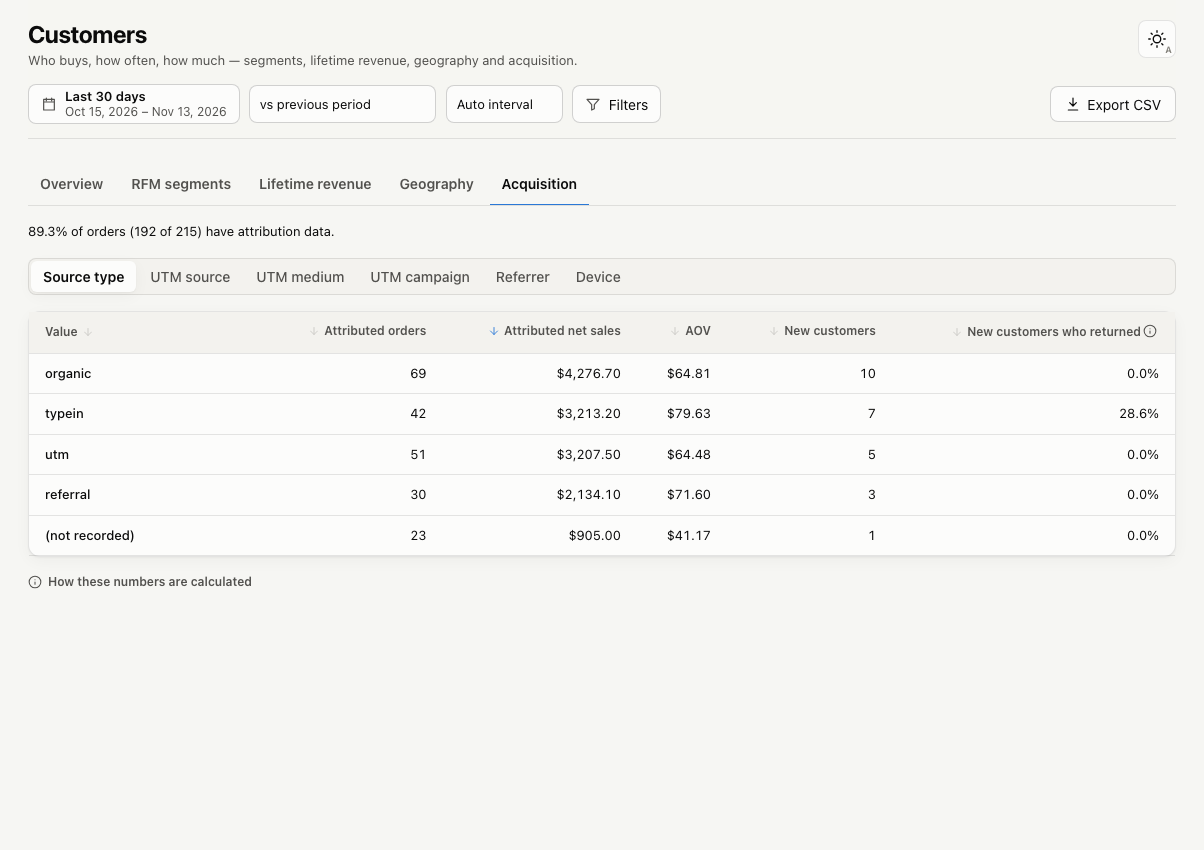
The Acquisition tab uses WooCommerce’s order attribution data to show where orders came from.
Orders by traffic source

Group by source type, UTM source, UTM medium, UTM campaign, referrer or device. For each value you see attributed orders, net sales, average order value, new customers, and the share of those new customers who ordered again.

WooCommerce records attribution for orders placed with WooCommerce 8.5 or newer while order attribution is enabled (it is on by default). Older orders show as “(not recorded)”. The page shows what share of orders have attribution data.

Deep Insights does not calculate conversion rates or return on ad spend, because WooCommerce doesn’t record visits or ad costs.

Products ReportsRFM Customer Segments
WPRuby Logo WPRuby

In 2015, WPRuby was established as an independent agency where we focus on producing and supporting many WordPress plugins. Each product we develop is simple to use and easy to customize and backed by awesome support and regular updates.

Resources

  • Knowledge Base
  • Affiliate Area
  • About Us
  • Nomad Jar
  • GarnerDocs
  • UnavailableToday

Legal

  • Privacy Policy
  • Terms of Use

Follow us

  • Github
  • X.com
  • LinkedIn
  • Facebook

© 2026 - WPRuby