
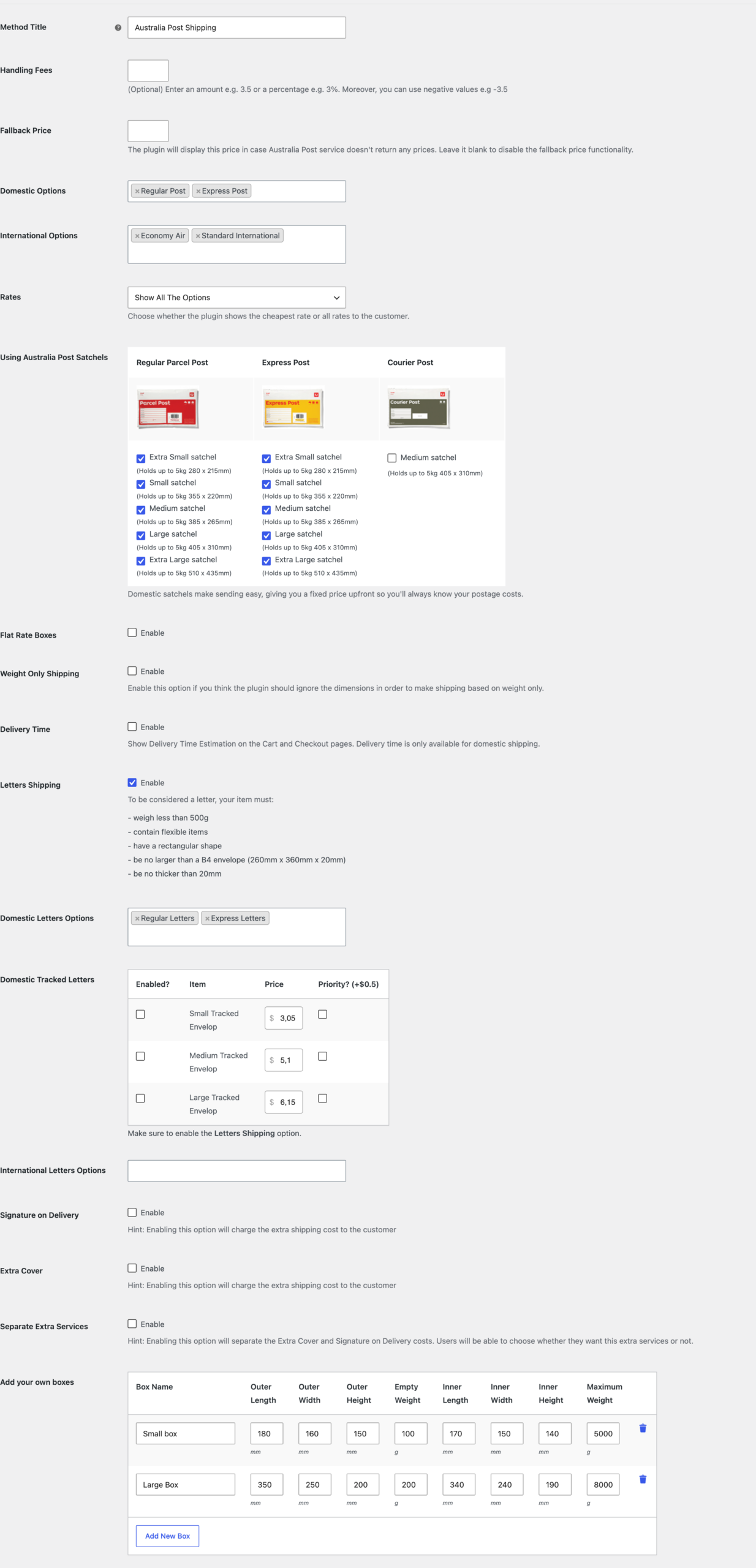
The Australia Post zone settings allow you to control how Australia Post shipping rates are calculated and displayed for a specific WooCommerce shipping zone.
To access these settings, go to:
WooCommerce → Settings → Shipping → Shipping zones
Open the shipping zone you want to edit, then click Australia Post Shipping from the shipping methods list.
Method Title
The Method Title is the name shown to customers during checkout.
For example:
Australia Post Shipping
You can change this title if you want to display a different shipping method name on the cart and checkout pages.
Handling Fees
Use Handling Fees to add an extra fee to the returned Australia Post shipping rates.
You can enter either:
- A fixed amount, for example:
3.5 - A percentage, for example:
3% - A negative amount, for example:
-3.5
This is useful if you want to add packaging, handling, or processing costs to the shipping price.
Fallback Price
The Fallback Price is used when Australia Post does not return any available shipping rates.
If a fallback price is entered, the plugin will display this price instead of showing no shipping option.
Leave this field blank if you do not want to use a fallback rate.
Domestic Options
Use Domestic Options to choose which Australia Post domestic services are available to customers.
Examples include:
- Regular Post
- Express Post
Only the selected services will be available when the customer’s shipping address is within Australia.
International Options
Use International Options to choose which Australia Post international services are available to customers.
Examples include:
- Economy Air
- Standard International
Only the selected services will be available when the customer’s shipping address is outside Australia.
Rates
The Rates option controls how many Australia Post rates are shown to customers.
You can choose whether the plugin should show:
- The cheapest available rate only
- All available shipping options
Choose Show All The Options if you want customers to select between services such as Regular, Express, or International options.
Using Australia Post Satchels
The satchels section allows you to enable specific Australia Post satchel sizes.
Satchels are available for:
- Regular Parcel Post
- Express Post
- Courier Post
Enable the satchel sizes that your store uses.
The plugin can then use these predefined Australia Post satchel options when calculating postage.
Domestic satchels make sending easier because they use fixed packaging sizes and help estimate postage costs more consistently.
Flat Rate Boxes
Enable Flat Rate Boxes if you want the plugin to use Australia Post flat rate box options.
When enabled, the plugin can calculate rates based on the available flat rate packaging options.
Weight Only Shipping
Enable Weight Only Shipping if you want the plugin to ignore product dimensions and calculate shipping based only on weight.
This can be useful if your products do not have accurate dimensions entered in WooCommerce.
Delivery Time
Enable Delivery Time if you want to show Australia Post delivery time estimates on the cart and checkout pages.
Delivery time estimates are only available for domestic shipping.
Letters Shipping
Enable Letters Shipping if you want the plugin to offer letter shipping options.
To be considered a letter, the item must:
- Weigh less than 500g
- Contain flexible items
- Have a rectangular shape
- Be no larger than B4 envelope size: 260mm × 360mm × 20mm
- Be no thicker than 20mm
Domestic Letters Options
Use Domestic Letters Options to choose which domestic letter services are available.
Examples include:
- Regular Letters
- Express Letters
These options are used only when Letters Shipping is enabled.
Domestic Tracked Letters
The Domestic Tracked Letters table allows you to configure tracked letter services.
For each tracked letter option, you can choose whether it is enabled and set the price.
Available tracked letter sizes include:
- Small Tracked Envelope
- Medium Tracked Envelope
- Large Tracked Envelope
You can also enable the Priority option, which adds the priority letter surcharge.
Make sure Letters Shipping is enabled if you want to use tracked letter services.
International Letters Options
Use International Letters Options to choose which international letter services are available.
These options apply when the customer’s shipping address is outside Australia and the shipment qualifies as a letter.
Signature on Delivery
Enable Signature on Delivery if you want to offer signature service for eligible Australia Post shipping methods.
When enabled, the additional signature cost is added to the shipping price.
Extra Cover
Enable Extra Cover if you want to offer extra cover for eligible Australia Post shipping methods.
When enabled, the extra cover cost is added to the shipping price.
Separate Extra Services
Enable Separate Extra Services if you want customers to choose extra services separately.
When this option is enabled, services such as Extra Cover and Signature on Delivery can be shown as separate selectable options instead of being automatically included in the shipping price.
Add Your Own Boxes
The Add Your Own Boxes section allows you to define custom packaging boxes used by your store.
For each box, you can configure:
- Box name
- Outer length
- Outer width
- Outer height
- Empty weight
- Inner length
- Inner width
- Inner height
- Maximum weight
The plugin can use these box dimensions when packing products and calculating shipping rates.
Click Add New Box to add another custom box.
Save Changes
After updating the zone settings, click Save changes to apply your configuration.