WPRuby Logo WPRuby
Log in Get started
  • Plugins
  • Docs
  • Blog
    • eCommerce
    • Plugins
    • How to
    • Coding
  • Affiliate Area
  • Contact Us
  • About Us
  • Plugins
  • Docs
  • Blog
    • eCommerce
    • Plugins
    • How to
    • Coding
  • Affiliate Area
  • Contact Us
  • About Us

WPRuby Account

4
  • How to upgrade your license
  • How to renew your license
  • How to change your plugin’s license domain
  • How to cancel your subscription.

WooCommerce Australia Post Shipping Method Pro

17
  • Installation
  • How to activate your plugin license
  • How to Upgrade from Free to Pro
  • Australia Post Zone Settings
  • Australia Post Global Settings
  • Australia Post Tracking
  • Pre-Paid Satchels
  • How to Mark a Product to be Shipped individually?
  • TroubleShooting and Common issues
  • Available WordPress Actions and Filters
  • [Labels Pro] How to connect the plugin with your MyPost Business account
  • [Labels Pro] How to connect Labels Pro with your eParcel account
  • [Labels Pro] How to create shipping labels?
  • [Labels Pro] How to print labels and create shipping orders.
  • [Labels Pro] Label Printing & Contracted Prices Credentials
  • [Labels Pro] How to Mark a Product as Containing Hazardous Materials?
  • Step by Step Guide on how to migrate to Shipping Zones

WooCommerce Custom Payment Gateway Pro

5
  • Installation
  • How to Upgrade from Free to Pro
  • Settings and Hooks
  • Multiple Gateways
  • TroubleShooting and Common issues

WooCommerce Royal Mail Shipping Calculator Pro

4
  • Installation
  • Settings
  • TroubleShooting and Common issues
  • How to activate your plugin license

Controlled Admin Access Pro

3
  • Available Actions for a Restricted Admin
  • Installation
  • Settings

WooCommerce Simple Table Rates Pro

8
  • Installation
  • Settings
  • Rules and Actions
  • How to Setup Weight Based Shipping
  • How To Setup Shipping By Shipping Class
  • How to Setup Shipping by Cart Total
  • How to Setup Shipping by Product
  • How to Setup Shipping by Product Category

WooCommerce Pack IQ

5
  • Installation
  • How to activate your plugin license
  • How to add a new box
  • How to change the boxes weight and dimensions units
  • How to view the packing results

WooCommerce Restricted Shipping and Payment Pro

4
  • Installation
  • Setting Up Shipping Methods Conditions
  • Available Shipping & Payment Rules
  • Setting Up Payment Gateways Conditions

Affiliate Butler PRO

9
  • Installation and Upgrade
  • Quick Start Guide
  • Settings
  • Keywords Management
  • Installation
  • Frequently Asked Questions
  • Files Structure
  • Links Types
  • Statistics

WooCommerce Adyen Payment Gateway

2
  • Setup the Adyen payment gateway
  • How to configure Adyen Webhook notifications? 

WooCommerce Free Shipping Per Product

2
  • Installation
  • How to setup free shipping for a certain product

WooCommerce UPS Shipping Method Pro

4
  • Installation
  • UPS Zone Settings
  • UPS Global Settings
  • How to get the UPS Access Key?

Delivery Promise for WooCommerce

9
  • Getting Started
  • Understanding Processing Time vs Transit Time
  • Setting the Cutoff Countdown
  • Configuring Default Delivery Estimates
  • Creating Delivery Rules
  • Setting Working Days and Holidays
  • Using Rule Presets
  • Product-Level Lead Times
  • Why the “Order Within” Countdown Is Not Showing
View Categories
  • Home
  • Knowledge Base
  • WooCommerce Australia Post Shipping Method Pro
  • [Labels Pro] How to connect the plugin with your MyPost Business account

[Labels Pro] How to connect the plugin with your MyPost Business account

Waseem
Updated on July 3, 2025

Method 1: Easy Connect (OAuth Login)

To integrate your WooCommerce store with your MyPost Business account using the Australia Post Pro plugin, follow these steps:

Step 1: Open the Plugin Settings

  1. In your WordPress dashboard, go to: WooCommerce → Settings → Shipping tab → Australia Post Pro
  2. You will see the Australia Post Settings section.

Step 2: Select Your Account Type

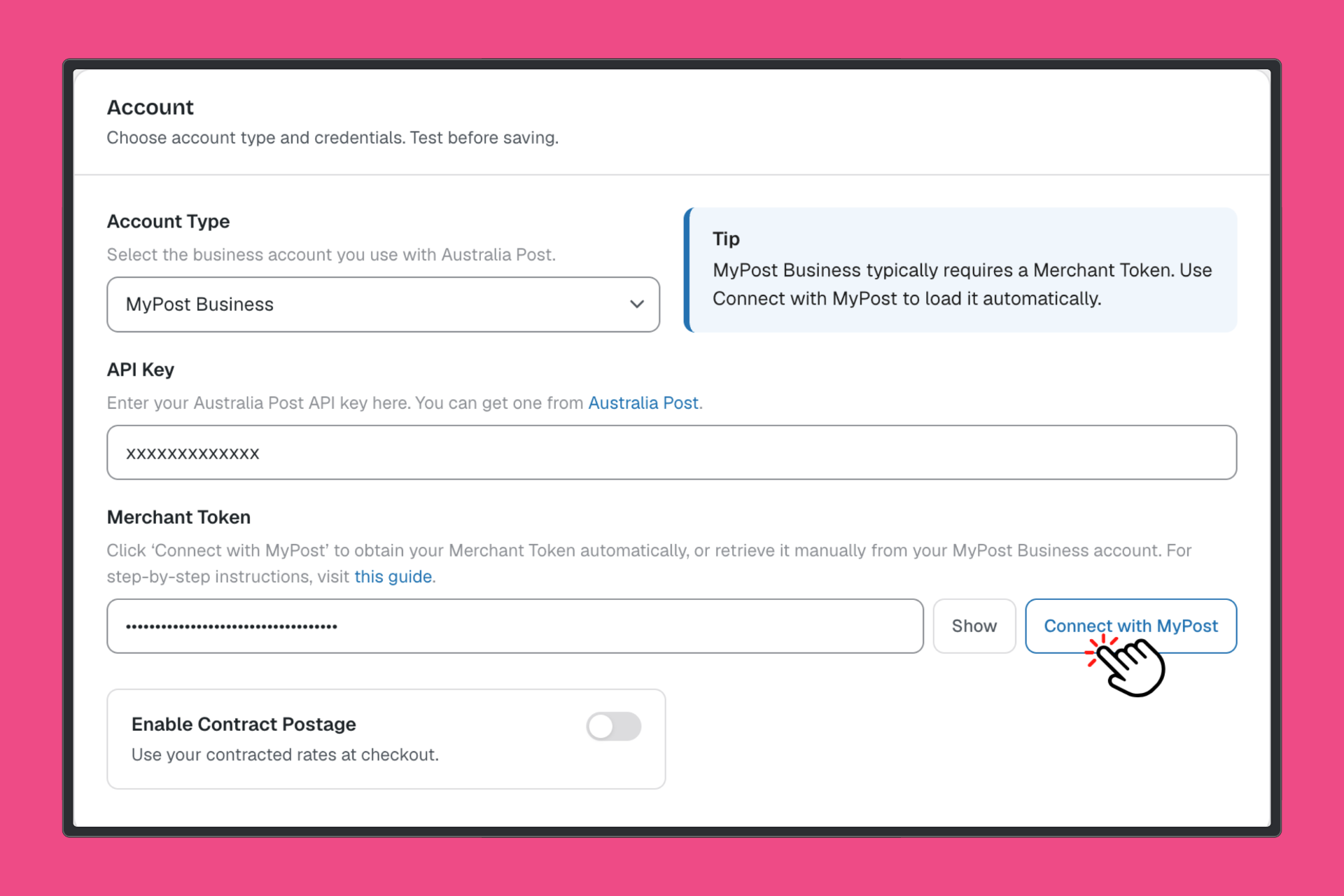
  • Under the Account section, ensure MyPost Business is selected from the Account Type dropdown.

Step 3: Connect Your MyPost Business Account

  • Click the blue Connect button next to the Merchant Token field.
  • You will be redirected to Australia Post’s login page.
  • Log in to your MyPost Business account.
  • Once logged in and permissions are granted, your Merchant Token will be automatically filled in the field.

Step 4: Verify Your Token (Optional)

  • After connecting, you can click Verify to ensure the token is valid and your account is connected correctly.

Method 2: Manual Token Entry

Follow these steps if you prefer to manually generate and enter your Merchant Token from your MyPost Business account:

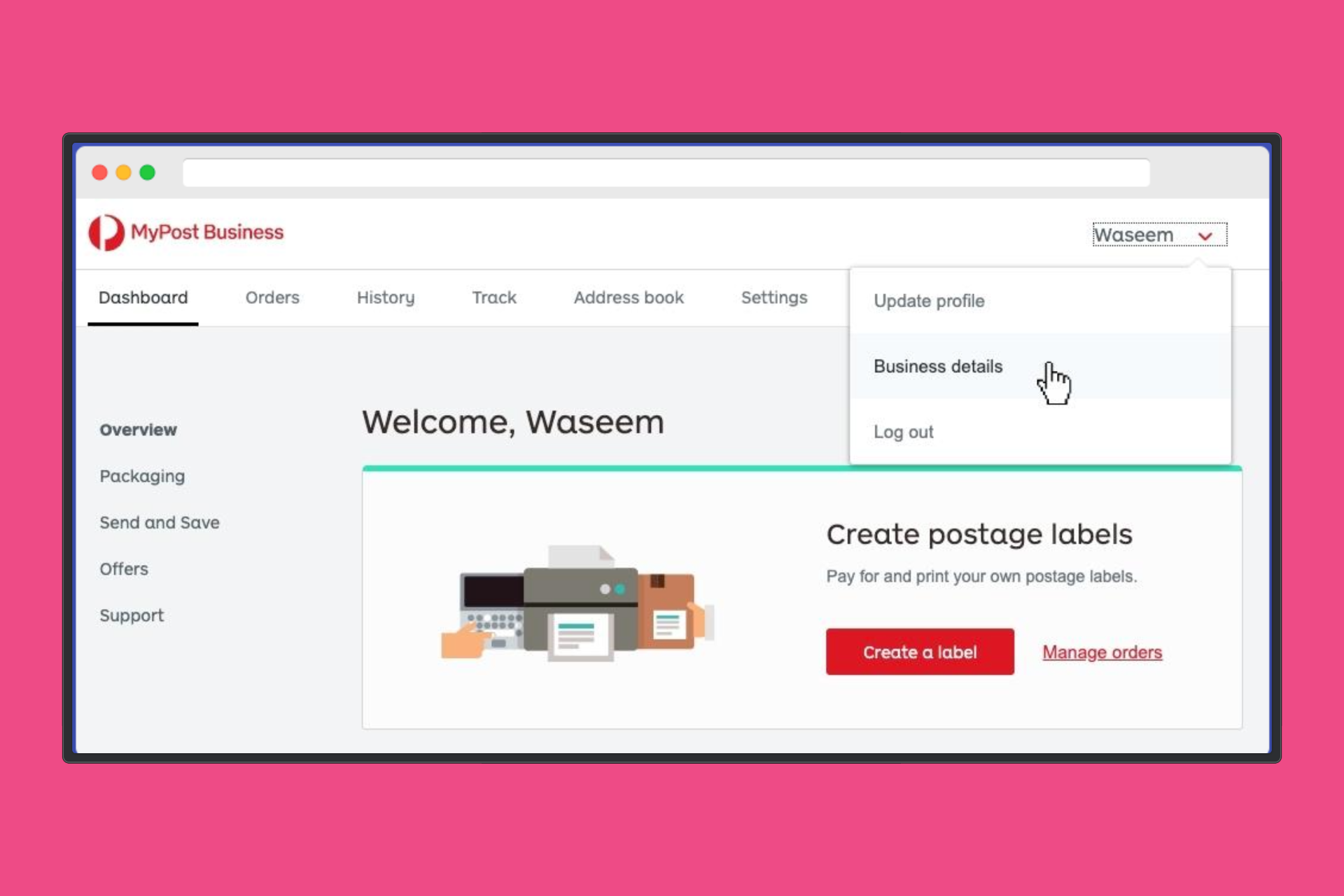
Step 1: Log into Your MyPost Business Account

Go to MyPost Business and sign in with your credentials.

Step 2: Navigate to Your Business Details

In the top-right corner, click on your name, then select Business details from the dropdown menu.

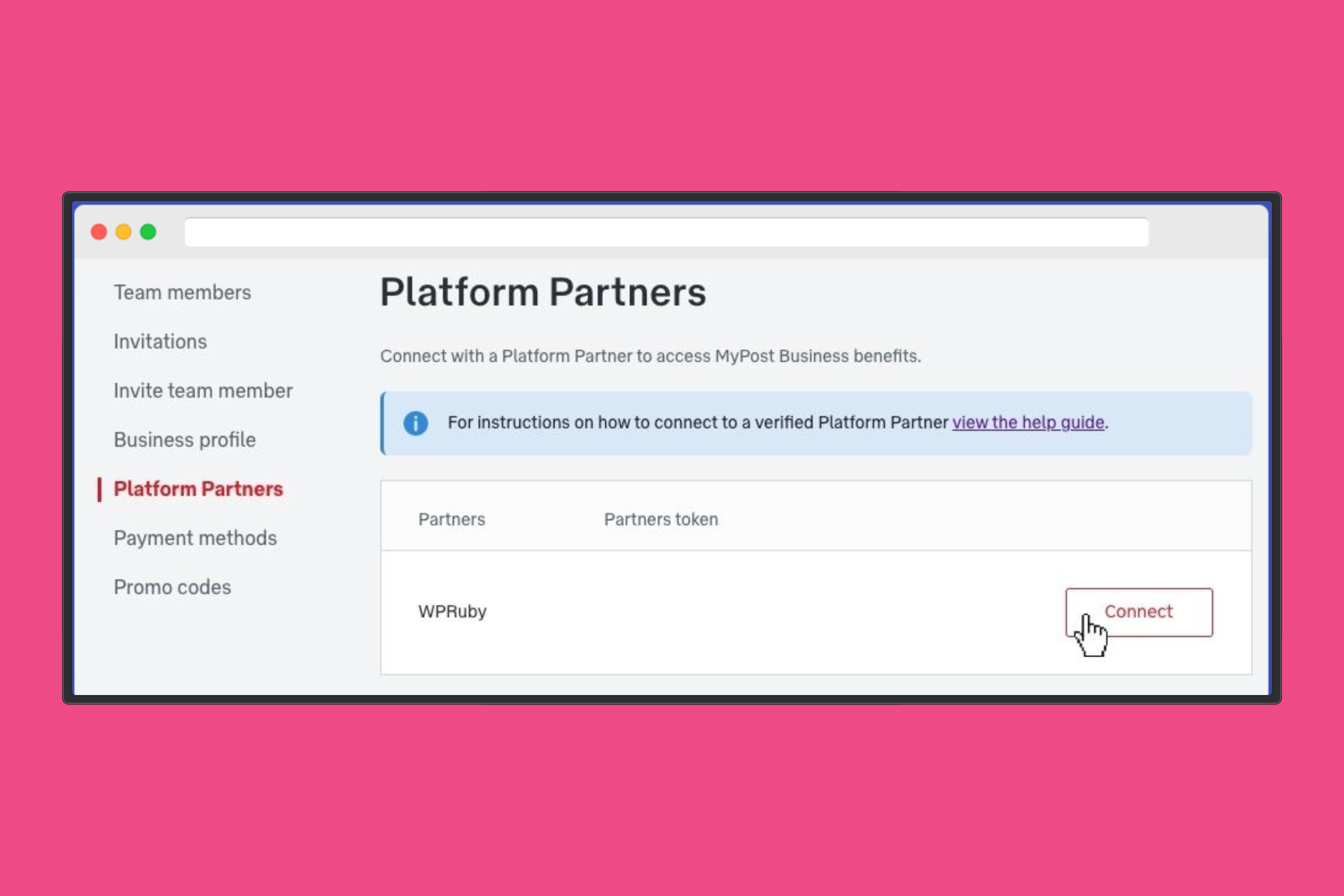
Step 3: Access Platform Partners

From the left sidebar, click on Platform Partners.

Step 4: Connect to WPRuby

  • Locate WPRuby in the list of available partners.
  • Click the Connect button.
  • If prompted, review and accept the Terms & Conditions, and enter your credit card details if required.

Step 5: Copy Your Merchant Token

  • Once connected, a Merchant Token will be displayed next to WPRuby.
  • Click Copy Token to copy it to your clipboard.

Step 6: Enter the Token in WooCommerce

  • In your WordPress dashboard, go to:
    WooCommerce → Settings → Shipping → Australia Post Pro

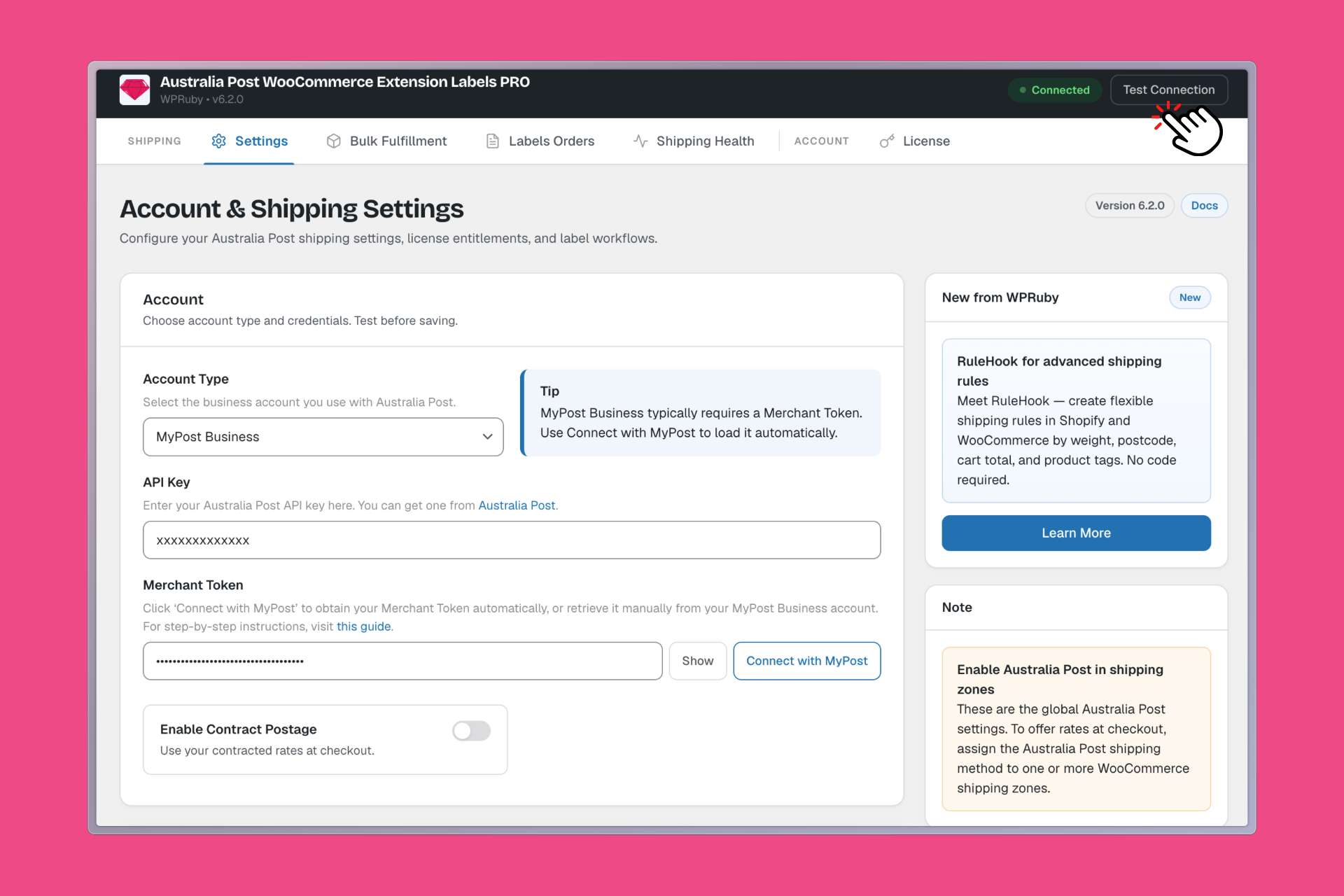
Step 7: Configure Your Account

Under the Account section:

  • Set Account Type to MyPost Business.
  • Paste the copied token into the Merchant Token field.
  • Click the Verify button to confirm the connection.

Step 8: Save Changes

Click the Save changes button at the bottom of the page.

Available WordPress Actions and Filters[Labels Pro] How to connect Labels Pro with your eParcel account
WPRuby Logo WPRuby

In 2015, WPRuby was established as an independent agency where we focus on producing and supporting many WordPress plugins. Each product we develop is simple to use and easy to customize and backed by awesome support and regular updates.

Resources

  • Knowledge Base
  • Affiliate Area
  • About Us
  • WPTools
  • Nomad Jar

Legal

  • Privacy Policy
  • Terms of Use

Follow us

  • Github
  • X.com
  • LinkedIn
  • Facebook

© 2026 - WPRuby