
The Inventory report combines your current stock with recent sales to estimate how long stock will last.
Go to WooCommerce → Deep Insights → Inventory.
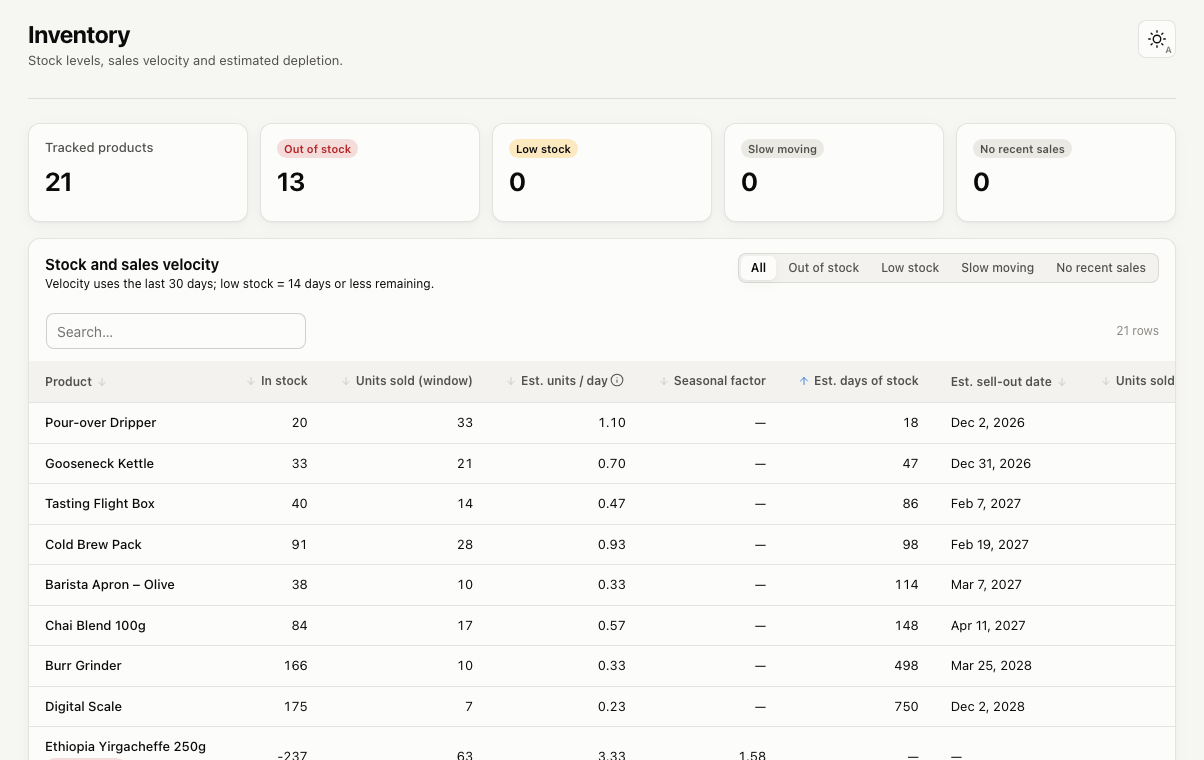
It covers physical products and variations with Manage stock enabled, or marked out of stock. Inventory always uses current stock, so the date filters don’t apply to this page.
Columns
- In stock: current stock quantity.
- Units sold (window): units sold in the last 30 days.
- Est. units / day: recent daily sales.
- Seasonal factor: when you have enough sales history for the same weeks last year, sales speed is adjusted for seasonality.
- Est. days of stock and Est. sell-out date: when stock will run out at the current pace.
- Units sold (all time)
The days of stock and sell-out date are estimates. Use them as a guide, not a promise.
Flags
- Out of stock
- Low stock: 14 days of stock or less, or at or below the product’s low-stock amount in WooCommerce.
- No recent sales: in stock, with no sales in the last 90 days.
- Slow moving: current stock would last more than 2 years at the current pace.
Use the buttons above the table to show only one group. You can change the 30-day window, the 14-day threshold and the 90-day window in Settings.
Stock history
WooCommerce keeps only current stock levels, so Deep Insights can’t show past stock. To build a history from today onward, turn on Record daily stock snapshots in Settings → Inventory. Snapshots are stored in a Deep Insights table and never change your stock.