
The plugin works with the WooCommerce Checkout block and the classic checkout shortcode.
Rates
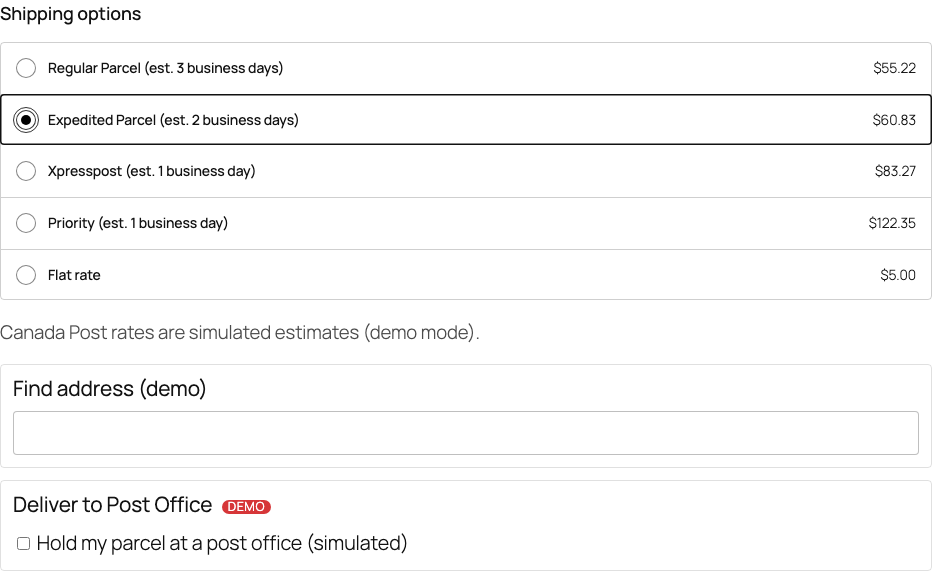
Rates are calculated per parcel when the customer enters a shipping address. A service is offered only when every parcel can use it and no product in the cart disallows it. The zone settings decide the names, adjustments, sorting and free shipping (see Adding Canada Post to a shipping zone).
Deliver to Post Office
Turn it on in Canada Post → Settings → Deliver to Post Office. When the customer chooses Expedited Parcel or Xpresspost to a Canadian address, they can tick Hold my parcel at a post office, search by postal code or city and choose an office. The office is saved on the order and pre-selected when you create the shipment.
Address lookup (AddressComplete)
Turn it on in Canada Post → Settings → AddressComplete after adding your AddressComplete key. Customers get address suggestions while they type a Canadian address. Strictness decides whether postal codes are only corrected or must have a valid format before the order can be placed.
Note: In Demo mode and Test API mode these features are only shown to store managers, and the rates and post offices are sample data. Your customers see your other shipping methods as usual.