
Where to edit it
Go to Appearance → Editor → Templates → Front Page, or click Homepage on Appearance → Candy Shop. Every section is its own pattern, so you can reorder, remove or reuse them. You’ll find them all under Patterns → Candy Shop: Store.
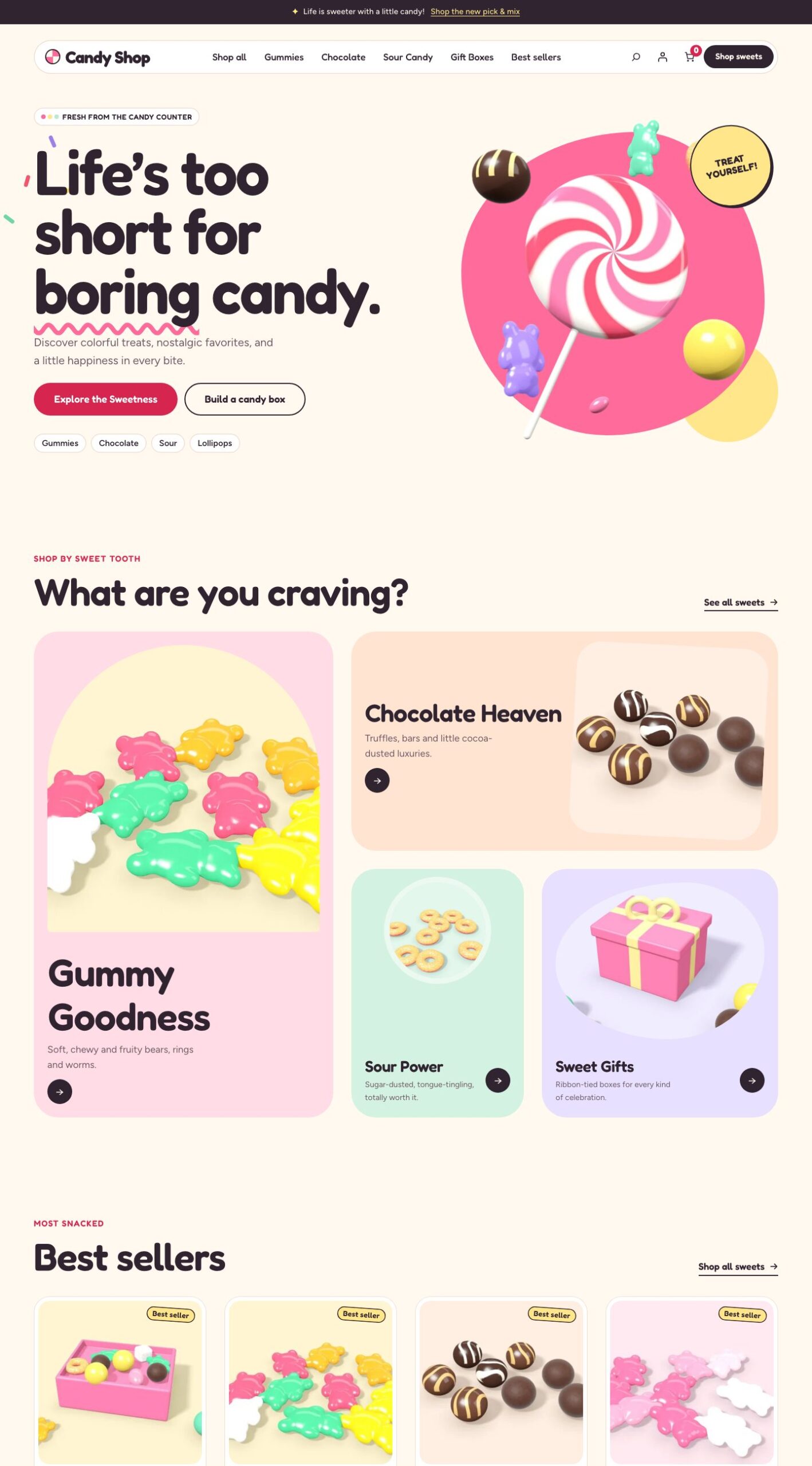
The sections
From top to bottom:
| Section | What it shows |
|---|---|
| Candy hero | A big headline, text and buttons beside floating sweets, with quick links to Gummies, Chocolate, Sour and Lollipops |
| Shop by sweet tooth | Four category cards: Gummy Goodness, Chocolate Heaven, Sour Power and Sweet Gifts |
| Best sellers | Your best-selling products, from WooCommerce’s sales data |
| Sour campaign | An advertising-style feature band |
| Build your candy box | A band with three steps and a Start your box button |
| Gift collection | Four occasion tiles: birthday, celebration, thank-you and seasonal |
| Brand story | A short story beside a photo |
| Newsletter | A sign-up panel with a Join the candy club button |
Where the links go
Sections link to your store by slug, and fall back to the shop page when there’s no match:
| Link | Goes to |
|---|---|
| Category cards and hero quick links | The product categories gummies, chocolate, sour-candy, gift-boxes and lollipops |
| Start your box | The product build-your-own-pick-mix-box, otherwise the pick-mix category |
| Gift tiles | The shop filtered by the Occasion attribute terms birthday, celebration, thank-you and seasonal |
Use the same slugs in your store, or select a link in the Site Editor and point it somewhere else. The Sweet Shop starter creates all of them.
Change images and text
Select any image and choose Replace to use your own. Click any heading or paragraph to edit it.
Newsletter
The Join the candy club button links to the account page; it doesn’t collect email addresses on its own. To build a mailing list, replace the button with your email marketing plugin’s form block. Candy Shop styles email fields placed in that area. The same applies to the Footer with newsletter.
Starter homepages
The Chocolatier, Pick & Mix, Retro Sweet Shop and Snacks & Treats starters come with their own homepage templates (“Homepage: …”). You can also choose one for any page: edit the page, open Template in the sidebar and pick it. When that page is your front page (Settings → Reading), its template is used.