
Go to WooCommerce → UPS Center → Shipping Health to check your setup. Each check shows whether it passed, and what to do when it did not.
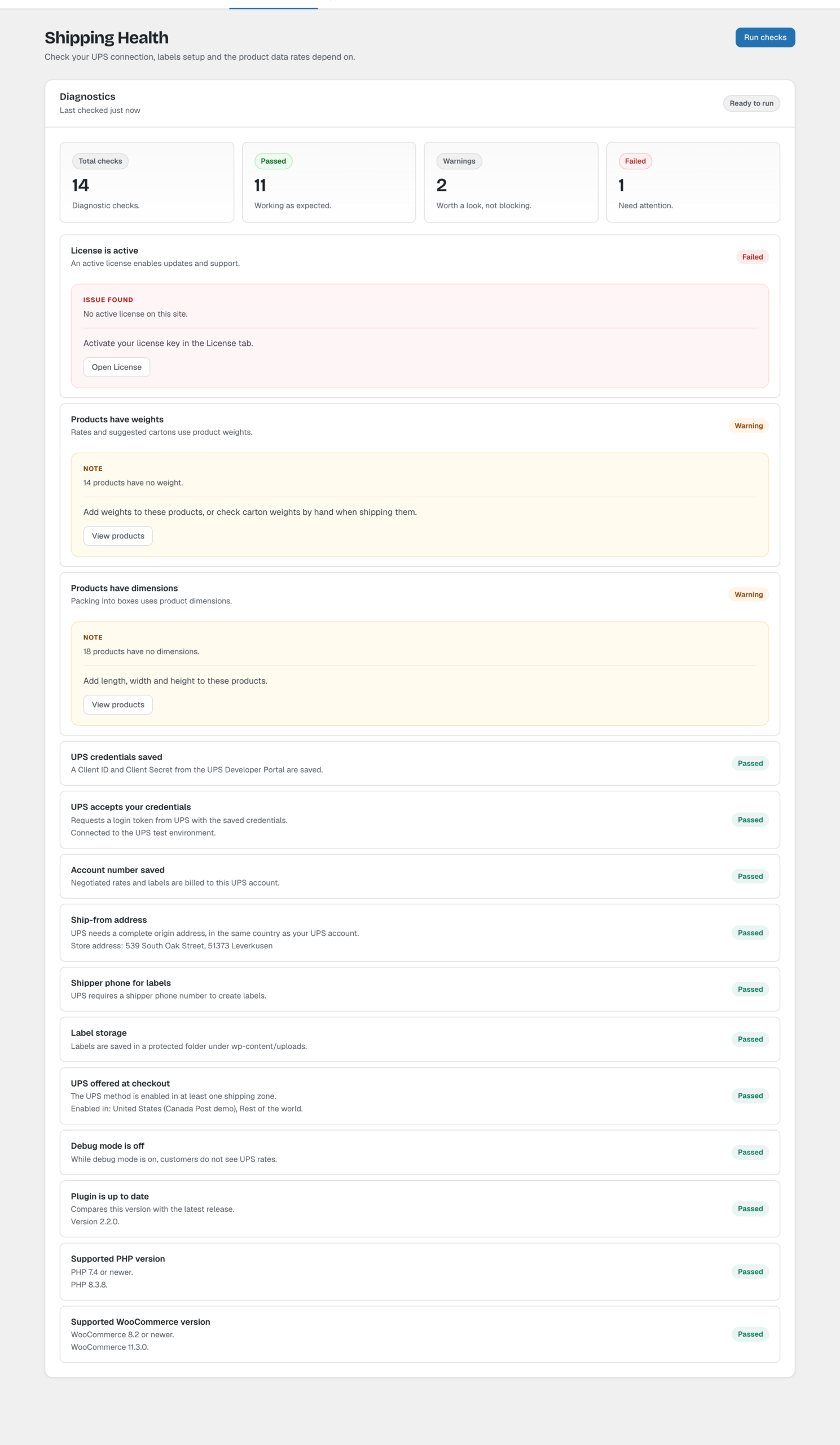
Checks
- UPS credentials saved: a Client ID and Client Secret are saved.
- UPS accepts your credentials: UPS returns a login token for the saved credentials. If not, check the credentials, and that your server can reach onlinetools.ups.com (wwwcie.ups.com in Test mode).
- Account number saved: needed for negotiated rates and labels.
- Ship-from address: the origin address is complete, and in the same country as your UPS account.
- Shipper phone for labels: UPS requires it to create labels.
- Label storage: the uploads folder is writable, so labels can be saved.
- UPS offered at checkout: the UPS method is enabled in at least one shipping zone. Skip this if you only use UPS for order labels.
- Products have weights and Products have dimensions: rates and suggested cartons use them. Click View products to see the products that are missing them.
- Debug mode is off: while debug mode is on, customers don’t see UPS rates.
- License is active: needed for updates and support.
- Plugin is up to date, Supported PHP version (7.4 or newer) and Supported WooCommerce version (8.2 or newer).
Click Run checks again after you fix something.