WPRuby Logo WPRuby
Log in Get started
  • Plugins
  • Docs
  • Blog
    • eCommerce
    • Plugins
    • How to
    • Coding
  • Affiliate Area
  • Contact Us
  • About Us
  • Plugins
  • Docs
  • Blog
    • eCommerce
    • Plugins
    • How to
    • Coding
  • Affiliate Area
  • Contact Us
  • About Us

WPRuby Account

4
  • How to upgrade your license
  • How to renew your license
  • How to change your plugin’s license domain
  • How to cancel your subscription.

WooCommerce Australia Post Shipping Method Pro

17
  • Installation
  • How to activate your plugin license
  • How to Upgrade from Free to Pro
  • Australia Post Zone Settings
  • Australia Post Global Settings
  • Australia Post Tracking
  • Pre-Paid Satchels
  • How to Mark a Product to be Shipped individually?
  • TroubleShooting and Common issues
  • Available WordPress Actions and Filters
  • [Labels Pro] How to connect the plugin with your MyPost Business account
  • [Labels Pro] How to connect Labels Pro with your eParcel account
  • [Labels Pro] How to create shipping labels?
  • [Labels Pro] How to print labels and create shipping orders.
  • [Labels Pro] Label Printing & Contracted Prices Credentials
  • [Labels Pro] How to Mark a Product as Containing Hazardous Materials?
  • Step by Step Guide on how to migrate to Shipping Zones

WooCommerce Custom Payment Gateway Pro

11
  • Getting Started
  • Custom Payment Gateway Settings
  • Custom Checkout Field Builder
  • Conditional Display Rules
  • Sending Payment Data to an External API
  • How to Create a Pay by Invoice Payment Method
  • How to Create a Manual Payment Link or Review-Based Payment Method
  • Troubleshooting
  • Frequently Asked Questions
  • Security and Sensitive Payment Data
  • How to Upgrade from Free to Pro

WooCommerce Royal Mail Shipping Calculator Pro

4
  • Installation
  • Settings
  • TroubleShooting and Common issues
  • How to activate your plugin license

Controlled Admin Access Pro

3
  • Available Actions for a Restricted Admin
  • Installation
  • Settings

WooCommerce Simple Table Rates Pro

8
  • Installation
  • Settings
  • Rules and Actions
  • How to Setup Weight Based Shipping
  • How To Setup Shipping By Shipping Class
  • How to Setup Shipping by Cart Total
  • How to Setup Shipping by Product
  • How to Setup Shipping by Product Category

WooCommerce Pack IQ

5
  • Installation
  • How to activate your plugin license
  • How to add a new box
  • How to change the boxes weight and dimensions units
  • How to view the packing results

WooCommerce Restricted Shipping and Payment Pro

4
  • Installation
  • Setting Up Shipping Methods Conditions
  • Available Shipping & Payment Rules
  • Setting Up Payment Gateways Conditions

Affiliate Butler PRO

9
  • Installation and Upgrade
  • Quick Start Guide
  • Settings
  • Keywords Management
  • Installation
  • Frequently Asked Questions
  • Files Structure
  • Links Types
  • Statistics

WooCommerce Adyen Payment Gateway

2
  • Setup the Adyen payment gateway
  • How to configure Adyen Webhook notifications? 

WooCommerce Free Shipping Per Product

2
  • Installation
  • How to setup free shipping for a certain product

WooCommerce UPS Shipping Method Pro

4
  • Installation
  • UPS Zone Settings
  • UPS Global Settings
  • How to get the UPS Access Key?

Delivery Promise for WooCommerce

9
  • Getting Started
  • Understanding Processing Time vs Transit Time
  • Setting the Cutoff Countdown
  • Configuring Default Delivery Estimates
  • Creating Delivery Rules
  • Setting Working Days and Holidays
  • Using Rule Presets
  • Product-Level Lead Times
  • Why the “Order Within” Countdown Is Not Showing
View Categories
  • Home
  • Knowledge Base
  • WooCommerce Australia Post Shipping Method Pro
  • [Labels Pro] How to connect Labels Pro with your eParcel account

[Labels Pro] How to connect Labels Pro with your eParcel account

Waseem
Updated on December 8, 2025

1 min read

In order to set up the plugin to access your contract rates and start printing labels, you need to obtain the following information: Account Number, API Key, and API Password.

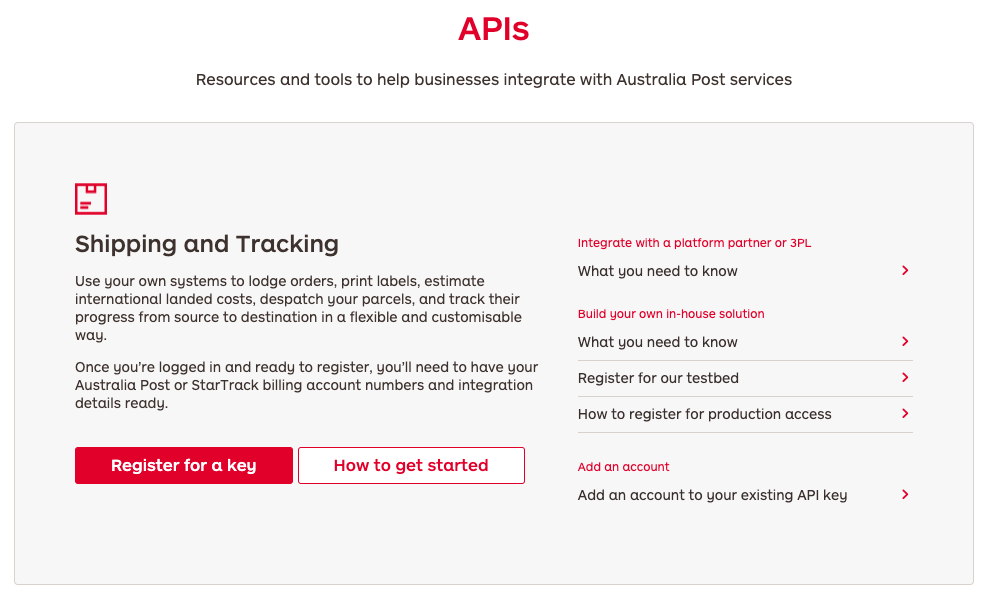
Register for the Shipping and Tracking API

  • Register at https://developers.auspost.com.au/register
  • And then log in using your registered account at https://developers.auspost.com.au/apis
  • In the Shipping and Tracking section, click on Register for a key.
  • Complete the registration form using your Australia Post account info.
  • Choose Platform Partner as an integration method.
  • Select WPRuby from the list. If WPRuby does not exist, choose Other and write WPRuby in the text field. (WPRuby is an official platform partner of Australia Post.)

After completing the registration, Australia Post will reply within 24hours, and in case the application was approved, they will send you an email with a PDF file that includes your API credentials information. If you do not receive an email from Australia Post within 24 hours, check your spam folder or contact Australia Post customer support via [email protected].

After you get the API credentials, add them to the settings page of Labels Pro. [Labels Pro] Label Printing and Contracted Prices Credentials

[Labels Pro] How to connect the plugin with your MyPost Business account[Labels Pro] How to create shipping labels?
WPRuby Logo WPRuby

In 2015, WPRuby was established as an independent agency where we focus on producing and supporting many WordPress plugins. Each product we develop is simple to use and easy to customize and backed by awesome support and regular updates.

Resources

  • Knowledge Base
  • Affiliate Area
  • About Us
  • WPTools
  • Nomad Jar

Legal

  • Privacy Policy
  • Terms of Use

Follow us

  • Github
  • X.com
  • LinkedIn
  • Facebook

© 2026 - WPRuby