Checkout says no shipping methods available. The cart shipping calculator sits empty. A customer in Sydney cannot buy a 500 g t-shirt you could walk to a post office and send this afternoon.
That is not a rare edge case. It is the ticket we see most often on Australia Post WooCommerce stores — including stores that already installed “an Australia Post plugin.” The Postage Assessment Calculator only returns a price when WooCommerce hands it a valid origin, a valid destination, and a pack Australia Post will actually carry. Miss any one of those and the method fails silently. Shoppers never see Regular or Express. They bounce.
This guide is the long version of our troubleshooting knowledge base. The KB is for people who already run WPRuby and want the shortest fix. This article explains why each failure happens, with WooCommerce screens, Australia Post limits, and examples. The checks apply if you use WPRuby, another Australia Post calculator, or a table-rate plugin you hoped would “do AusPost.”
Show live Australia Post rates at WooCommerce checkout → Get Australia Post Pro
The 12 checks (start here)
Work top to bottom. Most empty checkouts die on 1–8. Cache and debug mode waste hours because the setup was already fixed.
- The plugin is not the method WooCommerce is calling
- Australia Post is missing from the shipping zone that matches
- WooCommerce matched a different zone
- The origin (shop) postcode is blank or wrong
- Products have no weight
- Products have no dimensions
- The customer has not entered a postcode
- The pack is over Australia Post’s size and weight limits
- Debug mode is hiding rates from shoppers
- WooCommerce still has an empty result cached
- The Australia Post API is not reachable
- Suburb, state, and postcode do not match (and related address traps)
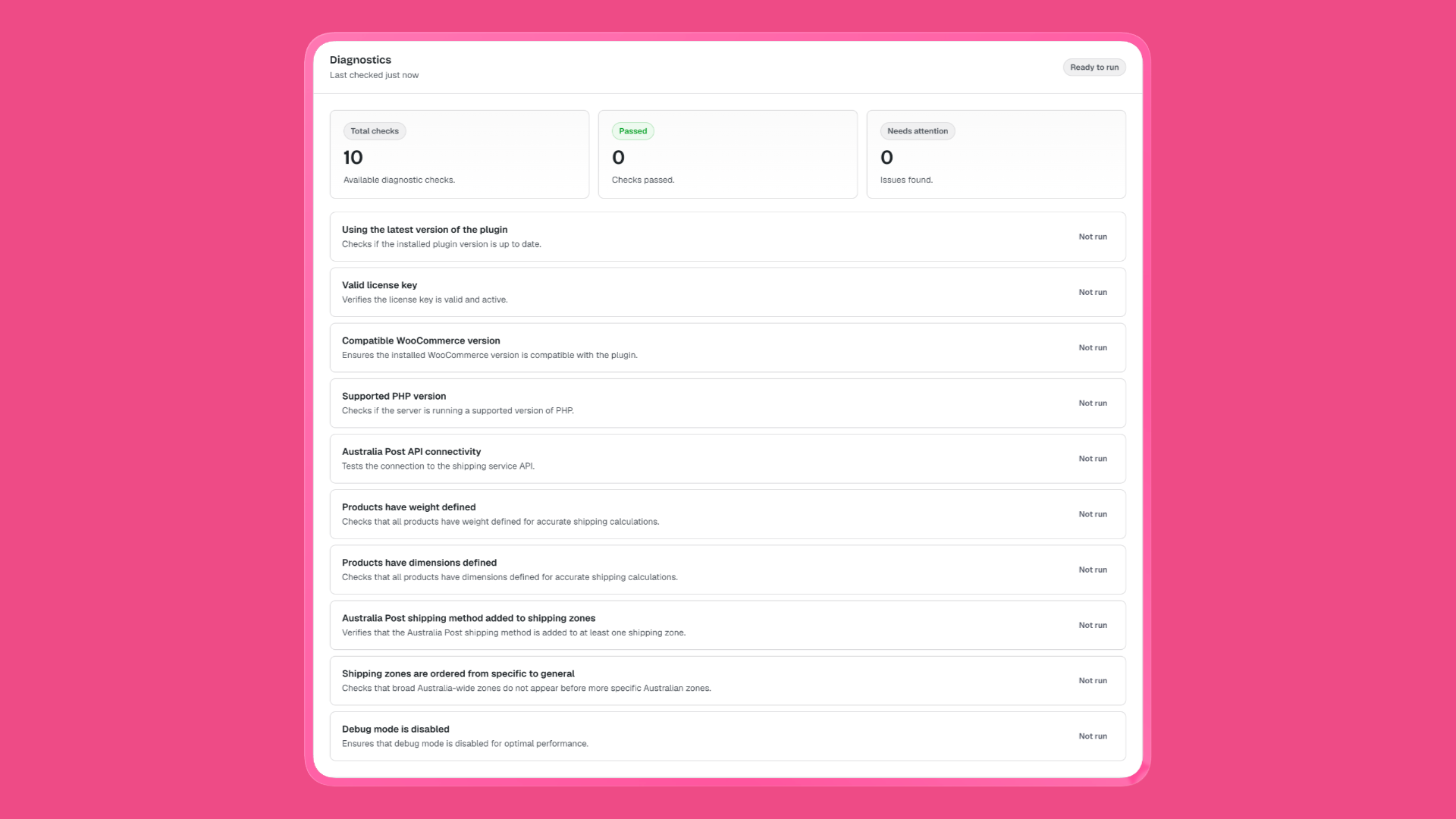
If you already use WPRuby Australia Post Pro / Labels Pro v7, skip the scavenger hunt: WooCommerce → Australia Post Centre → Health runs license, API, zone, weight, dimension, and debug checks in one pass, and can filter the product list for missing shipping data.
1. The plugin is not the method WooCommerce is calling
Why it happens: WooCommerce only quotes shipping methods that are installed, activated, and enabled on a zone. A plugin sitting in Plugins → Installed but deactivated never runs. An old copy (or a lite plugin left on next to Pro) can also mean you are debugging the wrong method.
What to check:
- Plugins — Australia Post is Active
- You are on a current release (WPRuby is at 7.0 with Australia Post Centre; older docs still say WooCommerce → Settings → Shipping → Australia Post)
- Only one Australia Post calculator is active. Two plugins both named “Australia Post” on the same zone will fight: one quotes, one errors, or both return nothing
Example: You installed a free AusPost plugin years ago, then bought a Pro calculator, and left both enabled on the Australia zone. Checkout shows a generic “no shipping options” because the first method in the zone failed the API call.
Deactivate the unused calculator. Update the one you keep. Then retest in a private browser window.
2. Australia Post is missing from the shipping zone that matches
Why it happens: WooCommerce does not “discover” Australia Post store-wide. You add it per zone, the same way you add Flat Rate or Free Shipping. If the method was never added — or it is on the zone but the Enabled toggle is off — customers in that zone see nothing.
What to check:
- Go to WooCommerce → Settings → Shipping → Shipping zones
- Open the zone that should cover Australian (or international) addresses
- Confirm Australia Post (or your plugin’s method name) is in the list and Enabled
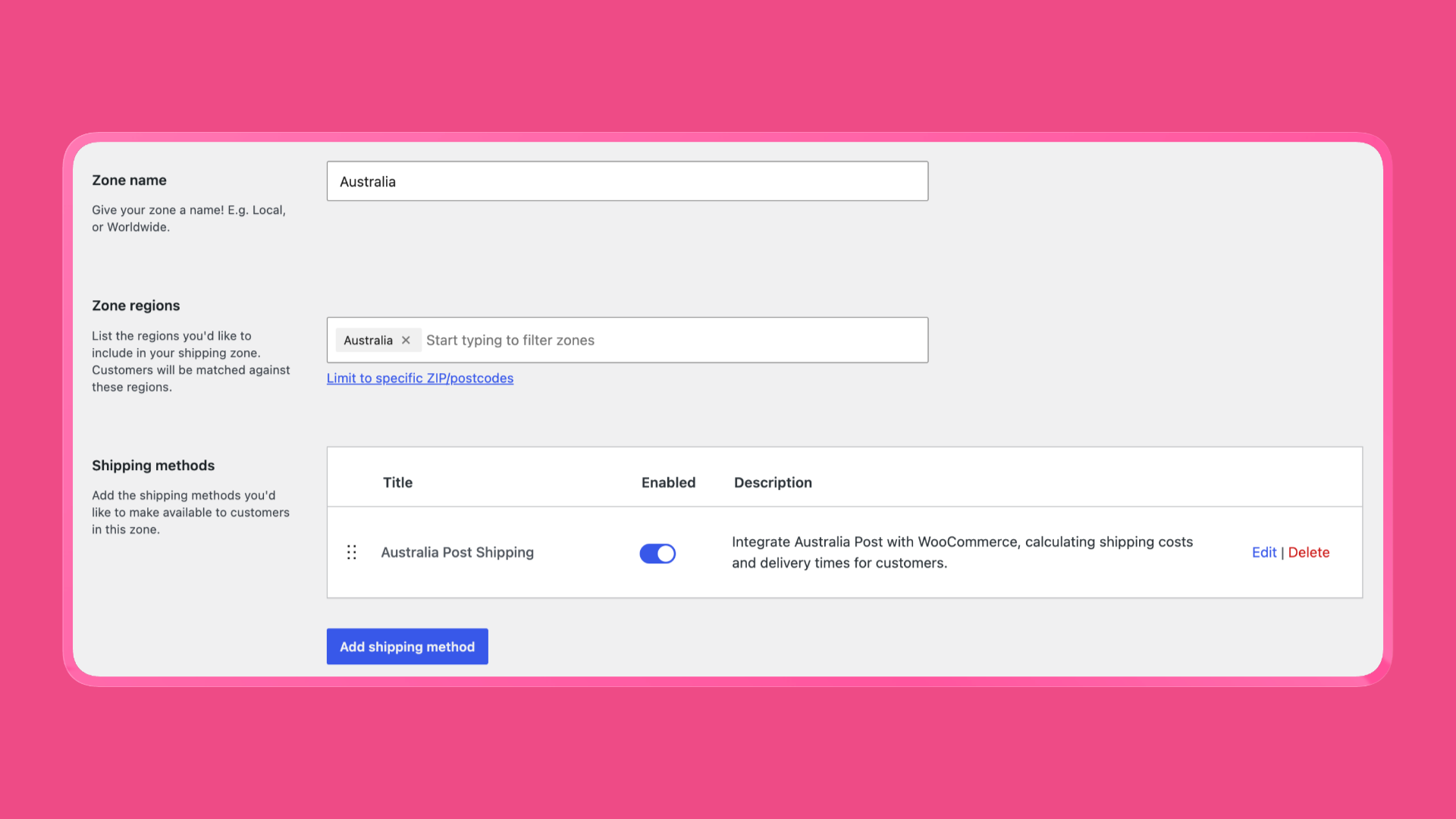
Example: Zone “Australia” exists with Flat Rate $12. You assumed the AusPost plugin would replace it automatically. It will not. Add the method, then disable or delete the stale flat rate if you no longer want it.
On WPRuby, Health fails this check with: The Australia Post shipping method is not added or enabled to any shipping zone.
3. WooCommerce matched a different zone
Why it happens: WooCommerce matches one zone per address, then offers only the methods on that zone. It walks zones from the top of the list. A broad “Australia (country)” zone sitting above a “NSW metro (postcodes)” zone means the NSW zone never runs. “Rest of the world” catching AU because you never created an Australia zone is the same class of bug.
This is in the Knowledge Base for a reason: merchants add Australia Post to the right zone, test with a Melbourne address, and still see Free Shipping from a leftover “Everywhere” zone higher up the list.
What to check:
- You have one zone whose locations are Australia (country
AU) for domestic Parcel Post / Express - More specific zones (state or postcode) sit above broader Australia-wide zones
- International destinations have their own zone with Australia Post added (or Rest of the world, if that is deliberate)
- You are not doubling up: two overlapping “Australia” zones, each with different methods
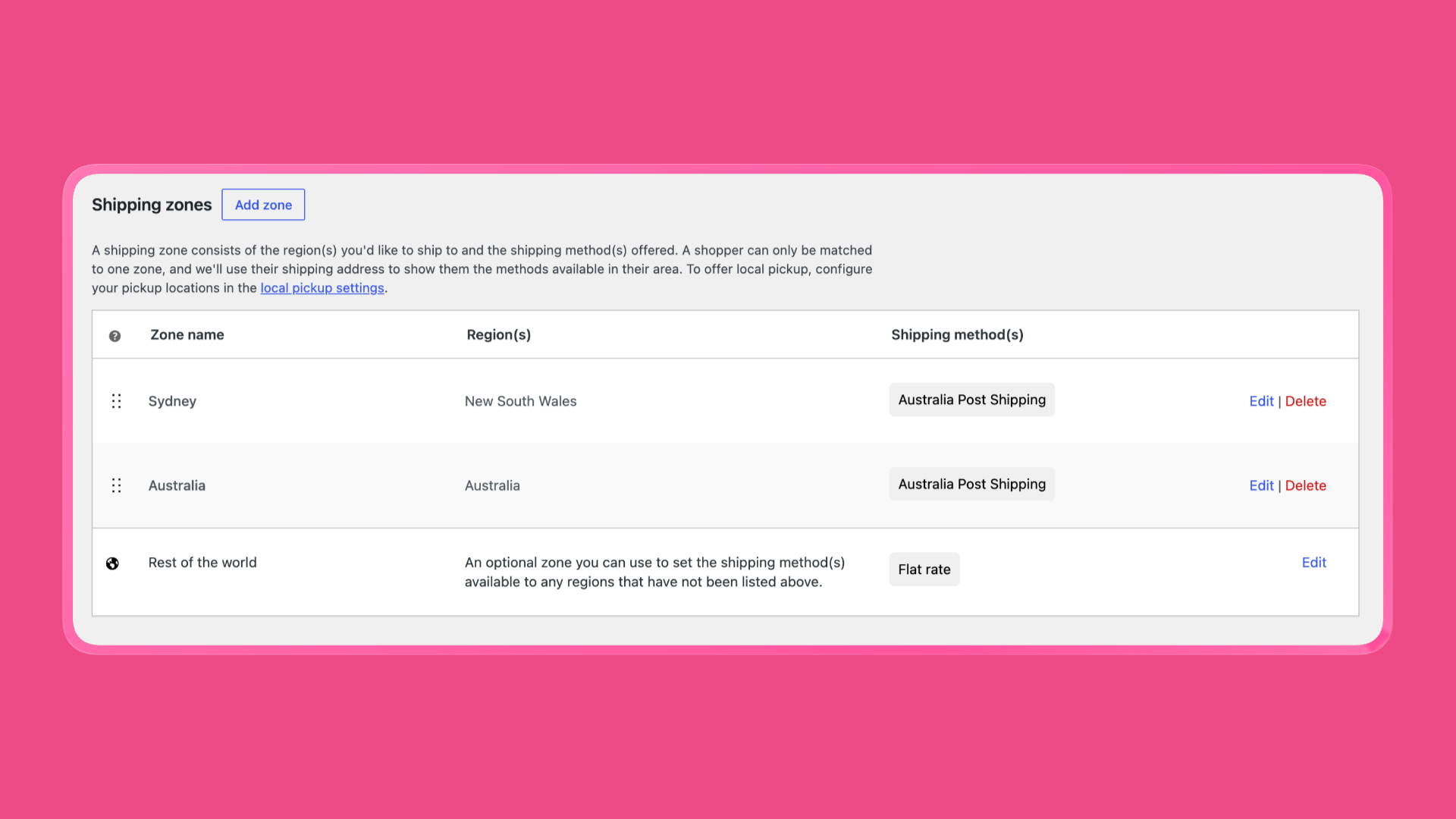
Example: Zones, top to bottom: (1) Australia — country AU — Free Shipping over $100, (2) Sydney metro — postcodes 2000–2234 — Australia Post. A customer in 2010 matches zone 1. They never see live AusPost rates.
Drag the Sydney zone above Australia, or remove AU from the free-shipping zone and use a postcode restriction instead.
WPRuby Health flags Australian zones that are ordered general-before-specific.
4. The origin (shop) postcode is blank or wrong
Why it happens: Australia Post prices from your send location to the customer. The calculator needs a four-digit Australian origin postcode. WooCommerce’s store address is easy to leave as a city name with an empty postcode, or as a PO Box that does not match where you actually lodge parcels.
If origin is empty, some plugins return no rates at all. WPRuby defaults the Shop Origin Post Code to the WooCommerce store postcode, then falls back to 2000 if that is empty — so you might see Sydney prices from a Perth warehouse and think the plugin is “wrong,” not “missing.” Wrong origin is as bad as a blank checkout: the number is live, but it is the wrong number.
What to check:
- WooCommerce → Settings → General — store country Australia, postcode filled (for example
3000notMelbourne) - Your Australia Post plugin’s origin / shop postcode field matches the postcode you actually ship from
- Dropshipped SKUs (if you use them) have their own origin postcode — mixed origins are split into separate packs
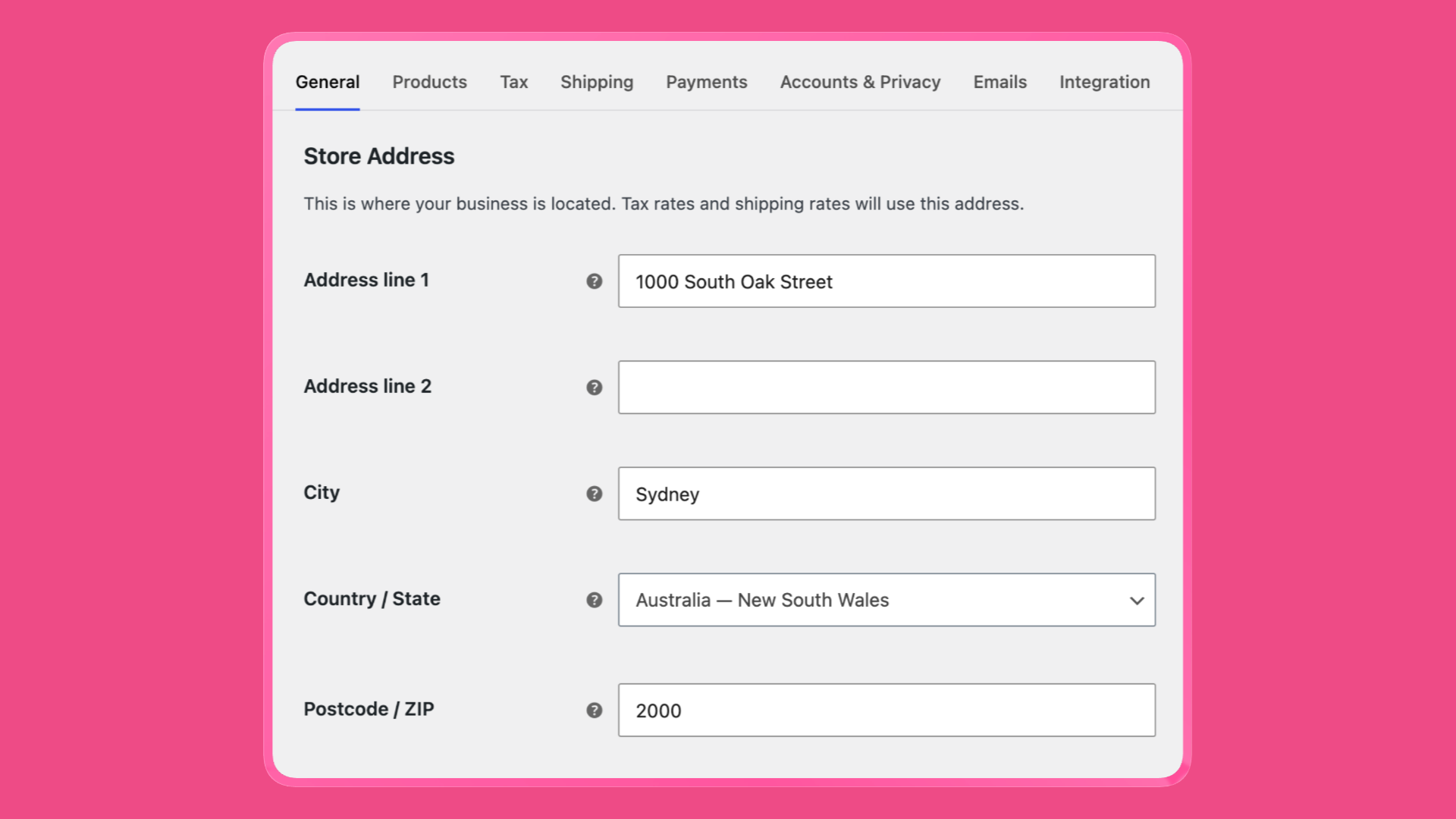
Example: Warehouse is 2148 (Westmead). Store address still says 2000 from when the company was in the CBD. Express to 4000 looks cheap until you pay MyPost from 2148. Set origin to 2148.
Confirm suburbs against the Australia Post postcode finder.
5. Products have no weight
Why it happens: Parcel Post is a weight-and-destination product. A WooCommerce product with a blank Weight on the Shipping tab is 0 as far as many calculators are concerned. Australia Post will not quote a 0 kg parcel. The method returns no rates — not an error on screen.
Variable products make this worse: the parent can have a weight while variations do not. Checkout uses the variation.
What to check:
- Products → each purchasable item → Shipping → Weight
- Variations: open each variation, not only the parent
- WooCommerce → Settings → Products — weight unit is what you think it is (
kgvsg)
Example: Unit is kg. You type 250 for a 250 g candle. The API sees a 250 kg item, which is over the 22 kg domestic limit (see check 8). Rates disappear. The fix is 0.25 kg, or switch the store to grams and enter 250.
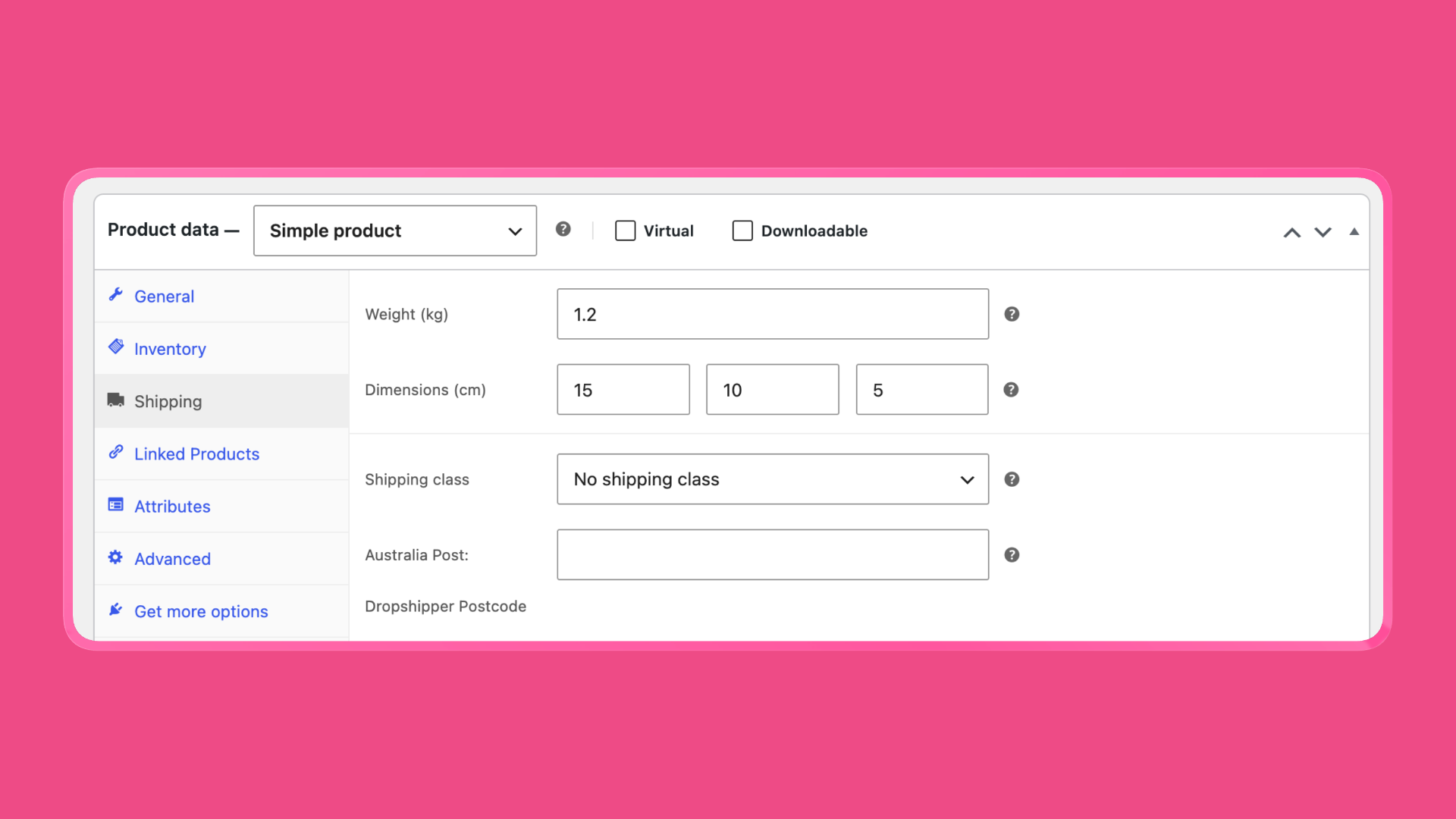
WPRuby can still quote using a Default Package Weight (0.5 kg unless you change it) when a product weight is empty. That avoids a blank checkout, but the price will be wrong until you fill real weights. Health lists how many products are missing _weight and links to a filtered product table (ap_missing_weight=1).
6. Products have no dimensions
Why it happens: Australia Post needs length, width, and height for own-packaging parcels (and to know whether a satchel even fits). Empty dimensions are treated as zero or as a tiny default. Some APIs reject the request. Others quote a letter or an undersized pack you cannot actually use.
What to check:
- Product Shipping tab: Length, Width, Height
- Same unit story as weight: cm vs mm.
30mm stored as 30 cm is fine;300mm entered as 300 cm is a 3 m side and will fail the 105 cm rule
Example: A poster tube 110 cm long. Domestic Parcel Post’s published maximum length is 105 cm. The plugin should refuse the quote rather than invent a price Australia Post will reject at the counter. Split the shipment, use a freight product, or shorten the pack.
WPRuby Health counts products missing length, width, or height. Default package size can fill gaps for quoting; treat that as a safety net, not a catalogue strategy.
7. The customer has not entered a postcode
Why it happens: For destination country AU, a blank postcode means the calculator has nowhere to send. WPRuby (and most AusPost plugins) stop rather than guess. On the cart, that looks like “shipping not calculated.” On checkout, it looks like no methods until the address is complete.
WooCommerce also has Hide shipping costs until an address is entered. That is intentional — but if your theme’s checkout blocks or guest checkout skip the postcode field, the method never fires.
What to check:
- Cart: WooCommerce → Settings → Shipping — “Enable the shipping calculator on the cart page” if you want quotes before checkout
- Checkout: postcode is required for Australia; suburb/city and state are filled
- Test with a real postcode (
2000,3000,4000), not0000orABCD - Blocks vs shortcode checkout: confirm the shipping address section actually collects postcode for guests
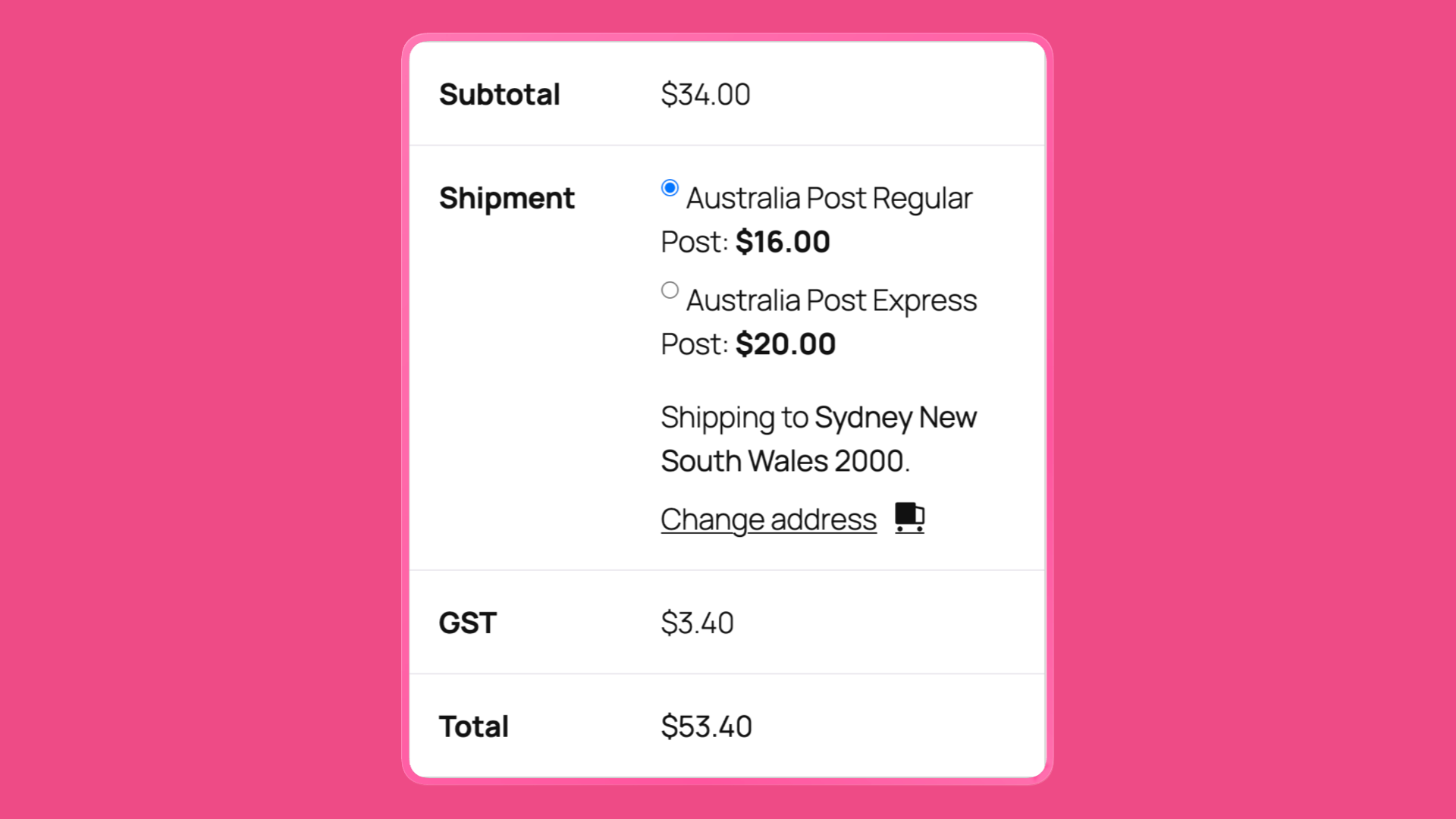
Example: You test checkout while logged in, with your admin account’s billing address already saved. A guest with an empty shipping postcode sees no rates. Use a private window.
8. The pack is over Australia Post’s size and weight limits
Why it happens: If any item in the cart is heavier or longer than Australia Post will accept, a well-behaved plugin does not quote. Showing $0 or a fake Express price would be worse. The checkout simply has no Australia Post line.
Published Australia Post size and weight guidelines:
| Destination | Max weight | Max length | Other |
|---|---|---|---|
| Within Australia | 22 kg | 105 cm | Max 0.25 m³ cubic volume |
| Overseas | 20 kg | 105 cm | Max 140 cm girth |
WPRuby skips the PAC call when an item is over 22 kg domestic (32 kg if you are on eParcel contract postage) or 20 kg international, or when the longest side is over 105 cm. Cubic 0.25 m³ and girth are still your packing problem even when the plugin only gates weight and longest side.
Example: A 24 kg bag of pet food on Parcel Post. No plugin can honestly return a Parcel Post price. Offer freight, split boxes, or a different carrier for that SKU. A 21 kg item with a 108 cm longest side fails on length even though weight is legal.
If this is a one-off, set a Fallback Price on the WPRuby method so checkout still offers a merchant-set rate when AusPost returns nothing. Do not use fallback to hide a 40 kg catalogue.
9. Debug mode is hiding rates from shoppers
Why it happens: Debug mode is a support tool. In WPRuby it only calculates for administrators and prints diagnostic output on cart/checkout. If it is left on after a ticket, you still see Regular and Express. Customers (and the “works on my machine” test in Chrome while logged out) see nothing.
The KB line is exactly this ticket: The plugin only works on the checkout page when I’m logged in as an administrator.
What to check:
- WPRuby: Australia Post Centre → Settings → Enable Debug Mode — off on production
- Other plugins: any “debug,” “test mode,” or “disable for guests” checkbox

Retest in a private window, not logged in as shop manager.
10. WooCommerce still has an empty result cached
Why it happens: You added weights, moved the zone, turned debug off — and checkout is still empty. WooCommerce stores shipping quotes in transients. Object cache (Redis, Memcached) and page cache (hosting, Cloudflare, a cart fragment plugin) can keep the old “no rates” response for minutes or hours.
What to check:
- WooCommerce → Status → Tools → Clear transients (and Clear expired transients)
- Purge the host cache / CDN
- Disable cart/checkout page caching — those pages must stay dynamic
- Retest with a new cart (add the product again), not a week-old session
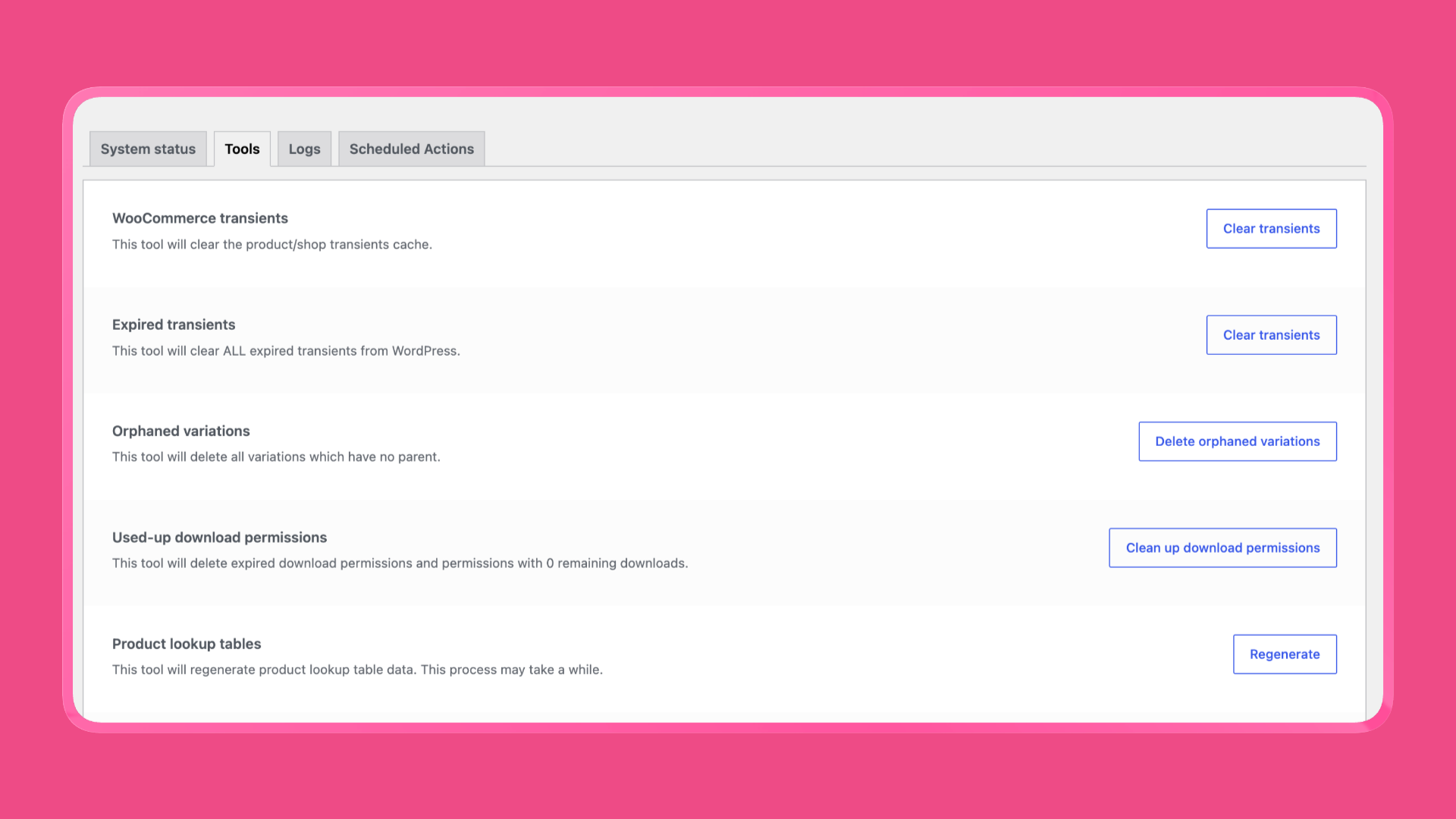
Example: You fixed a 0 kg product at 10:01. A customer who loaded checkout at 10:00 still has the empty quote until the transient expires. Clearing transients is the step in the KB after “I already fixed it.”
11. The Australia Post API is not reachable
Why it happens: Live rates are an HTTP call to Australia Post (PAC for public prices; Shipping & Tracking if you use contract/MyPost). A bad AUTH-KEY, a firewall that blocks digitalapi.auspost.com.au, a security plugin stripping outbound requests, or an AusPost outage all look identical at checkout: no methods.
What to check:
- PAC key: register at Australia Post PAC registration if your plugin requires your own key, or if a shared/default key is rate-limited
- WPRuby Pro can quote with a bundled PAC key; enter your own if you have a business account or see intermittent empty carts
- Labels Pro: Test Connection in Australia Post Centre (MyPost merchant token or eParcel API key/password/account number)
- Server can reach the API (ask hosting if
wp_remote_getto AusPost is blocked) - Security / “disable WordPress HTTP” modules
Empty rates with a valid key and a 500 g product usually mean checks 2–8, not “the API is down.” Confirm connectivity before rewriting the catalogue.
12. Suburb, state, and postcode do not match
Why it happens: Australia Post treats suburb + state + postcode as one locality. Richmond exists in VIC and NSW. 2000 is Sydney, not “Sydney Harbour.” A mismatch is the Labels Pro error: Your combination of suburb, state & postcode doesn’t match.
For checkout PAC rates, destination postcode is the main input. You can still see live prices with a sloppy suburb. The failure shows up when you print a label or when a plugin validates the address before quoting. Shoppers experience both as “Australia Post doesn’t work.”
What to check:
- Look up the postcode in the Australia Post postcode finder and use a listed locality name
- WooCommerce → Settings → General — store city/state/postcode is a real combination (this is the from address on labels)
- Edit the order shipping address before creating a MyPost/eParcel shipment
- Do not put the postcode in the city field and leave postcode blank (that also breaks check 7)
This is the last item in the KB because it is the error after rates did show and fulfilment failed. Fix the locality once; it protects both quotes and labels.
After the 12: still blank?
Less common, same symptom:
- No postage products selected on the method (all domestic services unchecked, or Labels Pro contract mode on with every product disabled)
- International-only method on a domestic zone, or the opposite
- Virtual products only in the cart (nothing physical to quote)
- A shipping class / conditional plugin hiding Australia Post for that product
- Theme or checkout plugin replacing WooCommerce shipping with a custom table
On WPRuby, enable at least Parcel Post and Express on the zone instance, or turn Enable Contract Postage off if you only wanted public PAC rates. Connecting MyPost is for labels and optional contract prices — it is not required for live public checkout rates. See How to Connect MyPost Business to WooCommerce when you are ready to print.
Why WPRuby stores usually find this faster
Any Australia Post plugin can quote PAC. The difference is how long you spend in WooCommerce → Settings → Shipping guessing.
Australia Post Centre Health is built from the same failures as the KB: method on a zone, Australian zone order, missing product weight and dimensions, debug mode, API connectivity, license. Failed checks link to the screen that fixes them. Default weight/size and an optional fallback price keep checkout from going empty while you clean the catalogue.
Get live Australia Post rates (and Labels Pro when you want to print) → Australia Post WooCommerce Extension
Quick reference
| Check | Typical WooCommerce path | Typical “why” |
|---|---|---|
| 1. Wrong / inactive plugin | Plugins | Two calculators, or lite still on |
| 2. Method not on zone | Settings → Shipping → Zones | Never added or not enabled |
| 3. Other zone matched | Shipping zones order | One zone wins; broad AU above postcodes |
| 4. Origin postcode | General settings + plugin origin | Empty or CBD leftover |
| 5. Weight | Product → Shipping | Blank variation or kg/g mix-up |
| 6. Dimensions | Product → Shipping | Blank or cm/mm mix-up |
| 7. Customer postcode | Cart calculator / checkout | AU with empty postcode = no quote |
| 8. Package limits | Product size vs AusPost guidelines | >22 kg, >105 cm, or intl 20 kg |
| 9. Debug mode | Plugin settings | Admins see rates; guests do not |
| 10. Cache | Status → Tools → Clear transients | Old empty quote stuck |
| 11. API | PAC key / Test Connection | Blocked outbound or bad credentials |
| 12. Locality | Store + order address vs postcode finder | Suburb/state/postcode combo |
FAQ
I see rates as the shop owner but customers do not.
Turn debug mode off. Retest logged out. That is check 9.
I added weights and still have no rates.
Clear transients, confirm kg vs g, and check the pack is under 22 kg / 105 cm. Then confirm the zone that matches the test address actually contains Australia Post.
Do I need MyPost Business for checkout rates?
No. Public PAC rates work without a business account. MyPost (or eParcel) is for printing labels and optional contract prices at checkout.
Does this apply if I don’t use WPRuby?
Yes for zones, origin, weight, dimensions, postcode, AusPost limits, transients, and debug/test modes. Other plugins will not have Australia Post Centre Health; the WooCommerce screens are the same.
Where is the short version?
TroubleShooting and Common issues in the knowledge base.
Empty Australia Post rates are almost never “the API randomly failed.” They are a missing zone, a missing postcode, a 0 kg product, a 110 cm tube, or debug mode left on. Walk the 12 checks once, then keep Health and product weights in the fulfilment routine so checkout stays honest.
Show live Australia Post rates at WooCommerce checkout → Get Australia Post Pro