If you ship WooCommerce orders with Australia Post, you have two websites in the way: WordPress for orders, and MyPost Business for labels, postage, and pickups.
Connecting them means checkout can show your real postage, labels print from the order screen, and tracking lands back on the WooCommerce order — without re-typing names and addresses into auspost.com.au.
This guide covers what MyPost Business is, when you need it, how retail prices compare, and the full Labels Pro (v7) connection: Platform Partner, merchant token, rates, labels, pickups, tracking, and the errors that usually block a first shipment.
Connect MyPost Business to WooCommerce → Get Labels Pro
What MyPost Business is
MyPost Business is Australia Post’s free business shipping account. There is no annual contract and no minimum volume to join. You create an account, add a payment method, and send parcels with digital labels instead of queueing at a post office counter.
With a MyPost Business account you can:
- Create and print Australia Post labels online
- Pay postage from a stored card or a MyPost charging account
- Book parcel pickups from your premises
- Move up savings bands as your spend grows (more on pricing below)
- Connect approved Platform Partners — including WPRuby — so your store can talk to Australia Post’s Shipping & Tracking API
MyPost Business is the account most Australian SMBs use. It is not the same as eParcel (sometimes called Parcel Send): eParcel is a contracted account with API keys, a different label workflow, and higher-volume eligibility. Labels Pro supports both. This article is for MyPost.
Do you need it?
You need MyPost Business (or eParcel) if you want to print paid Australia Post labels from WooCommerce. Public checkout rates alone cannot generate a label.
You do not need MyPost Business if you only want customers to see live Australia Post prices at cart and checkout. Pro already quotes the public Postage Assessment Calculator (PAC). Upgrade to Labels Pro when you are ready to connect the business account and fulfil from WordPress.
| Your situation | What to use |
|---|---|
| Live AusPost prices at checkout only | Pro — PAC / public rates, no MyPost connection |
| Print labels from WooCommerce, book pickups, write tracking to the order | Labels Pro + a MyPost Business (or eParcel) account |
| You already pay at a post office or on auspost.com.au for every order | Open a free MyPost account — then connect Labels Pro |
| High volume, negotiated contract, eParcel API credentials | Use eParcel in Labels Pro, not MyPost |
| A few parcels a month, still on Band 0 | MyPost is still worth it for labels, tracking, and pickups — postage may match retail until spend grows |
Pro (rates-only) lets customers see live Australia Post prices at checkout. Labels Pro adds the MyPost connection, label printer, bulk fulfilment, pickups, and tracking written back to the order.
Retail vs MyPost Business pricing
Retail is what you pay at a post office counter (or the equivalent public rate). It is the ceiling.
MyPost Business prices are calculated from those retail rates, minus a band-based discount. Australia Post currently advertises savings of up to 40% on domestic parcels and up to 35% on international parcels at the top band.
How bands work (from Australia Post’s July 2026 Rates and Savings Guide):
- Bands run from 0 to 5. Band 0 is standard retail.
- Your band is based on MyPost spend over the last four weeks or the last 12 months, whichever puts you higher.
- Savings typically start once you spend $50+ in a four-week period (Band 1). Band 0 is roughly $0–$49 in four weeks, or up to $499 in 12 months.
- Postage, eligible packaging, and pickups can count toward band spend.
- When you qualify for a higher band, the new rates apply the next day. You stay in a band for four weeks even if sending drops — unless you qualify for a higher band sooner.
Domestic Parcel Post examples Australia Post publishes for Zone 1 → Zone 1 at Band 5 (own packaging): from about $5.82 at 250 g, $6.69 at 500 g, and $9.15 at 1 kg — versus a higher retail sticker. Exact prices move with AusPost updates; check the current MyPost Business Rates and Savings Guide for your zone and weight.
Pickup is charged separately. Same-day (before 1 pm) and next-business-day pickup are a flat fee per booking (around $15.60 on Bands 0–3 and $13.39 on Bands 4–5 after the 1 July 2026 update), with a limit of 100 parcels per pickup.
What your WooCommerce checkout shows
Connecting MyPost does not automatically change checkout prices.
| Checkout setting | What the customer sees | When to use it |
|---|---|---|
| Contract postage off (default) | Live public PAC rates | You want shoppers to see standard AusPost prices, and you still print labels at MyPost rates in the back office |
| Contract postage on (Labels Pro) | Your MyPost / contracted product prices | You want cart totals to match what you actually pay Australia Post |
Turn on Enable Contract Postage in Australia Post Centre → Settings only if you want discounted MyPost products at cart/checkout. You can print labels either way.
MyPost-specific checkout extras (when contract postage is on) include Extra Small satchels and flat-rate MyPost boxes. eParcel has its own contract products and optional surcharge calculation — that is a different account type.
How the WPRuby Platform Partner connection works
Australia Post does not let an arbitrary plugin log into MyPost with your password. Integrations go through Platform Partners: businesses Australia Post has approved to connect stores to the Shipping & Tracking API.
WPRuby is a MyPost Business Platform Partner. That is why:
- You can click Connect with MyPost inside WooCommerce and complete an official Australia Post login / consent screen
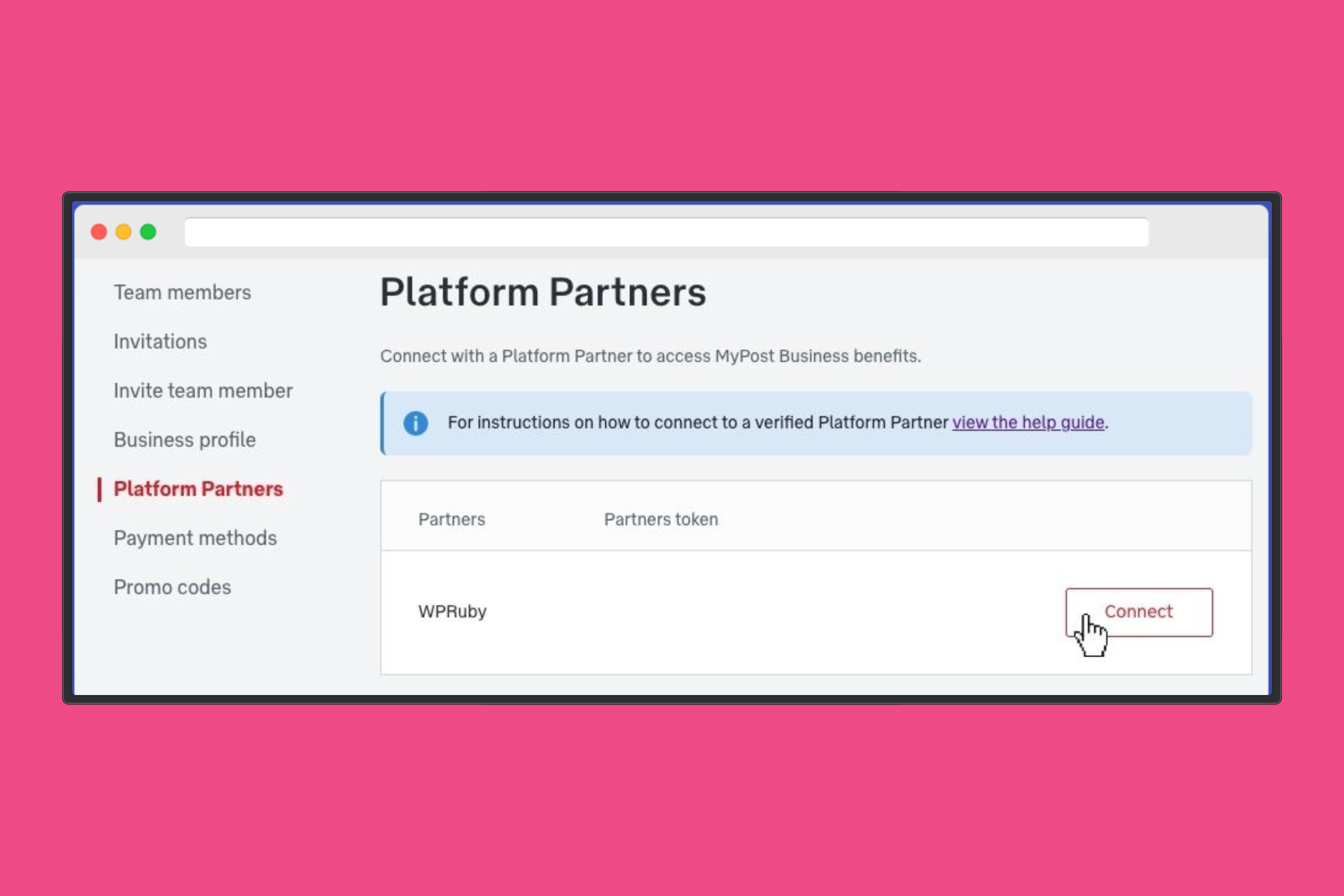
- You can also open MyPost Business → Platform Partners, find WPRuby, and connect there by hand
Once you grant access, Australia Post issues a merchant token for your account. Labels Pro stores that token in your WooCommerce settings and uses it to create shipments, buy postage, generate label PDFs, book pickups, and pull tracking.
You are not sharing your MyPost password with WordPress. You are granting WPRuby (as Platform Partner) permission to act on your MyPost account from this store. You can disconnect the partner from MyPost Business if you ever need to revoke access.
What a merchant token is
The merchant token is the API credential for MyPost Business. It is not your eParcel API key, and it is not the public PAC key used for checkout quotes.
Treat it like a password:
- Do not paste it into tickets, screenshots, or shared docs
- Use Copy Token in MyPost if you enter it by hand — a truncated token will fail verification
- If connection tests start failing, reconnect with MyPost (or paste a fresh token) rather than editing the old value
When Labels Pro verifies a token it also loads your MyPost account number and any eligible charging accounts (credit available, not blocked). Those charging accounts then appear as a payment method next to Stored Payment.
Connecting WooCommerce (Labels Pro)
You will need:
- WooCommerce with product weights (and dimensions where AusPost requires them)
- A MyPost Business account with a payment method on file
- WPRuby Australia Post Labels Pro installed, licensed, and showing Labels Pro entitlements
- An administrator logged into WordPress (the OAuth return is admin-only)
Method 1: Connect with MyPost (recommended)
This is the Platform Partner OAuth path. No token copying.
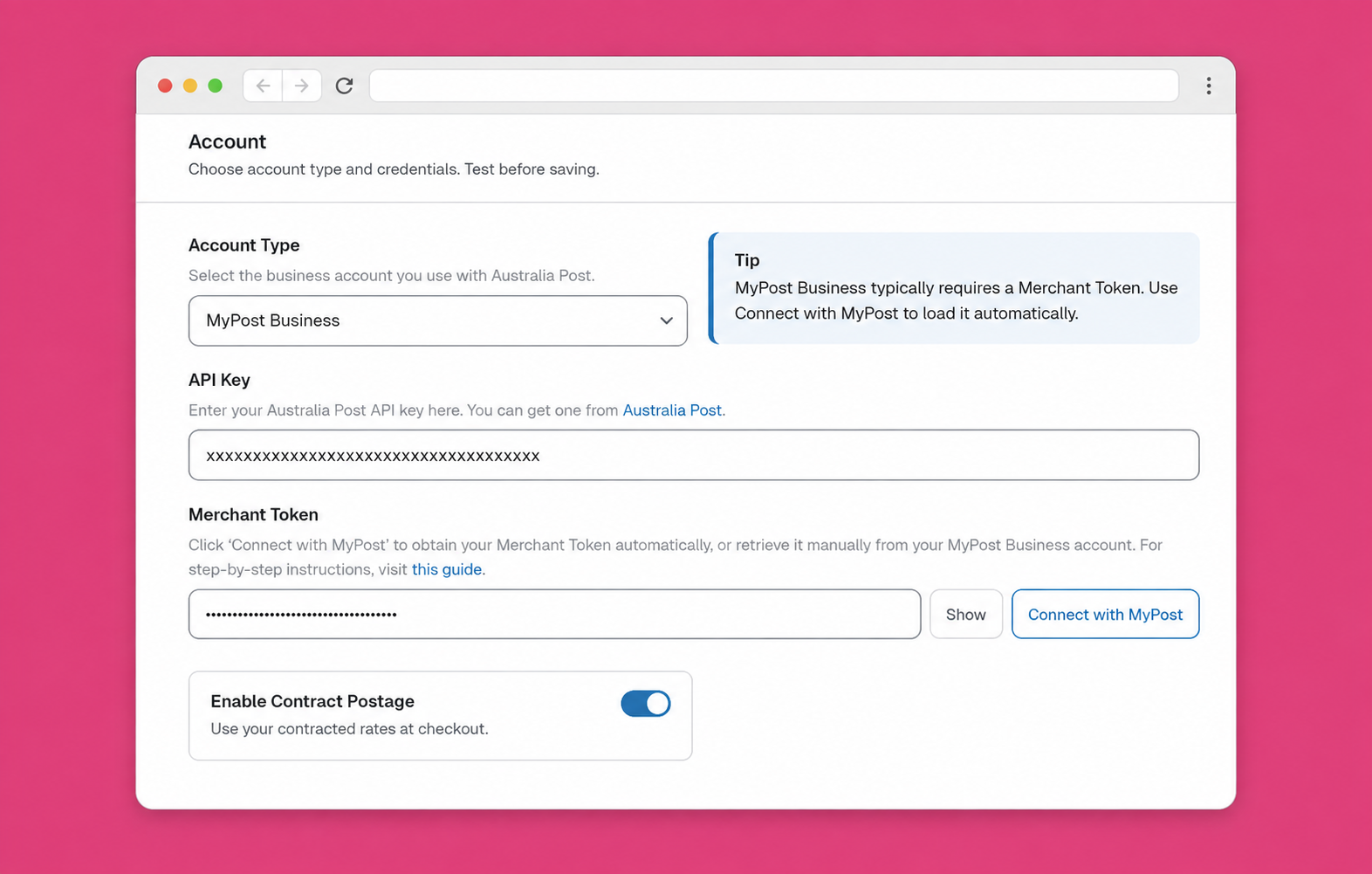
- Go to WooCommerce → Australia Post Centre → Settings
- Set Account Type to MyPost Business
- Next to Merchant Token, click Connect with MyPost
- Sign in to Australia Post and grant access to WPRuby
- You return to Australia Post Centre with a success notice: the merchant token has been loaded
- Click Test Connection in the Centre header to confirm the token is valid
- Set business name and business phone (phone is required for international labels)
- Choose how you pay for labels: Stored Payment, or a Charging Account if one was synced
- Optionally turn on Enable Contract Postage if checkout should use MyPost prices
- Click Save Changes
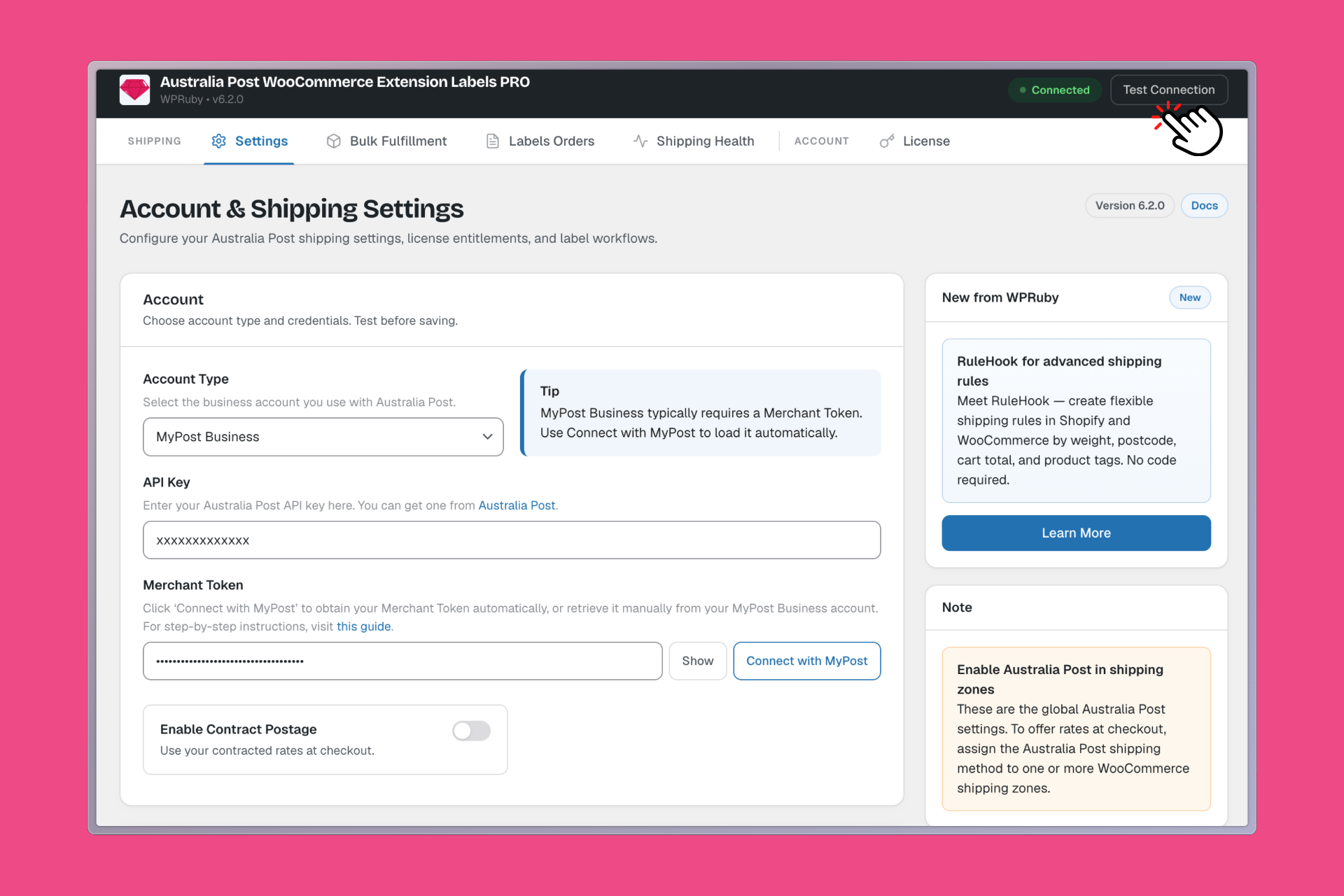
If Connect with MyPost never returns, or Test Connection fails, use the manual token path below. Also confirm your Labels Pro license is valid — a Pro-only license (or an expired Labels Pro license) will not unlock the business account features.
Method 2: Paste a merchant token
Use this if OAuth is blocked (redirects, security plugins, or a host that strips query strings).
- Log in to MyPost Business
- Open your name (top right) → Business details
- In the sidebar, open Platform Partners
- Find WPRuby, click Connect, accept terms if prompted, and add a payment card if Australia Post asks
- Click Copy Token next to WPRuby
- In WooCommerce: Australia Post Centre → Settings → account type MyPost Business
- Paste the token into Merchant Token
- Click Test Connection, then Save Changes
Step-by-step screens for the MyPost UI are also in the knowledge base: How to connect the plugin with your MyPost Business account.
After a successful test, you are connected. The rest of this article is what that connection is for.
Rates: checkout after you connect
With the token in place you still configure Australia Post as a shipping method on your zones (domestic Australia, and a separate international zone if you ship overseas).
Public PAC rates (Pro and Labels Pro)
Customers see live Regular, Express, Courier, letters, and satchels from the Postage Assessment Calculator. Delivery estimates can appear on domestic rate labels. This path does not need a merchant token.
MyPost contract rates (Labels Pro)
Turn on Enable Contract Postage, then refresh / select the contract products you actually send. Checkout then quotes against your connected MyPost account instead of PAC. Hide unused products so the cart does not list services you never buy.
You can mix the two commercially: public rates at checkout for a simple shopper experience, MyPost rates only when staff calculate postage on the label. Or show MyPost prices at checkout so the customer pays what you pay (plus any handling fee you set).
Packaging still matters. Incomplete product weights are the most common reason both PAC and MyPost quotes fail. Use Australia Post Centre → Health (and the product filters for missing weight/dimensions) before you blame the token.
Labels: MyPost’s create-then-pay flow
MyPost is not one-click like eParcel. You create the shipment first, then buy postage, then download the PDF.
One order
- Open the WooCommerce order → Order Labels
- Review Shipments — from/to address, weight, dimensions, postage product, Signature on Delivery, Extra Cover, and customs for international
- Calculate Prices — lock in postage against your MyPost account
- Click Create Shipment(s) (not “Generate Label” — that button is eParcel)
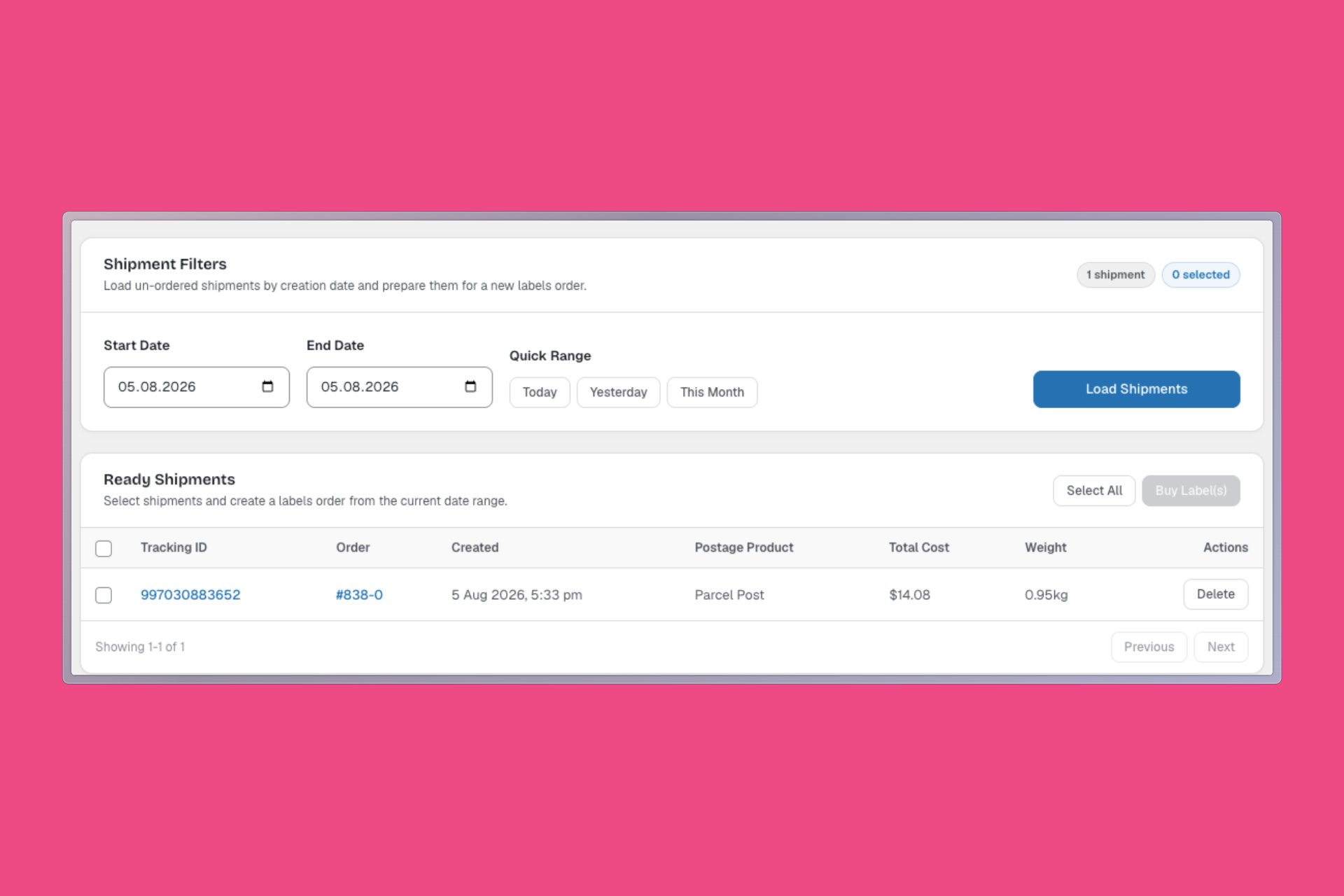
- Go to Australia Post Centre → Labels Orders
- Load the date range, select the ready shipment(s), click Buy Label(s)
- Pay with stored payment or your charging account
- Download the label PDF (A4 1–4 per page, or thermal A6)
Tracking / consignment IDs are saved on the order when the label is generated.
Many orders
Use Australia Post Centre → Bulk Fulfillment: filter processing/on-hold orders, fix blocked rows (weight, phone, customs) in place, then Create & Buy Labels for a combined PDF.
Full printer walkthrough (layouts, branded labels, bulk, reprints): How to Print Australia Post Shipping Labels in WooCommerce.
Return labels in Labels Pro are eParcel + Australian destination only. MyPost merchants still handle returns in MyPost Business or by creating a new outbound-style shipment — there is no MyPost return button on the order printer.
Printing a label does not auto-complete the WooCommerce order. Change status yourself, or use the manual status action in Bulk Fulfillment after a run.
Pickups
Pickup booking in Labels Pro is MyPost-only.
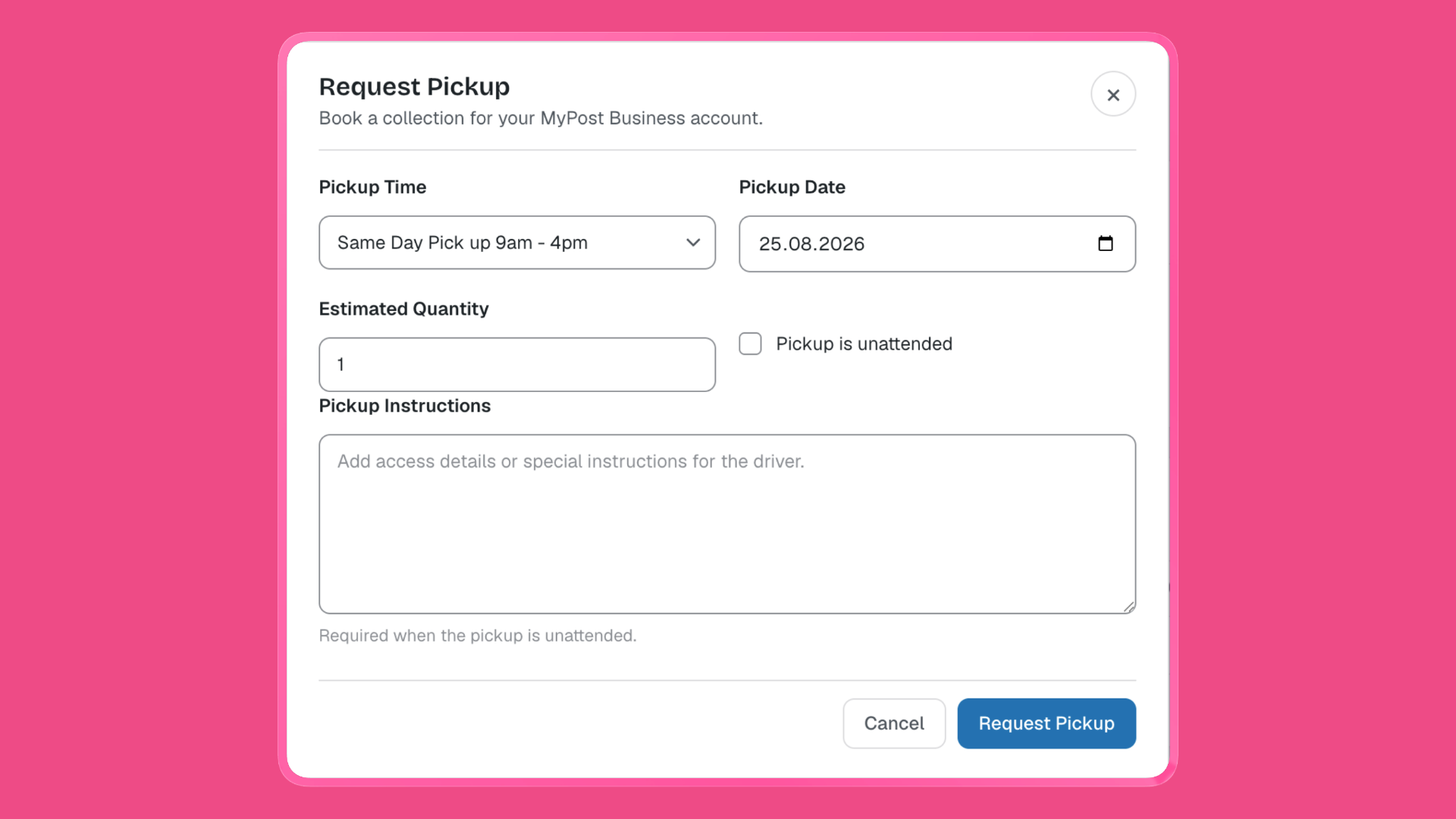
On Australia Post Centre → Labels Orders, click Request Pickup and choose:
- Same-day pickup (PU1) — typically ordered before 1 pm for collection that business day (9 am–4 pm; someone usually needs to be present unless you mark unattended)
- Next-business-day pickup (PU3) — order by midnight for collection the next business day
You can allow unattended pickup and add collection instructions (required when unattended is on). Estimated parcel quantity is sent with the booking. Australia Post limits pickups (100 parcels per booking in the current guide).
Book pickup as its own step on Labels Orders. Do not assume buying labels also books a driver — the current Centre UI keeps postage and pickup separate.
Tracking
Once a MyPost label is generated, Labels Pro writes consignment / tracking numbers onto the WooCommerce order.
Customers get:
- A Track action in My Account → Orders (opens Australia Post’s track page)
- Tracking on the order details screen
- Tracking in WooCommerce emails
Staff get:
- Tracking in the WooCommerce orders list
- Tracking on the order and in the Labels printer
If you ever bought postage outside WooCommerce, Pro and Labels Pro both include a manual tracking metabox so you can still type a number and notify the customer.
What this is not: a live scan-by-scan timeline on the customer account. Shoppers follow the Australia Post Track link (and AusPost’s own tracking email, which is sent when the shipment is created).
Common errors (and what to do)
Most first-week failures are credentials, addresses, or package data — not “the API is down.”
| What you see | Likely cause | Fix |
|---|---|---|
| Test Connection fails / invalid token | Truncated token, revoked Platform Partner, or Labels Pro license not entitling the business account | Re-run Connect with MyPost, or Copy Token again from Platform Partners. Confirm the license on Centre → License. |
| Credentials / authentication error when creating a shipment | Token expired or account type still set to eParcel | Set account type to MyPost Business, reconnect, Test Connection, Save |
| Destination address is not accurate | Suburb, state, and postcode don’t match | Correct the WooCommerce shipping address (city / state / postcode combination) |
| Weight error (Parcel Post / Express Post) | Package over the service limit (commonly 22 kg domestic MyPost; 20 kg international) | Split the order, choose a different product, or reduce packing |
| Length, width, or volume error | One side too long (guideline longest side 105 cm) or cubic volume too high | Use a smaller carton or a different postage product |
| At least 2 dimensions must be 5 cm | A side is under Australia Post’s minimum | Increase length/width/height so at least two sides are ≥ 5 cm |
| No products found — choose a different postage product | That MyPost product isn’t valid for this pack/destination | Change the postage product on the shipment (or in bulk options) |
| Shipment not paid / can’t download label | MyPost shipment created but postage not bought | Labels Orders → Buy Label(s) |
| Label expired | Label PDF window passed | Recreate / regenerate via Labels Orders |
| Bulk row Blocked — missing weight or dimensions | Product catalogue incomplete | Use Fix weight in Bulk Fulfillment, or edit the product |
| Bulk invalid phone | International (and some domestic) labels need a usable phone | Fix phone in Bulk Fulfillment |
| International customs incomplete | Missing HS tariff (6–12 digits), origin, description, or dangerous-goods flag | Fill product shipping fields; Fix customs in bulk |
| International label rejected | Business phone missing | Set business phone in Centre Settings |
| OAuth “Invalid token” / never returns to Centre | Redirect blocked; user isn’t an administrator | Use Method 2 (paste token). Complete Connect while logged in as an admin |
| Charging account not listed | No eligible charge account on the MyPost profile (credit blocked or unavailable) | Pay with Stored Payment, or fix the account in MyPost Business then Test Connection again |
Australia Post Centre → Health is the fastest pre-flight: license, API connectivity, zones, and products missing weight.
Quick reference
| Goal | Where | Main actions |
|---|---|---|
| Connect MyPost | Centre → Settings | Account type MyPost → Connect with MyPost (or paste token) → Test Connection → Save |
| Show MyPost prices at checkout | Settings → Enable Contract Postage | Refresh products; keep PAC if you prefer public checkout rates |
| Print one label | Order → Order Labels | Review → Calculate → Create Shipment(s) → Labels Orders → Buy Label(s) → Download |
| Print many labels | Centre → Bulk Fulfillment | Filter → fix blocked → Create & Buy Labels |
| Book a driver | Centre → Labels Orders | Request Pickup (PU1 same day / PU3 next business day) |
| Customer tracking | Order / emails / My Account | Consignment saved after the label; Track opens AusPost |
FAQ
Is MyPost Business free?
Yes. Australia Post does not charge to open the account. You pay postage, packaging, and optional pickup. Savings depend on your band.
Do I need MyPost Business to show Australia Post rates at checkout?
No. Pro quotes public PAC rates without a business account. You need MyPost (or eParcel) plus Labels Pro to print paid labels.
Connect with MyPost vs pasting a token — which is better?
Connect with MyPost. It is the Platform Partner OAuth flow and avoids copy/paste mistakes. Paste a token only if OAuth cannot complete.
Will checkout automatically use cheaper MyPost rates after I connect?
Only if you turn on Enable Contract Postage. Otherwise checkout stays on public PAC rates and you still pay MyPost prices when you buy labels.
Is this the same as eParcel?
No. Different credentials (merchant token vs API key/password), different label buttons, and pickups in the plugin UI are MyPost-only. Return labels in Labels Pro are eParcel domestic AU only.
Does connecting WPRuby give you access to my MyPost login?
No. You grant Platform Partner access; Australia Post issues a merchant token to this store. You can disconnect WPRuby from MyPost Business → Platform Partners.
Stop re-typing orders into MyPost
MyPost Business is the right Australia Post account for most WooCommerce stores: free to join, cheaper than retail as volume grows, and built for digital labels. Labels Pro is the Platform Partner that puts that account inside WordPress — connect once, then quote, print, pick up, and track without leaving WooCommerce.
Connect MyPost Business to WooCommerce → Get Labels Pro