Royal Mail Tracked 24 and Tracked 48 are the services to use when a parcel needs tracking but not a guaranteed delivery time. Customers get updates by email or text and a photo on delivery. You get a record of delivery if a customer says it never came.
WooCommerce doesn’t offer either service out of the box. This guide explains what Tracked 24 and Tracked 48 are, what they cost online and at the Post Office, how to show them at checkout with the right price, and how to get the labels done in Royal Mail Click & Drop. For everything else about Royal Mail shipping, see our complete guide to WooCommerce Royal Mail shipping.
What Tracked 24 and Tracked 48 are
Both are UK services that track the item to the delivery point. The difference is the delivery aim:
- Tracked 24 aims to deliver the next working day.
- Tracked 48 aims to deliver in two to three working days.
These are aims, not guarantees. Royal Mail gives no delivery target for some postcode areas, including Northern Ireland (BT), parts of the Scottish Highlands and islands, the Isles of Scilly, the Isle of Man and the Channel Islands. If you need a guaranteed time, Special Delivery is the service for that.
According to Royal Mail’s Tracked 24 and Tracked 48 pages, both services include:
- Tracking to the delivery point and a photo on delivery.
- Email or SMS notifications to the recipient, when you buy the postage online.
- Compensation for loss or damage up to £75, or the item’s value if that’s lower. Valuables such as money and jewellery aren’t covered.
- An optional signature on delivery, sold as Tracked 24 with Signature and Tracked 48 with Signature.
Royal Mail lists these sizes for both services:
| Format | Maximum weight | Maximum size |
|---|---|---|
| Large letter | 1kg online, 750g at the Post Office | 35.3 × 25 × 2.5cm |
| Small parcel | 2kg | 45 × 35 × 16cm |
| Medium parcel | 20kg | 61 × 46 × 46cm |
Tracked 24 and 48 prices: online vs Post Office
Royal Mail charges less when you buy postage online, for example in Click & Drop, than over the counter at a Post Office. These are the prices on Royal Mail’s Tracked 24 and Tracked 48 pages when we checked them on 23 November 2026. They include VAT.
| Format and weight | Tracked 48 online | Tracked 48 Post Office | Tracked 24 online | Tracked 24 Post Office |
|---|---|---|---|---|
| Large letter | £2.90 (up to 1kg) | £3.45 (up to 750g) | £3.90 (up to 1kg) | £4.15 (up to 750g) |
| Small parcel, up to 2kg | £3.75 | £4.70 | £4.80 | £6.05 |
| Medium parcel, up to 2kg | £5.70 | £7.60 | £6.75 | £8.85 |
| Medium parcel, up to 10kg | £7.55 | £9.60 | £8.80 | £11.05 |
| Medium parcel, up to 20kg | £12.25 | £14.30 | £14.30 | £17.05 |
At those prices, adding a signature costs £1.60 more for a parcel and £2.00 more for a large letter, on both services. Royal Mail usually changes its prices in April and sometimes again during the year, so check the Royal Mail pages before you rely on these figures. Business Parcels account holders pay their own contract prices instead.
If you buy postage online but your checkout charges Post Office prices, customers pay more than you do. The other way round, you pay the difference. See Royal Mail online vs Post Office prices for more.
How to offer Tracked 24 and Tracked 48 at checkout
WooCommerce Royal Mail Shipping Calculator Pro adds Royal Mail as a WooCommerce shipping method. It works out the price of each service from the order’s weight, size and destination, using Royal Mail’s published prices, which are built into the plugin. You don’t need a Royal Mail account or API key for rates.
It can quote every Tracked 24 and Tracked 48 variant:
- Tracked 24 and Tracked 48: large letter, small parcel and medium parcel.
- Tracked 24 with Signature and Tracked 48 with Signature: large letter, small parcel and medium parcel.
The free Royal Mail plugin doesn’t include Tracked 24 or Tracked 48.
To set them up, add the Royal Mail Pro method to your UK shipping zone, open its settings and:
- Choose the parcel services. In Domestic Parcel Options, pick the Tracked small and medium parcel services you want to offer.
- Add large letters if you send them. Tracked large letters are under Domestic Letters Options. The plugin offers letter services only when the whole order fits as a large letter.
- Set the Pricing Source. Choose Online if you buy postage in Click & Drop or elsewhere online, or Post Office if you pay at the counter. The default is Post Office.
- Check your product weights and sizes. The plugin uses them to decide whether an order is a large letter, small parcel or medium parcel, and packs the cart into parcels before pricing it. Set a default weight and size for products that don’t have them.
- Rename or adjust if you like. Each service can have its own checkout name, such as “Tracked delivery (2–3 working days)”, and its own price adjustment, as a fixed amount or a percentage. There’s also a handling fee for all services.
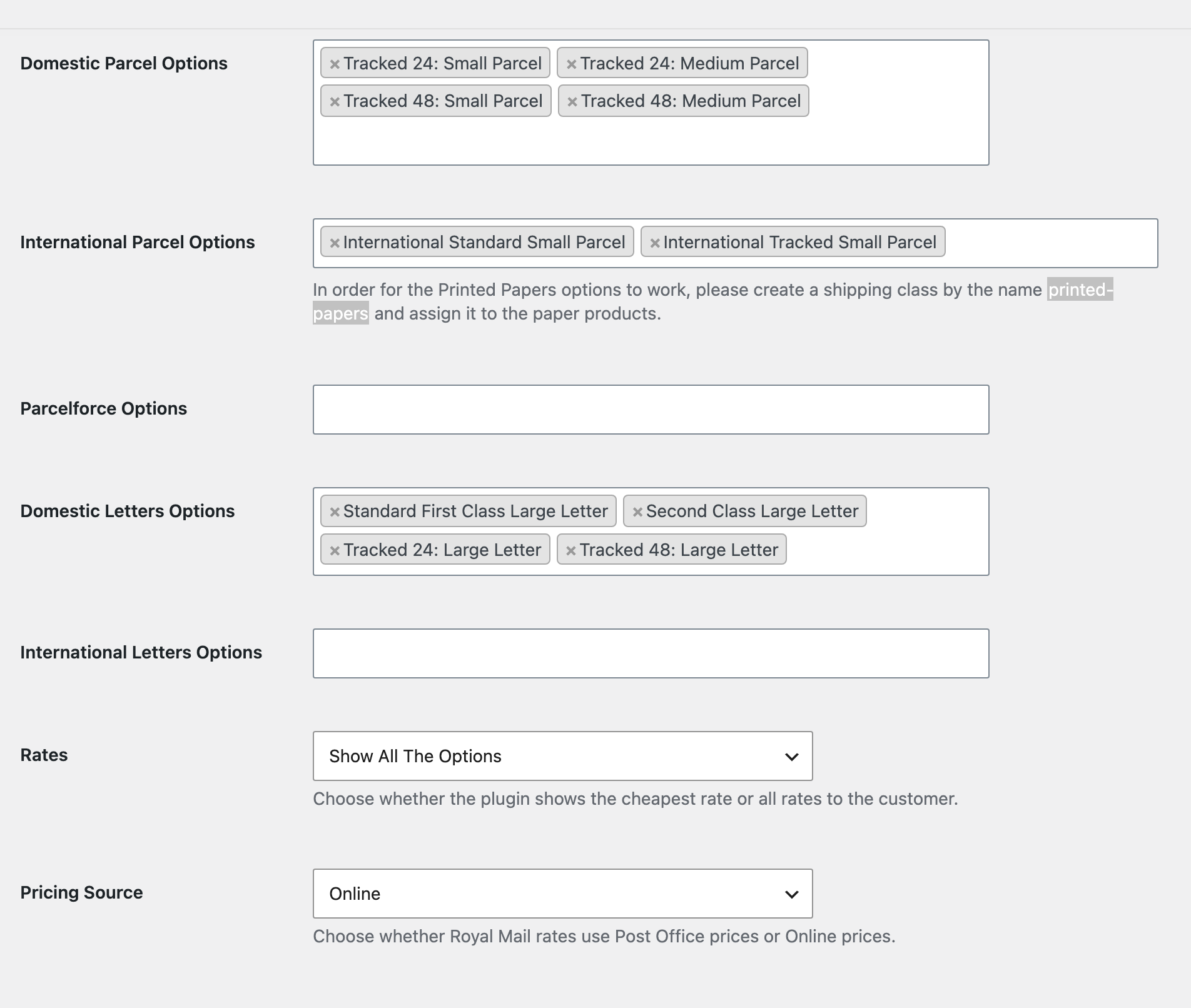
One thing to watch: if Rates is set to “Show only the cheapest option”, customers see a single service, usually an untracked one. Leave it on “Show All The Options” if you want customers to choose tracking.
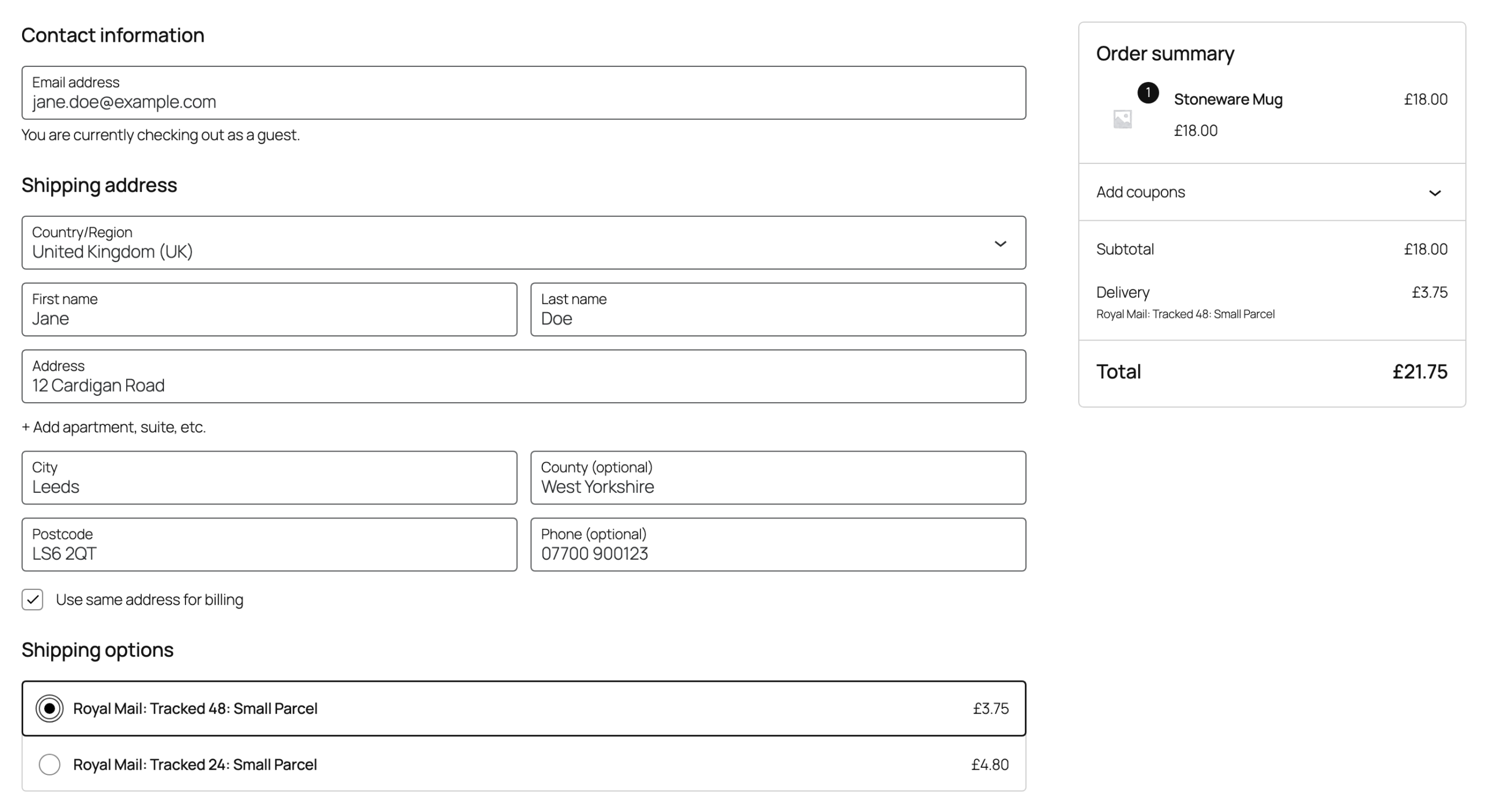
The Royal Mail settings guide covers the rest of the method settings.
Labels for Tracked 24 and 48 with Click & Drop
Click & Drop is Royal Mail’s online tool for buying postage and printing labels, and it’s one place to get online prices. Royal Mail Pro connects to it with your Click & Drop API key. Here is what that does, and what it doesn’t.
- Sends orders to Click & Drop. New checkout orders that need shipping go across automatically, or you can turn that off and click Create Click & Drop Order on the order screen. The plugin won’t send the same order twice.
- Fills in the details. The order arrives with the delivery and billing addresses, the customer’s email and phone number, the package weight, the order total and the shipping charged. The plugin asks Royal Mail to send delivery notifications to the customer.
- You print the label in Click & Drop. The plugin doesn’t print labels inside WooCommerce.
- Tracking comes back. When Click & Drop has a tracking number for the order, click Refresh Status and the plugin saves it to the WooCommerce order and shows it there. It doesn’t email the number to the customer.
The service and format follow the checkout. Since version 5.4.0, each order goes to Click & Drop with the service the customer chose and the format it was priced as, such as a large letter or a small parcel. In the Click & Drop settings, the Service codes table has a field for each service: Tracked 24, Tracked 48, both with signature, and the others. Enter the code your Click & Drop account uses for each one. Codes depend on your account type, so copy them from your account rather than guessing. A service with no code falls back to the Default service code, or to Click & Drop’s own rules if that’s empty too. The Click & Drop box on each order shows the service, code and format that will be sent, so you can check before you export.
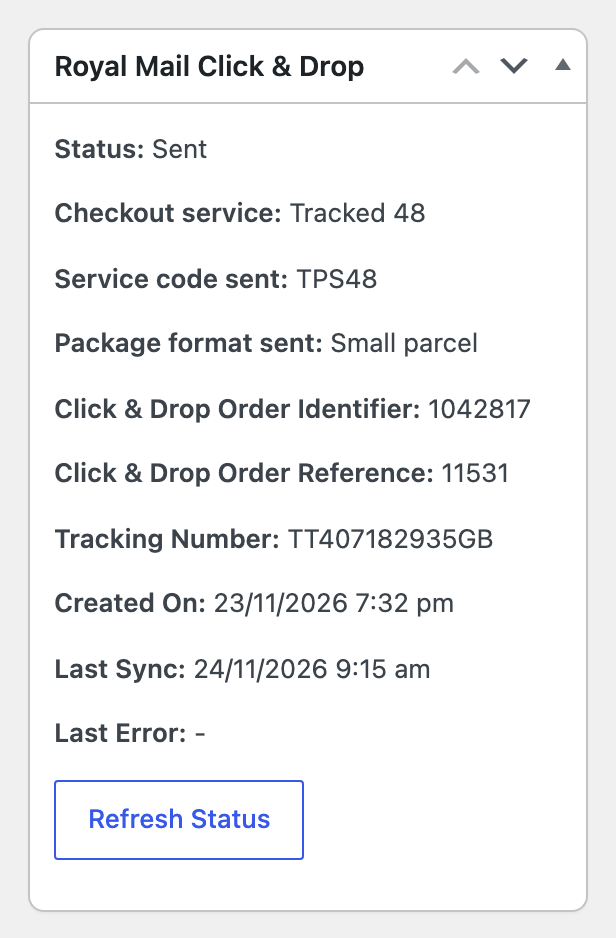
For setup steps, see how to connect Royal Mail Click & Drop to WooCommerce and the Royal Mail Click & Drop for WooCommerce page. If orders don’t appear, work through Click & Drop not syncing: what to check.
Frequently asked questions
Does the free Royal Mail plugin include Tracked 24 and Tracked 48?
No. Tracked 24, Tracked 48 and their signature versions are only in Royal Mail Pro, as is the choice between online and Post Office prices.
Do the prices update when Royal Mail changes them?
The prices are built into the plugin, so they change when you update it. We release an update when Royal Mail changes its prices. Version 5.3.0 added Royal Mail’s October 2026 prices, and the bundled Tracked 24 and 48 prices matched Royal Mail’s pages when we checked on 23 November 2026. Keep the plugin updated, especially after April.
Can customers choose a signature on delivery?
Yes. Enable Tracked 24 with Signature or Tracked 48 with Signature and they appear as separate options with their own price. Enter your account’s codes for both signature services in the Click & Drop Service codes table, and those orders reach Click & Drop with the signature service. Leave the Signature required setting off unless you want a signature on every order.
I have a Business Parcels account. Can I charge my contract prices?
The plugin quotes Royal Mail’s published online or Post Office prices, not account-specific contract prices. To get closer to what you pay, use the per-service price adjustment, as a fixed amount or a percentage, which can be negative. Royal Mail’s business Tracked page says an account needs at least 1,000 items a year per site.
Why isn’t Tracked 48 showing at checkout?
Check that the service is selected in the method settings, that the address is in the UK shipping zone and that Rates isn’t set to show only the cheapest option. Royal Mail’s Tracked prices stop at 20kg and the medium parcel size, so heavier or bigger orders won’t get a Tracked rate. Our list of 11 things to check when Royal Mail rates aren’t showing covers the rest, and the troubleshooting guide explains debug mode.
Is Tracked 48 the cheapest tracked option?
It’s the cheaper of Royal Mail’s two, but other carriers can be cheaper for some parcels. See Royal Mail vs Evri vs DPD vs Parcelforce. Royal Mail Pro can quote Evri and DPD too.
Offer Tracked 24 and 48 with Royal Mail Shipping Calculator Pro
WooCommerce Royal Mail Shipping Calculator Pro shows Tracked 24 and Tracked 48, with or without signature, at your checkout. It prices each order from its weight and size, using the online or Post Office price list you choose. Orders can then go straight to Click & Drop, where you print the label, and the tracking number comes back to the WooCommerce order.