If you sell from a UK WooCommerce store, shipping is one of the first things customers check at checkout. A flat rate that is too high loses sales. A rate that is too low eats into your margin. Royal Mail prices also change with weight, size, destination, and service type, so a simple table rarely stays accurate for long.
This guide walks you through WooCommerce Royal Mail shipping from start to finish: how rates should be calculated, how to set up WooCommerce Royal Mail Shipping Calculator Pro, how to configure domestic and international services, how Click and Drop fits into fulfilment, and how to fix the issues that most often stop rates from appearing.
Why WooCommerce Royal Mail shipping needs more than a flat rate
Royal Mail does not charge one price for every parcel. A 200g large letter, a 1.5kg small parcel, and a 8kg medium parcel are priced differently. Tracked 24 is not the same as Second Class. Special Delivery has compensation limits. International Tracked and Signed is not the same as International Economy.
WooCommerce cannot do that out of the box. You can create shipping zones and add a flat rate, but you would have to maintain dozens of rows by hand every time Royal Mail updates prices. That is why a dedicated Royal Mail calculator is the practical option for most UK stores.
A proper WooCommerce Royal Mail shipping setup should:
- Calculate rates from the cart weight, dimensions, and destination
- Offer the services you actually use, not every Royal Mail product
- Pack items into realistic boxes or letters
- Stay current when Royal Mail, Evri, DPD, or Parcelforce change prices
- Let you add handling fees, rename services, and adjust prices
- Connect orders to Royal Mail Click and Drop when you are ready to dispatch
What WooCommerce Royal Mail Shipping Calculator Pro does
WooCommerce Royal Mail Shipping Calculator Pro is a WooCommerce shipping method for UK stores. It calculates shipping cost and delivery options at cart and checkout, using current carrier prices rather than a static table.
The plugin covers more than Royal Mail alone:
- Royal Mail domestic and international parcels, letters, tracked services, Signed For, and Special Delivery
- Parcelforce Worldwide timed UK services and international options such as Global Priority and Euro Priority
- Evri domestic and international rates, including drop-off style services
- DPD UK domestic timed deliveries and international shipping
- Royal Mail Click and Drop so you can create shipment orders from WooCommerce instead of copying details by hand
- EU B2C customs duty recovery for stores that need a checkout fee on qualifying EU orders
Rates are based on weight, dimensions, and destination. You can show every matching service or only the cheapest one. The plugin also supports WooCommerce shipping zones, WooCommerce Blocks checkout, and High-Performance Order Storage (HPOS).
Before you start: product data and store settings
Accurate Royal Mail rates depend on accurate product data. Spend a few minutes on this before you add the shipping method.
- Set your store location to the United Kingdom under WooCommerce > Settings > General.
- Set weight and dimension units under WooCommerce > Settings > Products. Kilograms and centimetres are the simplest match for Royal Mail limits.
- Enter weight on every physical product. Length, width, and height matter as well, especially for letters, small parcels, and medium parcels.
- Skip virtual and downloadable products. The plugin already ignores them when it calculates postage.
- Decide how you pack. If you ship in known box sizes, you will add those boxes later so the packing algorithm can choose a realistic package.
If a product has no weight or size, the plugin can fall back to a default package weight and default dimensions. Defaults keep checkout working, but they should be a safety net, not your main data source.
How to install the plugin
You can use the free calculator if you only need basic Royal Mail rates. For Pro features such as handling fees, custom titles, custom boxes, Evri, DPD, Parcelforce, and Click and Drop, install the Pro plugin and remove the free version first so the two do not conflict.
Upload the Pro plugin
- Download the zip file from your WPRuby account or from the purchase receipt email.
- Go to Plugins > Add New > Upload Plugin.
- If the free version is active, deactivate and delete it.
- Upload the Pro zip, install it, then activate it.
Activate the license when you want updates
You do not need a license to calculate rates on day one. You do need a license to receive plugin updates, price updates, and support.
- Add Royal Mail Pro to a shipping zone (the next section).
- Open the method settings and click Add/Update Your License.
- Paste the license key from your WPRuby purchase history or receipt email.
- Save changes, then return to the shipping settings.
Add Royal Mail to a WooCommerce shipping zone
WooCommerce only shows a live calculator when the method belongs to a matching zone.
- Go to WooCommerce > Settings > Shipping > Shipping zones.
- Edit your UK zone, or create one that covers Great Britain and Northern Ireland in the way you sell.
- Click Add shipping method and choose Royal Mail Pro.
- Click the method name to open its settings.
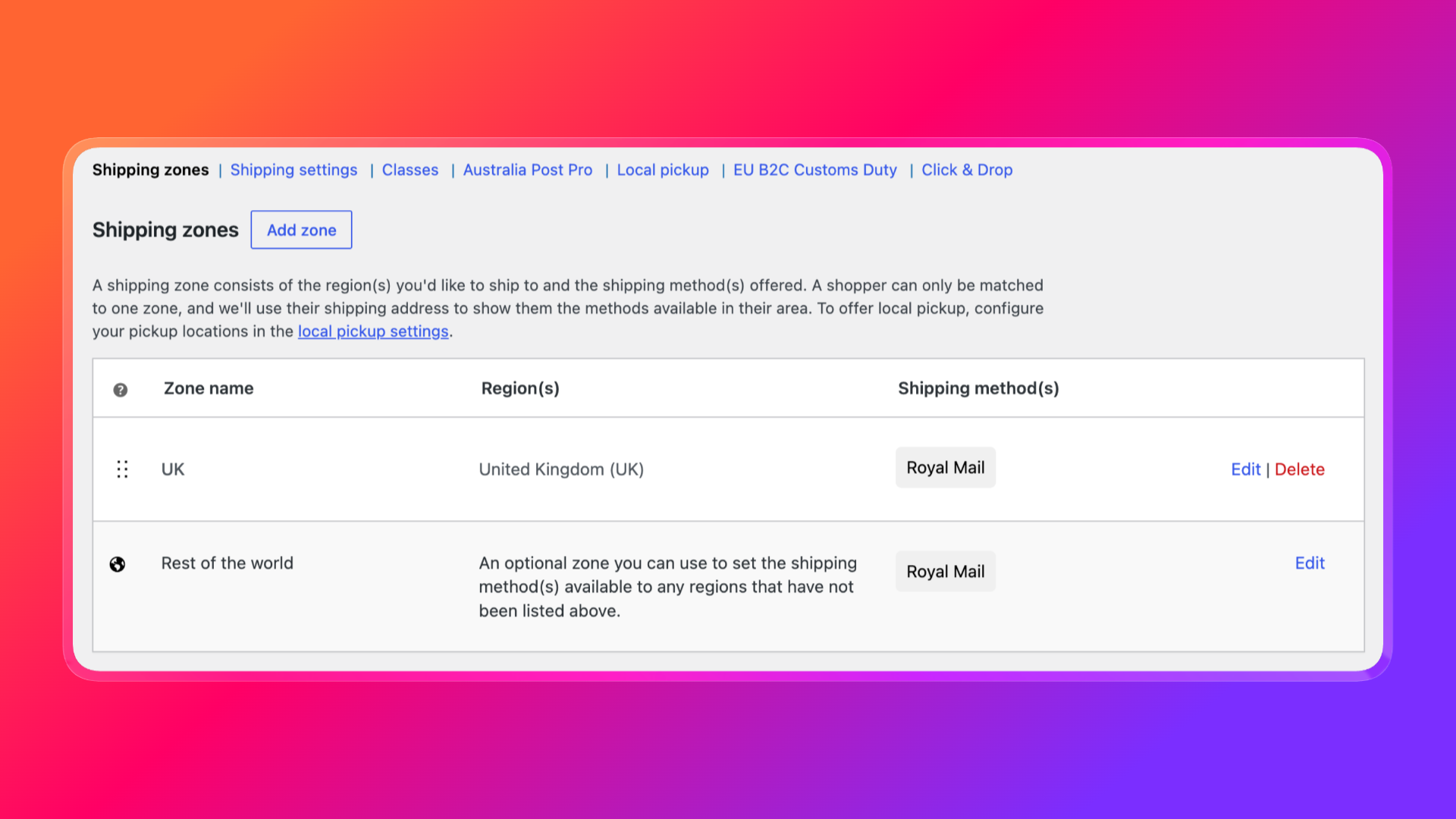
Create extra zones if you need them. A common layout is:
- United Kingdom for Royal Mail, Evri, DPD, and Parcelforce domestic services
- Europe for international tracked, signed, and economy options
- Rest of world for worldwide Royal Mail and Parcelforce Global services
You can add Evri, DPD UK, and Parcelforce as their own shipping methods in the same zones if you want customers to compare carriers at checkout.
Configure the Royal Mail shipping method
This is the core of WooCommerce Royal Mail shipping. Open the Royal Mail Pro method and work through the settings below.
Method title
This is the carrier name customers see. Royal Mail is the default and is usually the clearest choice. Custom titles for individual services are configured separately.
Debug mode
Turn this on while you test. Debug mode limits the method to administrators and prints calculation details on the cart and checkout pages. Turn it off before you go live so customers do not see packing data.
Handling fees
Use this when postage is not the whole cost of fulfilling an order. Examples:
1.50adds £1.50 to every matching rate5%adds five percent of the postage-2knocks £2 off the rate, which is useful for a promotional discount-10%reduces the postage by ten percent
You can also adjust individual services later with custom rates if only Tracked 24 or Special Delivery needs a markup.
Default package weight and size
These values are used only when a product has no weight or dimensions. Set them to a realistic average for your catalogue, not an optimistic minimum. If your typical fallback item is a 300g product in a 20 x 15 x 5 cm mailer, enter that, not a 10g letter.
First / Second Class parcel size
Royal Mail prices First Class and Second Class differently for small and medium parcels.
- Choose Small Parcel (up to 2kg) if most of your UK orders fit small parcel limits. After 2kg, the plugin uses medium parcel pricing automatically.
- Choose Medium Parcel if your packing is usually larger than a small parcel.
If checkout shows no First or Second Class rates, this setting is one of the first things to check.
Domestic parcel options
Enable only the UK services you actually offer. A typical store does not need every option. Common combinations include:
- Standard First Class and Second Class for low-value, untracked orders
- Tracked 24 and Tracked 48 for most paid orders
- Tracked 24/48 with Signature when you need a signature
- Signed For if you still use that service
- Special Delivery by 9am or 1pm, including Saturday options, for high-value or urgent orders
Fewer, clearer choices almost always convert better than a long list of similar prices.
International parcel options
Royal Mail international services include Standard, Economy, Tracked, Signed, Tracked and Signed, Tracked and Signed Heavier, and Printed Papers. Enable the ones that match how you currently send abroad.
Printed Papers is a special case. To use those rates, create a WooCommerce shipping class named printed-papers and assign it to the relevant products. The plugin then prices those items as printed papers instead of a standard parcel.
Parcelforce options
Parcelforce sits alongside Royal Mail for heavier or timed deliveries. Domestic examples include Express 9, Express 10, Express AM, Express 24, Express 48, Express 48 Large, and Saturday variants. International examples include Global Economy, Global Value, Global Priority, Global Express, Euro Priority Business, and Euro Priority Home.
Use Parcelforce when Royal Mail weight or size limits are not enough, or when a customer needs a timed delivery that Royal Mail does not cover.
Domestic and international letters
Turn letter options on if you sell items that fit Royal Mail letter or large letter limits, such as prints, cards, jewellery in envelopes, or documents. The plugin checks both size and weight against Royal Mail letter standards, so product dimensions must be correct.
If you sell a mix of letters and parcels, keep both groups enabled. The packing logic will choose a letter rate when the items fit, and a parcel rate when they do not.
Show all rates or only the cheapest
- Show All The Options is better when customers care about speed versus price, for example Tracked 48 versus Special Delivery.
- Show only the cheapest option is better when you want a simple checkout and you are happy to fulfil whatever the cheapest valid service is.
Pricing source: Post Office or Online
Royal Mail publishes different prices depending on whether you pay at a Post Office counter or buy postage online. In the method settings, choose:
- Post Office if your prices should match counter rates
- Online if you buy labels through Click and Drop or another online account
This is one of the most important settings in the plugin. If your checkout rates do not match the labels you buy, check this first.
Remove tax
Royal Mail prices can include VAT. If you need the shipping amount without that 20% tax component, enable Remove Tax. Only use this if it matches how you account for shipping in WooCommerce tax settings. Incorrect tax handling here will show the wrong total at checkout.
Consider insurance and the insurance threshold
Royal Mail services have compensation limits. If Consider Insurance is enabled, the plugin treats the package value as a compensation amount and hides services that cannot cover it.
Insurance Threshold (£) delays that filter until the goods value exceeds the amount you enter. Set it to 0 if insurance should always be considered. Use a threshold if you only want Special Delivery or similar services to appear on higher-value carts.
You can also override insurance or declared value at product or variation level when a specific item needs a different compensation figure.
Custom titles and price adjustments
Custom titles let you rename services on the cart and checkout pages. That is useful when Royal Mail’s official names are too long, or when you want to add a delivery promise such as “Royal Mail Tracked 24 (next working day)”.
Custom rates let you add or subtract a fixed amount or a percentage per service. Use this for:
- Packaging costs on Tracked services only
- A small discount on Second Class
- Rounding prices to a cleaner figure
Custom boxes and packing
The plugin uses a box packing algorithm to decide whether an order fits a letter, small parcel, medium parcel, or one of your own boxes. Add the boxes you actually keep in the warehouse: mailers, book wraps, and the cardboard sizes you buy.
More accurate boxes mean more accurate prices. If you skip this and rely on product dimensions alone, a multi-item cart can be priced as if every item travels in its own unrealistic shape.
You can also mark a product to ship in its own package. Use that for fragile, liquid, or already-boxed items that should never be combined with the rest of the cart.
Set up Royal Mail Click and Drop
Rate calculation tells the customer what shipping will cost. Click and Drop is the fulfilment side: creating the Royal Mail order, sending parcel and customs data, and managing the shipment from WooCommerce.
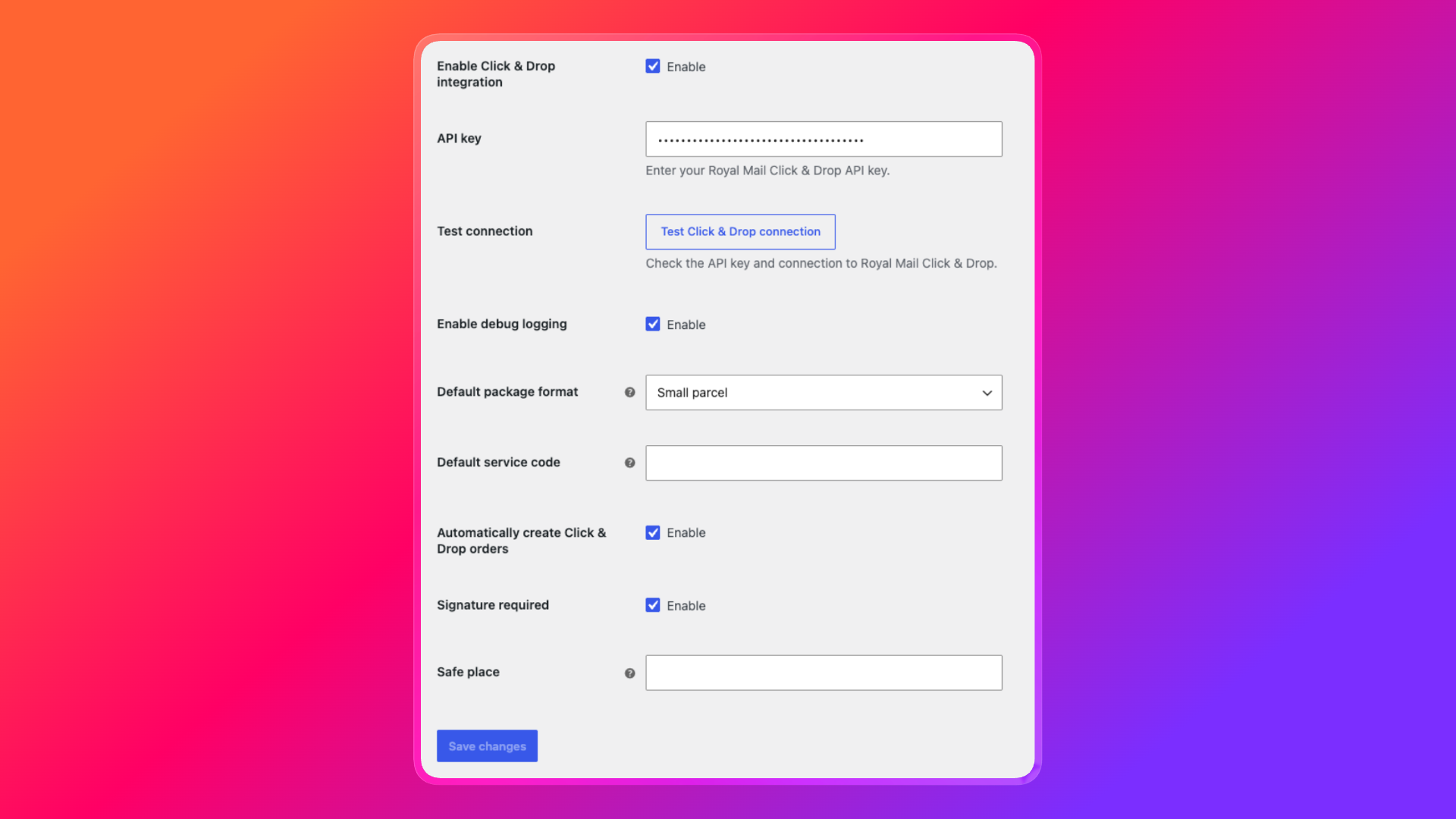
Click and Drop settings live under WooCommerce > Settings > Shipping > Click & Drop.
- Enable the Click and Drop integration.
- Enter your Royal Mail Click and Drop API key.
- Click Test connection before you export a live order.
- Choose a default package format, such as small parcel.
- Optionally add a default Royal Mail service code, a safe place instruction, and signature required.
- Decide whether orders should be created automatically after checkout. Automatic creation is on by default and will not create a duplicate Click and Drop order for the same WooCommerce order.
- Enable debug logging if you need sanitized API activity in the WooCommerce logs.
From the order screen you can create a Click and Drop order, refresh its status, and delete it if you need to correct or recreate the shipment. The export can include customer details, line items, package dimensions, variation metadata, order tags, and customs-related fields such as HS codes and country of origin.
For international orders, add customs data on the product. The plugin looks for common meta keys, including HS code and origin country, so Click and Drop receives a complete payload instead of a blank customs form.
Add Evri, DPD, and Parcelforce if you need more carriers
Royal Mail is enough for many UK catalogues. Add extra carriers when:
- Some orders are cheaper with Evri drop-off
- You need DPD next-day or timed delivery
- Parcelforce covers a weight or destination that Royal Mail does not
Each carrier has its own shipping method, handling fee, and service list. Put them in the same shipping zones as Royal Mail if you want customers to compare, or in separate zones if you only offer DPD to certain countries.
Do not enable every service on every carrier at once. Start with the two or three options you can fulfil this week, then expand.
EU B2C customs duty recovery
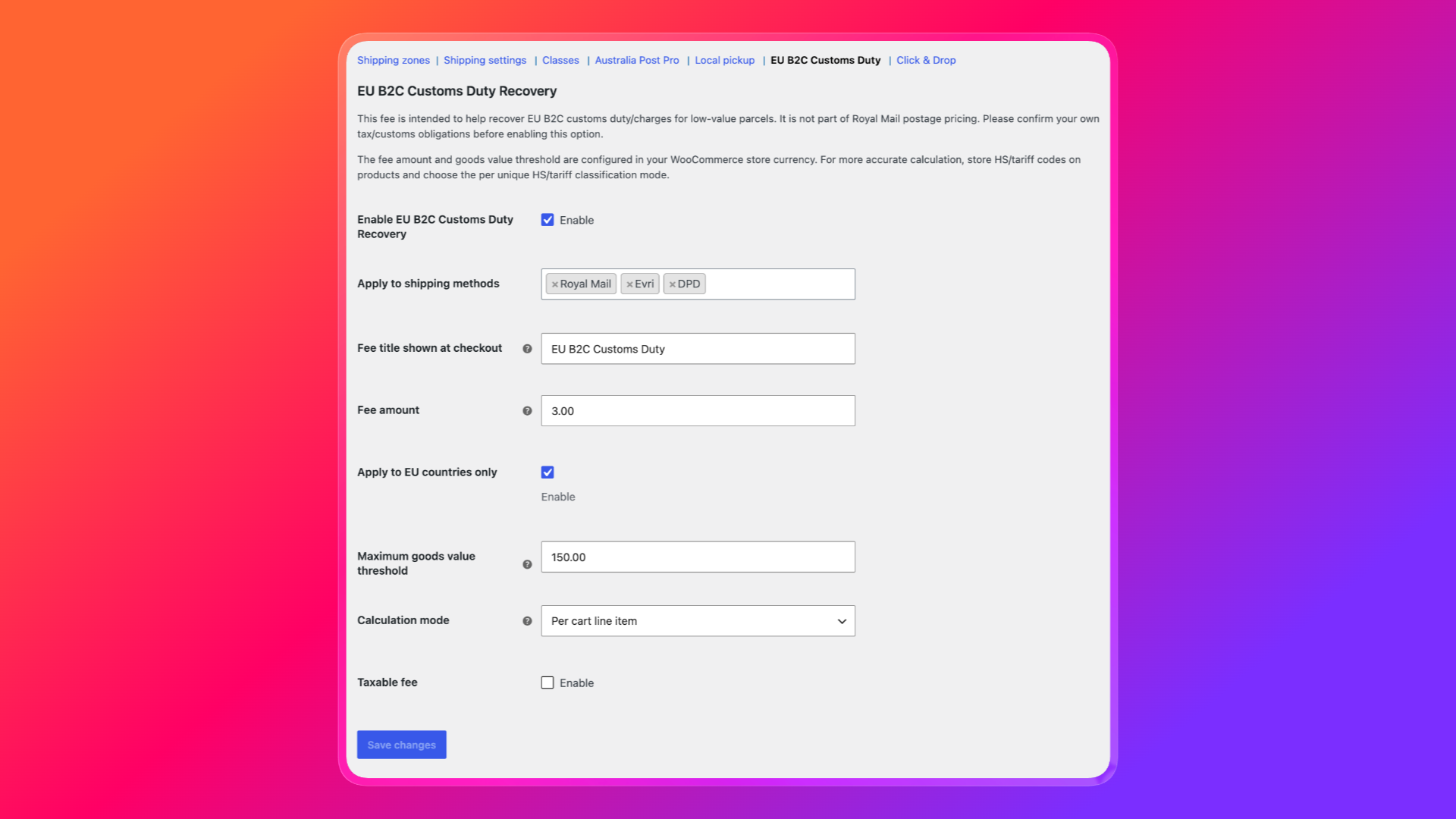
If you ship B2C orders into the EU, you may need to recover a customs duty amount at checkout. The plugin includes an EU B2C Customs Duty section under WooCommerce shipping settings.
You can:
- Enable or disable the fee
- Choose which shipping methods trigger it
- Set the fee title and amount in your store currency
- Limit it to EU destinations (the UK is always excluded)
- Apply it only when the goods value is at or below your threshold, typically the equivalent of €150
- Calculate per parcel, per line item, or per unique HS/tariff code
- Mark the fee as taxable or not
Enter the fee in your store currency. WooCommerce does not convert live euro amounts for you.
Test checkout before you go live
Use debug mode and place a few test orders as an administrator.
- A light UK order that should rate as a large letter or small parcel
- A heavier UK order that should move to a medium parcel or Parcelforce
- A tracked service versus an untracked service, to confirm customers see the choice you intended
- An international order with a full address and postcode
- A printed papers product, if you use that shipping class
- A Click and Drop export on a processing order, then a connection test if the export fails
Confirm that the checkout price is close to the postage you actually buy. If Online rates match your Click and Drop account, keep Pricing Source set to Online.
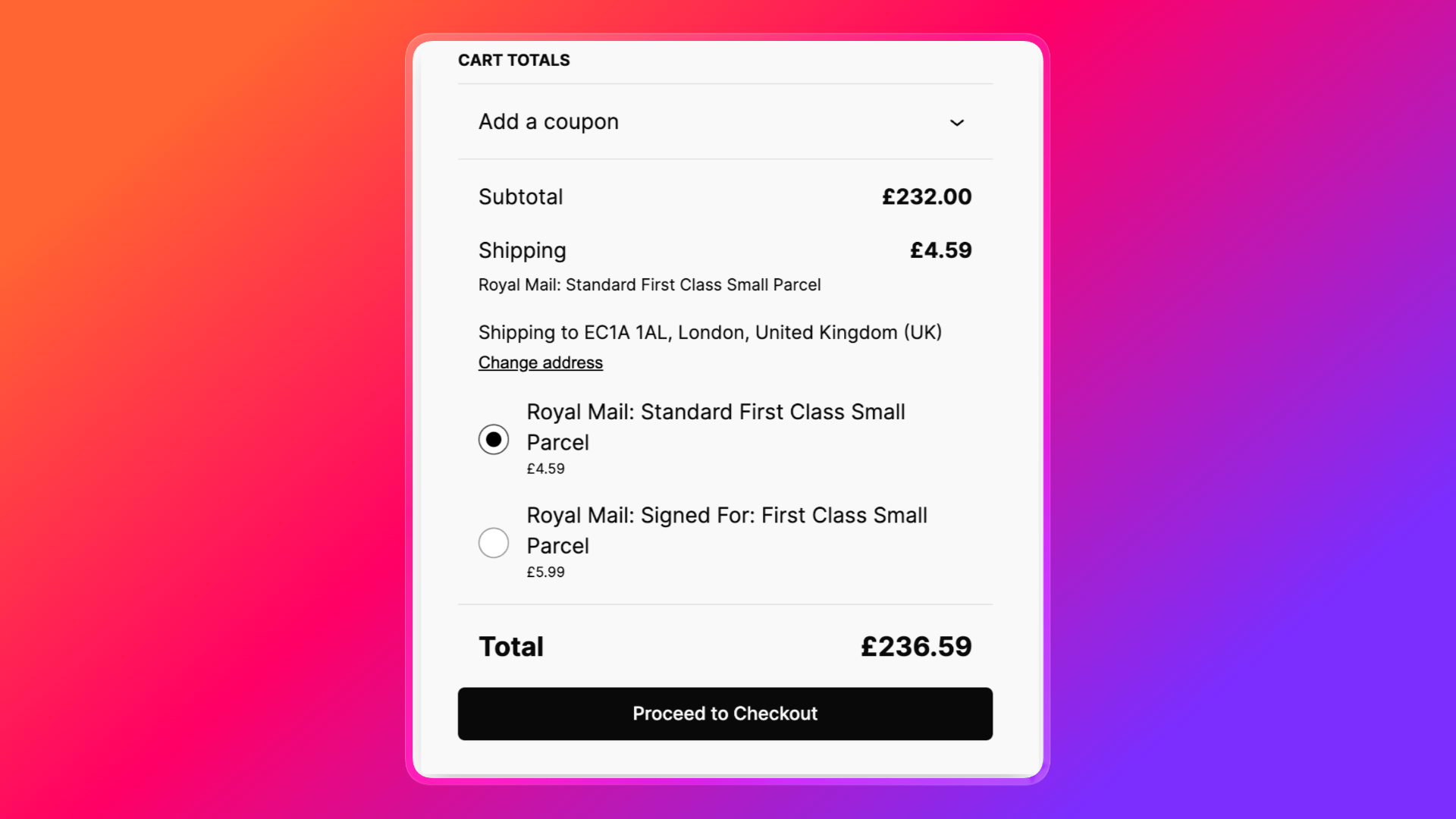
Troubleshooting: no Royal Mail rates at checkout
Work through these checks in order.
- Update the plugin to the latest version so you have current Royal Mail prices.
- Confirm the method is enabled and assigned to a zone that matches the customer address.
- Fill in the full checkout address, especially the postcode. Incomplete addresses often return no rates.
- Check First / Second Class parcel size. Medium parcel may be required for the items in the cart.
- Confirm product weights and dimensions are present, or that defaults are set.
- If you recently changed settings and rates still look cached, go to WooCommerce > Status > Tools and clear transients.
- Turn on debug mode and read the packing output on the cart page. It usually shows whether the cart was treated as a letter, small parcel, or too large for the enabled services.
- For Click and Drop issues, use Test connection, then enable debug logging and check the WooCommerce logs.
Best practices for a clean Royal Mail checkout
- Keep product weights and dimensions complete. The calculator cannot guess well.
- Offer a short list of services: one economy option, one tracked option, and one premium option is enough for most stores.
- Match Pricing Source to how you buy postage.
- Add the boxes you really use.
- Use handling fees for packing time, not for hiding a bad product weight.
- Turn insurance consideration on if you sell items above standard compensation limits.
- Use debug mode in staging, not on a live checkout.
- Keep the license active so Royal Mail price updates arrive with plugin updates.
Frequently asked questions
Does this work for international shipping?
Yes. Royal Mail, Evri, and DPD all include international services, and Parcelforce adds further worldwide and Europe options.
Can I ship letters as well as parcels?
Yes. Enable domestic and international letter options, then make sure product dimensions fit Royal Mail letter or large letter limits.
What if a product has no weight?
Set a default package weight and default size in the method settings. Then go back and add real weights when you can.
Can I show only the cheapest Royal Mail rate?
Yes. Set Rates to Show only the cheapest option.
Do I need Click and Drop to calculate shipping?
No. Rate calculation works on its own. Click and Drop is for creating and managing Royal Mail shipment orders from WooCommerce.
Is there a free version?
Yes. The free calculator covers basic Royal Mail rates. Pro adds handling fees, custom titles, custom boxes, extra carriers, Click and Drop, and related fulfilment tools.
Get started
If you want Royal Mail, Evri, DPD, and Parcelforce rates that follow real carrier prices, install WooCommerce Royal Mail Shipping Calculator Pro, add it to your UK shipping zone, and test a handful of carts before you take it live. A correct setup means customers see a fair price, you collect enough to cover postage, and dispatch can move from the WooCommerce order straight into Click and Drop.