WPRuby vs PluginHive: Which Australia Post Plugin Is Better for WooCommerce?
Both plugins support advanced Australia Post workflows in WooCommerce. They differ in account coverage, fulfilment automation, and how far the product extends beyond MyPost Business.
You want flexibility between Australia Post account types
Australia Post is a core part of your WooCommerce operation
You want rates, labels, tracking and bulk fulfilment in one Australia Post product family
You prefer a dedicated Australia Post Centre workflow
Choose PluginHive if...
You are specifically committed to MyPost Business
You want labels generated automatically from WooCommerce order events
PluginHive’s WooCommerce Orders bulk-action workflow fits your team
You already use PluginHive products
You do not need eParcel
Neither product is best for every store.
WPRuby vs PluginHive at a glance
This table uses published product and documentation details. Where a capability needs Labels Pro or is only listed on a product page, that is stated instead of a simple yes.
Swipe sideways to compare all columns.
WPRuby compared with PluginHive for WooCommerce Australia Post shipping
Capability
WPRuby
PluginHive
Starting price
Pro from $79.00/year
$99.00/year, single site
Free version
Yes — WordPress.org plugin for Regular and Express rates
Not published for this WooCommerce product
Standard Australia Post rates
Pro and Labels Pro, without a business account
Live rates from a connected MyPost Business account
MyPost Business
Labels Pro, connected in WooCommerce
Included — this product is built around MyPost Business
eParcel
Labels Pro
Not offered in this WooCommerce product
Contract / business rates
Labels Pro, optional at checkout
Negotiated MyPost rates from the connected account
Domestic labels
Labels Pro
Included
International labels
Labels Pro
Included, with commercial invoice option
Bulk labels
Labels Pro
Included, from WooCommerce Orders bulk actions
Automatic label generation
Manual or bulk queue; not automatic on order status
Can generate packages and labels after an order event
Multiple packages per order
Labels Pro
Included; add or remove packages on the order
Shipment tracking
Pro: manual number. Labels Pro: generated from shipments
Tracking ID added when the shipment is created
Pickup requests
Labels Pro, MyPost, from Labels Orders
Listed on the product page; not documented in the WooCommerce setup guide
WPRuby Labels Pro supports both MyPost Business and eParcel. PluginHive’s WooCommerce product compared here is built around MyPost Business.
WPRuby
MyPost Business
+
eParcel
PluginHive
MyPost Business
MyPost Business support
Both products can connect a MyPost Business account and run rates, labels and tracking from WooCommerce. The connection and day-to-day screens are not the same.
WPRuby
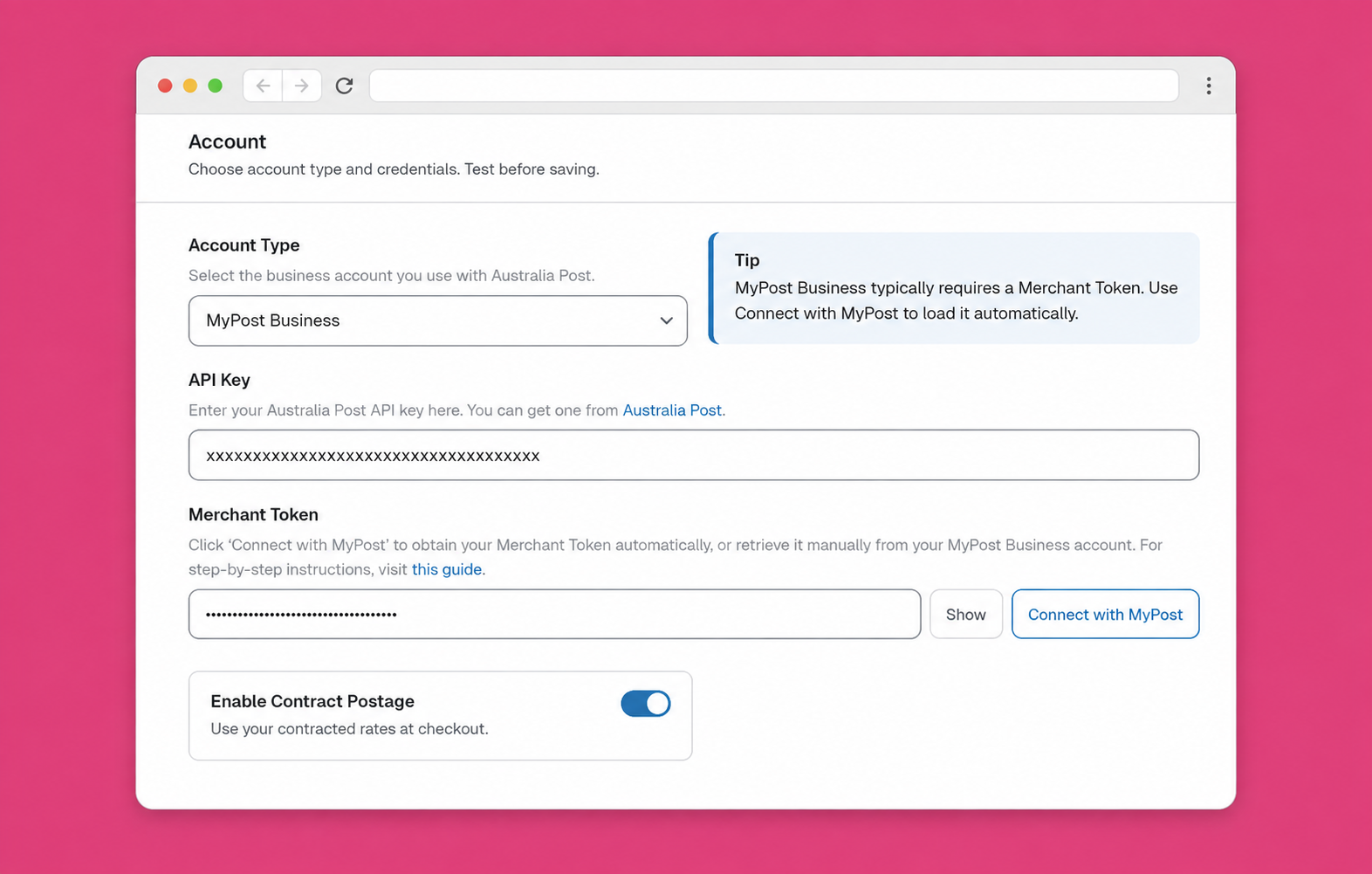
Connect in Australia Post Centre with OAuth or a merchant token.
Optional MyPost business rates at checkout with Labels Pro.
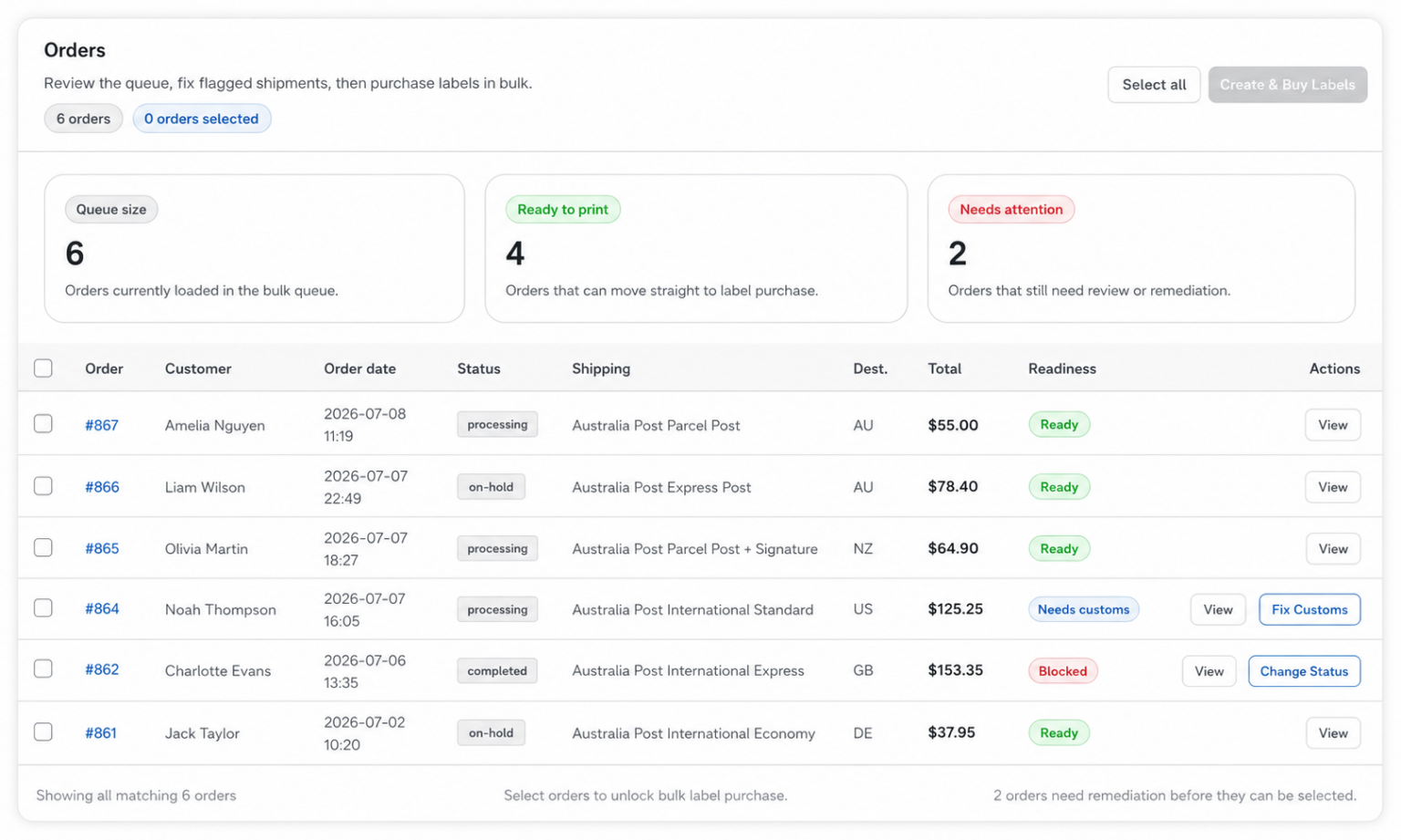
Create shipments from the order or Bulk Fulfillment.
Pay and download labels in Labels Orders.
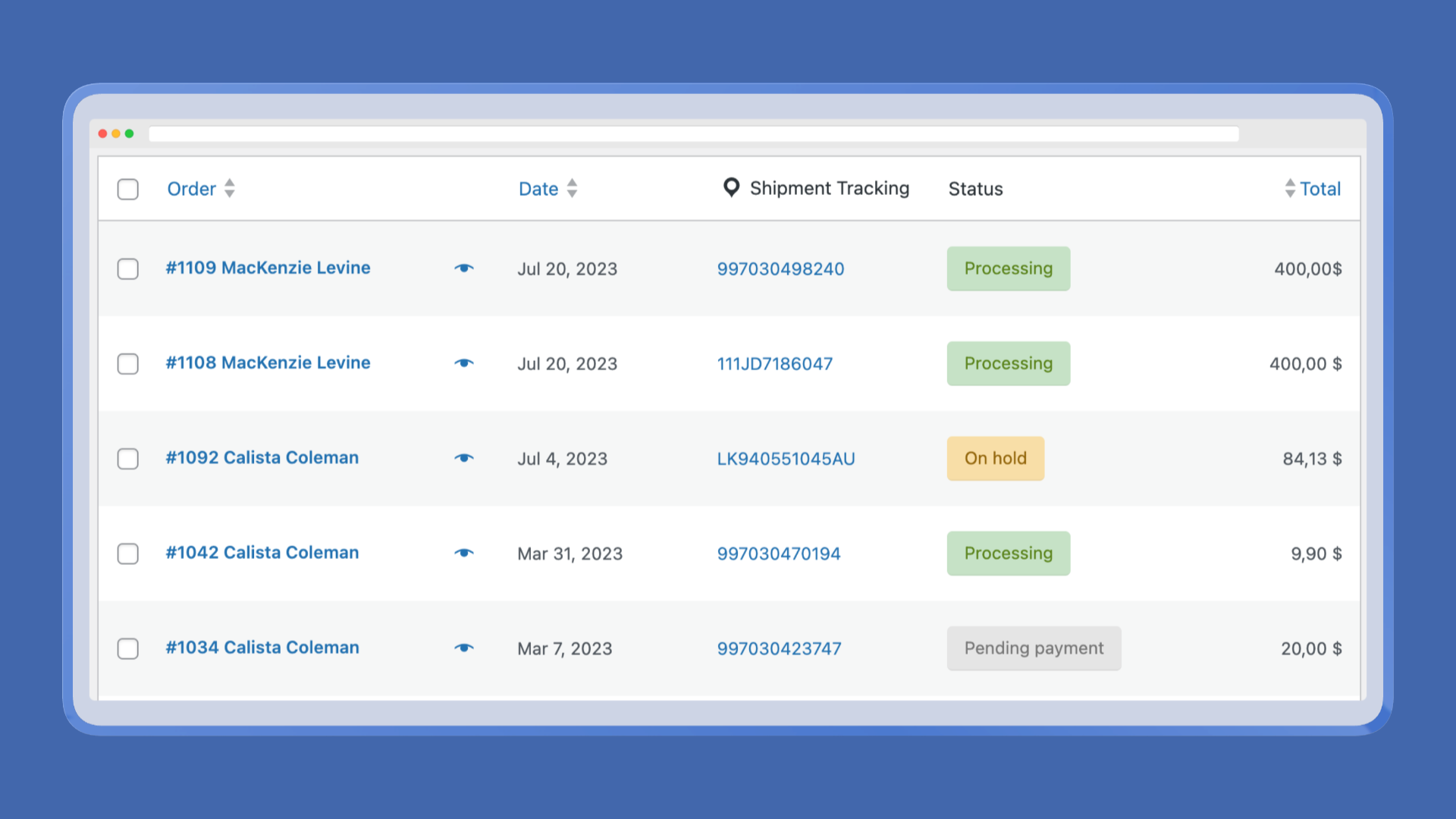
Tracking is saved on the WooCommerce order.
Supported MyPost pickups can be requested from Labels Orders.
PluginHive
Connect MyPost Business from the plugin registration screen.
Live MyPost account rates at cart and checkout.
Generate packages, then Create Shipment on the order.
Print labels from the order or WooCommerce bulk actions.
Tracking ID is added when the shipment is created.
Optional automatic packages and labels after an order event.
The published WooCommerce product is a single-site yearly subscription. Rates, labels and tracking are in that plan.
Single site
$99.00/year
Includes one year of updates and support. An active subscription is required to use the features.
PluginHive’s setup guide states the plugin stops functioning without an active licence.
14-day trial and 30-day money-back guarantee are published. Larger site licences are not listed for this product.
Prices checked on 8 September 2026.
Compare the plan that includes the workflow you need, not just the lowest advertised price.
Australia Post labels
Both can print MyPost Business labels from WooCommerce. The useful difference is where the work happens, and whether eParcel is included.
Swipe sideways to compare all columns.
Australia Post label workflow comparison for WPRuby and PluginHive
Label capability
WPRuby
PluginHive
Individual labels
Labels Pro, from the order or Australia Post Centre
From the WooCommerce order after Create Shipment
Bulk labels
Labels Pro Bulk Fulfillment, combined PDF
WooCommerce Orders bulk actions
Multiple packages
More than one shipment per order
Generate, add or remove packages, then print each label
International labels
Labels Pro, with customs fields on the shipment
Included; commercial invoice can print with the label
Label formats
A4 1–4 labels per page, or thermal A6
A4-1pp, A4-4pp, thermal A6 1pp
Reprinting
From Labels Orders / past label orders
Stored in WooCommerce and can be reprinted
Automation
Manual or bulk queue
Optional automatic packages and labels after an order event
Workflow location
Australia Post Centre and the order screen
WooCommerce order and Orders list
WPRuby MyPost labels finish through Labels Orders after shipments are created. PluginHive creates the shipment on the WooCommerce order, then print is available there or from bulk actions.
PluginHive can also generate packages and labels automatically after an order is received. WPRuby does not create labels from an order-status trigger.
WPRuby Labels Orders / bulk printing in Australia Post Centre.
This is one of the clearest PluginHive advantages in the current published feature set.
WPRuby
Labels are created manually or from the bulk queue.
No automatic label generation on order status.
Order status after print is a separate bulk action.
Tracking is written back when Labels Pro creates the shipment.
No extra add-on is required for bulk labels.
PluginHive
Can generate packages automatically after the order is received.
Can generate shipping labels automatically after the order is received.
Triggers include payment confirmed, or as soon as the customer places the order.
Can change WooCommerce order status after label creation.
These options are in the Labels and Advanced settings of this plugin, not a separate add-on.
Packing and multiple parcels
Swipe sideways to compare all columns.
Packing comparison for WPRuby and PluginHive
Packing
WPRuby
PluginHive
Pack individually
Ship designated products individually
Each cart item packed separately
Weight-based packing
Weight-influenced packing setting
Pack to a maximum package weight
Boxes
Custom boxes; MyPost flat-rate boxes with Labels Pro
MyPost satchels and boxes, plus custom boxes
Multiple packages
Labels Pro can split an order into shipments
Add or remove packages before Create Shipment
Parcel dimensions
Product dimensions, defaults, and packing rules
Product dimensions, minimums, and package edits on the order
Both can split an order across packages. PluginHive’s weight-based max-weight packing is explicit. WPRuby’s packing also feeds public satchel and letter quotes in Pro.
Tracking and pickup workflow
Tracking
WPRuby Pro can store a tracking number entered by the merchant.
WPRuby Labels Pro saves consignment details from created shipments onto the order, emails, and a customer Track link.
PluginHive adds the tracking ID when Create Shipment runs, and can include it in the order completion email.
PluginHive can hide tracking in My Account, customise the tracking message, and send customers to Australia Post’s tracking page.
Pickups
WPRuby Labels Pro can request supported MyPost pickups from Labels Orders.
Creating a WPRuby label does not book a pickup automatically.
PluginHive’s product page lists pickup requests from WooCommerce.
A pickup workflow is not documented in PluginHive’s current WooCommerce setup guide.
Generated tracking stays with the WooCommerce order in WPRuby.
International shipping
Swipe sideways to compare all columns.
International Australia Post shipping comparison for WPRuby and PluginHive
International
WPRuby
PluginHive
International rates
Eligible parcel and letter groups in Pro and Labels Pro
The daily difference is the screen your team uses to ship, not a vague claim that one plugin is easier.
WPRuby
WooCommerce
↓
Australia Post Centre
↓
Rates / shipments / labels / tracking
↓
Australia Post
PluginHive
WooCommerce
↓
Order screen or Orders bulk actions
↓
Generate packages → Create Shipment → Print
↓
Australia Post MyPost Business
WPRuby adds a dedicated Australia Post hub for settings, bulk fulfilment and Labels Orders. PluginHive keeps shipping on WooCommerce’s native order list, which some teams already know.
Choose WPRuby if...
You need MyPost Business and eParcel support
You expect your Australia Post account type to change as you grow
You want an Australia Post-focused WooCommerce workflow
You need Labels Pro bulk fulfilment and a combined label PDF
You want public checkout rates now, then business-account labels later, in the same product family
A lifetime licence, or a plugin that can keep running after the licence year, matters to you
PluginHive is a serious MyPost Business option, not a fallback. Several of its strengths are features WPRuby does not currently match.
MyPost Business is your only Australia Post account requirement
You prefer PluginHive’s order-screen and bulk-action fulfilment workflow
Automatic package and label creation from order events is central to how you ship
You want the order status to change automatically after a label is created
You already use PluginHive products, or value PluginHive’s published MyPost eCommerce partnership
You do not need eParcel, public PAC rates, or a lifetime licence
WPRuby vs PluginHive: which should you choose?
For a WooCommerce store that wants flexibility between MyPost Business and eParcel, WPRuby is our preferred option because Labels Pro covers both account types, includes bulk labels in Australia Post Centre, and keeps rates and fulfilment in one Australia Post product family.
PluginHive remains a strong choice for merchants specifically focused on MyPost Business, particularly where automatic label creation, order-status automation, or a native WooCommerce Orders bulk-action workflow matters more than eParcel.
The right choice depends mainly on your Australia Post account type and fulfilment workflow.
Neither plugin is best for every store. WPRuby is usually the stronger fit when you need MyPost Business and eParcel in one Australia Post product family. PluginHive is often the stronger fit when you are committed to MyPost Business and want labels created automatically from WooCommerce order events.
Yes. Australia Post Labels Pro can connect a MyPost Business account in Australia Post Centre. That connection is used for supported rates, shipments, labels, tracking, and MyPost pickups. Live public checkout rates in Pro do not require the MyPost connection.
Yes. The PluginHive WooCommerce product compared here is built around MyPost Business. It connects a MyPost Business account, shows account rates at checkout, and creates MyPost labels and tracking from WooCommerce.
Not in the WooCommerce product compared on this page. That PluginHive product is a MyPost Business integration. WPRuby Labels Pro supports eParcel as well as MyPost Business. PluginHive’s Shopify Australia Post app is a different product and is not compared here.
Both can print MyPost Business labels from WooCommerce. WPRuby Labels Pro keeps label work in Australia Post Centre, including a combined bulk PDF and eParcel labels. PluginHive prints from the WooCommerce order and Orders bulk actions, and can generate labels automatically after an order event.
Yes. WPRuby includes bulk fulfilment in Labels Pro, with a combined print-ready PDF from Australia Post Centre. PluginHive generates and prints MyPost labels from WooCommerce Orders bulk actions. Neither bulk workflow requires a separate add-on in the products compared here.
Both do. WPRuby Labels Pro can create more than one shipment for an order. PluginHive can generate multiple packages, add or remove packages on the order, and print a label for each package.
WPRuby Labels Pro can request supported MyPost Business pickups from Labels Orders. PluginHive’s product page lists pickup requests from WooCommerce. A pickup workflow is not documented in PluginHive’s current WooCommerce setup guide, so treat that claim as product-page only unless you confirm it in the plugin.
Both can quote and label MyPost international parcels. WPRuby covers a wider set of international rate groups and customs fields in Labels Pro. PluginHive’s documented international services are Standard and Express parcels, and it can print a commercial invoice with the label.
Yes. Australia Post Pro calculates public checkout rates. MyPost Business connection, shipments, labels, bulk fulfilment, generated tracking, and pickups require Labels Pro.
If MyPost Business is your only Australia Post account and automatic label creation from order events matters, PluginHive may fit better. If you still want eParcel as a later option, or prefer WPRuby’s Australia Post Centre bulk workflow, WPRuby remains a strong MyPost choice.
Australia Post rates, labels and MyPost Business
Australia Post WooCommerce Extension PRO
Compare Pro and Labels Pro, review pricing, and choose the licence that matches your store.
30-day money-back guarantee · 1 year of updates and support
30-Day Money-Back Guarantee on All Plugins
Try our WordPress plugins risk-free! We’re confident you’ll love the functionality and performance our plugins bring to your site. If you’re not completely satisfied, just reach out to us within 30 days, and we’ll provide a full refund—no questions asked. Enjoy the peace of mind knowing you have nothing to lose!