PO boxes and parcel lockers are convenient for customers, but they are not accepted by every courier or shipping service.
If your store accepts one of these addresses for an incompatible delivery method, the problem often appears only after the order has been paid for. Your fulfilment team then has to stop processing the order, contact the customer, request a street address, and wait for a response.
WooCommerce does not block PO boxes or parcel lockers by default. However, you can prevent these orders by adding local address rules with Address Guard Pro.
Why PO boxes and parcel lockers cause fulfilment problems
Many couriers require delivery to a physical street address. Some services can deliver to a PO box or parcel locker, while others cannot.
For example, a store may offer:
- Postal services that accept PO boxes
- Express courier services that require a street address
- Local delivery that cannot deliver to parcel lockers
- Large or freight deliveries that require direct access to a property
- Signature-required services that are incompatible with certain collection addresses
When WooCommerce accepts an unsupported address, the customer can complete checkout normally. The incompatibility may not become apparent until someone tries to create the shipping label.
This creates several operational problems:
- The order cannot be dispatched immediately
- Your team must manually contact the customer
- The fulfilment queue is interrupted
- Delivery estimates become inaccurate
- The customer may not respond quickly
- Express orders can miss their dispatch deadline
- Address changes may introduce additional mistakes
One invalid address may take only a few minutes to resolve. Across dozens or hundreds of orders, however, those exceptions become a significant operational cost.
Why manual order review is not enough
Reviewing addresses after checkout can identify the problem, but it does not prevent it.
By that point:
- The customer has already paid.
- The order has entered your fulfilment process.
- A shipping service may already have been selected.
- Your team must request a replacement address.
- The order remains on hold until the customer responds.
The most effective place to resolve the problem is during checkout, while the customer is still available and can immediately correct the address.
Instead of accepting the order and fixing it later, the store should explain why the address cannot be used and ask for an eligible street address.
How address rules solve the problem
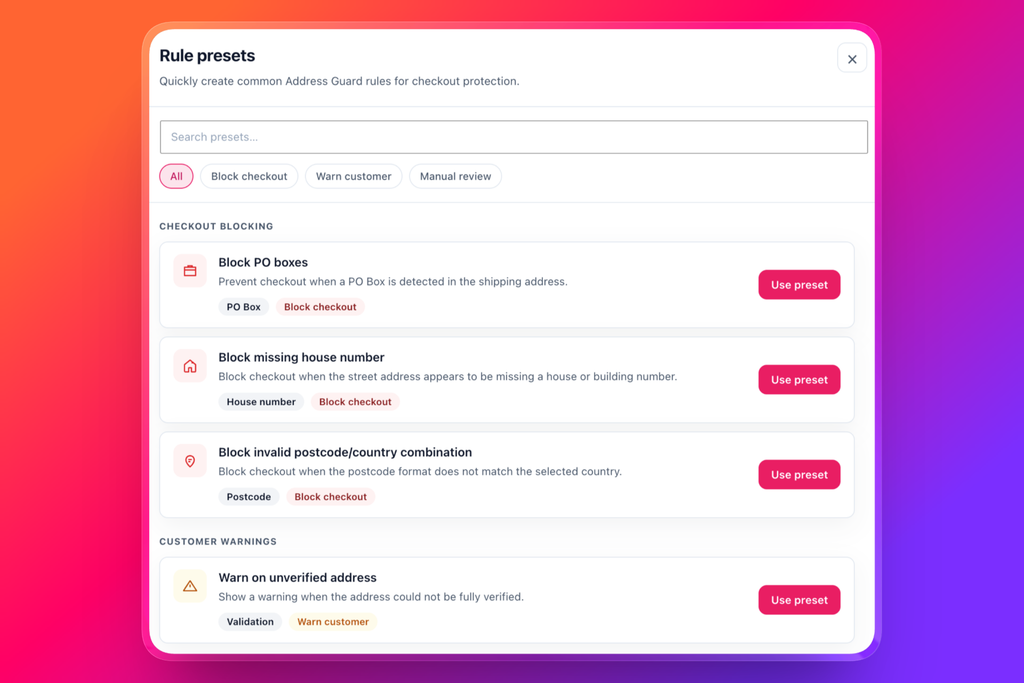
Address Guard Pro lets you create local checkout rules that inspect the address entered by the customer.
A rule can look for terms commonly associated with PO boxes and parcel lockers, such as:
- PO Box
- P.O. Box
- Post Office Box
- Parcel Locker
- Parcel Collect
- Locked Bag
- Private Bag
When the shipping address matches a restricted pattern, the rule can display a clear validation message and prevent checkout until the address is corrected.
For example:
We cannot deliver this order to a PO box or parcel locker. Please enter a physical street address.
This gives the customer an immediate and actionable explanation. Your fulfilment team receives a valid address from the beginning, rather than discovering the problem after payment.
Blocking PO boxes in WooCommerce
To block PO boxes, create an address rule that checks the relevant shipping address fields for common PO box wording.
Your rule should account for formatting variations. Customers may enter the same address in several ways:
- PO Box 123
- P.O. Box 123
- P O Box 123
- Post Office Box 123
- POBOX 123
Checking multiple variations makes the rule more reliable without requiring an external address-validation service.
Once the rule is active, customers using one of these formats will see your validation message during checkout and will need to provide a street address before placing the order.
A suitable message would be:
This shipping method cannot deliver to PO boxes. Please enter a residential or business street address.
Blocking parcel lockers in WooCommerce
Parcel lockers require similar treatment. Common address formats may contain phrases such as:
- Parcel Locker
- Parcel Collect
- Locker followed by a number
- Carrier-specific collection-point wording
A local rule can detect these phrases in the shipping address and stop the customer from continuing with an incompatible delivery option.
A suitable message would be:
Parcel locker addresses are not available for this delivery service. Please enter a physical street address.
The message should explain what the customer needs to change. A generic “Invalid address” notice is less helpful and may cause checkout abandonment.
Block addresses only when necessary
Not every store needs to reject PO boxes and parcel lockers for every order.
If some of your shipping services support them, the better approach is to apply the restriction only when the selected method cannot deliver to that address type.
For example:
| Shipping service | PO box | Parcel locker |
|---|---|---|
| Standard postal service | Allowed | Allowed |
| Express courier | Blocked | Blocked |
| Local delivery | Blocked | Blocked |
| Freight delivery | Blocked | Blocked |
This allows customers to use a PO box or parcel locker when a compatible service is selected, while preventing combinations that would fail during fulfilment.
Depending on your store’s workflow, rules may also be limited by conditions such as destination, shipping method, product type, or other checkout information.
Use shipping addresses, not only billing addresses
The restriction should normally be applied to the shipping address.
A customer may legitimately use a PO box as their billing address while requesting delivery to a physical street address. Blocking the entire checkout because the billing address contains “PO Box” could reject an otherwise valid order.
For physical deliveries, the shipping address is the operationally important address. Apply the rule to billing details only when your payment or business requirements specifically require it.
Local rules versus external address-validation APIs
Blocking PO boxes and parcel lockers does not necessarily require a third-party address-validation API.
These restrictions are usually based on clear business rules:
- If the address contains a prohibited pattern, show an error.
- If the selected delivery service supports that address type, allow it.
- Otherwise, require a physical street address.
Because Address Guard Pro can perform these checks locally, there are no per-request validation charges for this type of rule. The customer’s address does not need to be sent to an external provider simply to detect phrases such as “PO Box” or “Parcel Locker.”
External address services can still be useful when you need address autocomplete, deliverability verification, or standardized postal data. But for store-specific restrictions, local rules are often faster, more predictable, and easier to customize.
Write a helpful checkout message
The validation message affects whether the customer fixes the problem or abandons checkout.
A good message should:
- Explain which address type is unsupported
- Mention the selected service when relevant
- Tell the customer exactly what to enter instead
- Avoid technical language
- Appear while the customer can still correct the address
Good:
Express Courier cannot deliver to PO boxes or parcel lockers. Please enter a physical street address or choose Standard Shipping.
Less helpful:
Address validation failed.
The first message explains both the problem and the available solutions. The second leaves the customer guessing.
Test the rules before enabling them
Before applying a rule to your live checkout, test several valid and invalid address formats.
Your test cases should include:
- PO Box 123
- P.O. Box 123
- Post Office Box 123
- Parcel Locker 456
- Parcel Collect 789
- A normal residential address
- A business street address
- An address containing similar words that should remain valid
- Uppercase and lowercase variations
You should also test each relevant shipping method. Confirm that restricted addresses are blocked where necessary and remain available when a compatible service is selected.
Testing reduces false positives and ensures customers receive the correct message in every checkout scenario.
Prevent address problems before they reach fulfilment
PO boxes and parcel lockers are not inherently invalid addresses. The problem is that they may be incompatible with the service your store is using.
The right solution is therefore not to reject every non-standard address automatically. It is to encode your actual fulfilment requirements as checkout rules.
With Address Guard Pro, you can detect restricted address patterns locally, show a specific message, and prevent incompatible orders before they are submitted.
That means fewer held orders, fewer customer-support emails, faster label creation, and a cleaner fulfilment workflow.