Address autocomplete and address validation are often treated as two names for the same feature. They are not.
Autocomplete helps customers enter an address. Validation evaluates whether the completed address appears correct and usable.
A WooCommerce store can use either feature independently, but they solve different problems. For the strongest protection against incomplete or incorrect delivery addresses, merchants should normally use both—supported by local checkout rules for store-specific restrictions.
The difference in one sentence
Address autocomplete suggests addresses while the customer types; address validation checks the address after it has been entered.
Here is a quick comparison:
| Address autocomplete | Address validation | |
|---|---|---|
| Main purpose | Help customers enter addresses | Check completed addresses |
| When it runs | While the customer types | Before the order is placed |
| Typical output | Search suggestions and populated fields | Validation status and correction suggestions |
| Main benefit | Faster checkout and fewer typing errors | Fewer incomplete or undeliverable addresses |
| Can identify missing components? | Not reliably | Yes, depending on the provider |
| Can enforce store policies? | No | Not by itself |
| Does it guarantee delivery? | No | No |
The two features complement one another, but neither replaces checkout rules for restrictions such as PO boxes, parcel lockers, unsupported regions, or missing house numbers.
What is address autocomplete?
Address autocomplete displays possible addresses as the customer types into the checkout address field.
For example, a customer begins entering:
25 High Str…
The autocomplete provider may suggest:
25 High Street, Manchester M4 1AA, United Kingdom
When the customer selects the suggestion, WooCommerce can populate the relevant fields, including:
- Street address
- City
- State or region
- Postcode
- Country
This reduces the amount of information the customer must type manually.
Benefits of address autocomplete
Autocomplete can make WooCommerce checkout faster, particularly on mobile devices where entering a complete address is inconvenient.
It can also reduce common data-entry problems such as:
- Misspelled street names
- Incorrectly formatted addresses
- Postcodes entered in the wrong field
- Mismatched cities and postcodes
- Missing state or region information
- Inconsistent country formatting
The customer selects a structured suggestion instead of entering every component manually.
What autocomplete cannot guarantee
Selecting an autocomplete suggestion does not necessarily mean that the address is deliverable.
Autocomplete is primarily a search and data-entry tool. It may suggest:
- A street without a specific building number
- A business or landmark
- A broad geographic location
- An address that is correctly formatted but unsuitable for your courier
- An address that the customer edits after selecting it
- A PO box or parcel locker your shipping service cannot accept
A customer can also ignore the suggestions and continue typing manually.
Autocomplete improves the likelihood of receiving a clean address, but it should not be treated as proof that the address is complete or deliverable.
What is address validation?
Address validation examines the completed address and evaluates its components.
Depending on the provider and destination, validation may identify:
- A missing house number
- An invalid postcode and country combination
- An unrecognized street
- A misspelled or incomplete locality
- Missing address components
- Differences between the submitted and standardized address
- An address that could not be confirmed
A validation provider may also return a corrected or standardized version for the customer to review.
For example, a customer might enter:
25 High St, Manchester
The validation service may recommend:
25 High Street, Manchester M4 1AA, United Kingdom
This happens after the address has been entered, rather than while the customer is typing.
Benefits of address validation
Validation adds a checkpoint before WooCommerce accepts the order.
Instead of assuming that a non-empty address field is complete, the store can evaluate the finished address and decide what should happen next.
Depending on the result, the store can:
- Accept the address
- Suggest a correction
- Warn the customer
- Allow the customer to continue at their own risk
- Block checkout until the address is corrected
This can prevent incomplete addresses from reaching label creation and fulfilment.
What address validation cannot guarantee
A successfully validated address does not guarantee that every courier or shipping service can deliver to it.
For example, the address may be genuine but still be:
- A PO box rejected by your courier
- A parcel locker unsupported by the selected service
- Outside your delivery area
- In a postcode you do not serve
- Unsuitable for freight or oversized deliveries
- Missing access information required by your operation
Validation answers a general question: Does this appear to be a valid address?
Your WooCommerce store may need to answer another question: Can we fulfil this particular order to this address using the selected service?
That second question requires business rules.
Why autocomplete alone is not enough
Imagine that a customer selects a valid address from the autocomplete suggestions and then removes the house number.
The remaining street name still fills the required WooCommerce address field. Unless another check runs before checkout, the order may be submitted with an incomplete address.
Autocomplete alone can also accept an address type that conflicts with your fulfilment policy. A parcel locker may be a legitimate address, but that does not mean your courier supports it.
The autocomplete provider does not know all the operational rules of your store.
It does not know:
- Which couriers you use
- Whether a product requires freight delivery
- Which regions you exclude
- Whether your local delivery driver accepts collection points
- Whether the selected service can deliver to a PO box
- Which address components your fulfilment process requires
Autocomplete improves entry. It does not enforce policy.
Why validation alone is not the ideal experience
Address validation can work without autocomplete, but the customer must still type the entire address manually.
That creates more opportunities for spelling errors, inconsistent formatting, and mobile-checkout friction. The validation service may then need to correct problems that autocomplete could have prevented earlier.
Using only validation can create a repetitive experience:
- The customer manually types the address.
- The customer submits checkout.
- Validation finds a problem.
- The customer returns to the address fields.
- The customer corrects and resubmits the address.
Autocomplete reduces the chance of reaching that correction loop. Validation then acts as the final checkpoint.
The best WooCommerce setup uses three layers
A strong checkout-address workflow combines three different layers.
Layer 1: Autocomplete assists the customer
Autocomplete suggests structured addresses while the customer types.
Its purpose is convenience and error prevention.
Layer 2: Validation checks the completed address
Validation examines the final address before the order is placed.
Its purpose is identifying missing, incorrect, or unverifiable components.
Layer 3: Local rules enforce your fulfilment policies
Local rules determine whether the address is acceptable for your store.
They can handle requirements such as:
- Block addresses without a house number
- Block PO boxes
- Block parcel lockers
- Reject invalid postcode and country combinations
- Restrict unsupported destinations
- Detect custom address patterns
A valid postal address can still violate a store rule. Keeping these layers separate makes the behaviour easier to understand and configure.
Combining autocomplete and validation with Address Guard Pro
Address Guard Pro for WooCommerce lets merchants configure autocomplete and validation separately.
In the example below, Google Places is selected as the autocomplete provider, while Google Address Validation is selected as the validation provider.
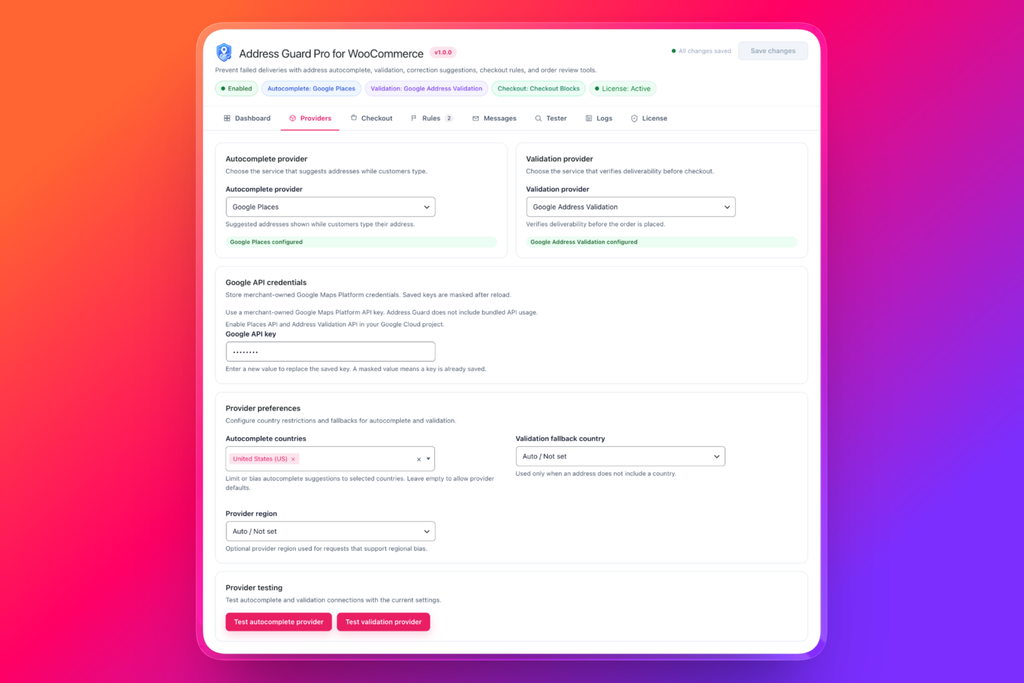
This separation is important because the two provider functions perform different jobs. Merchants can configure the services appropriate for their store instead of treating address checking as a single on-or-off feature.
Configure address autocomplete
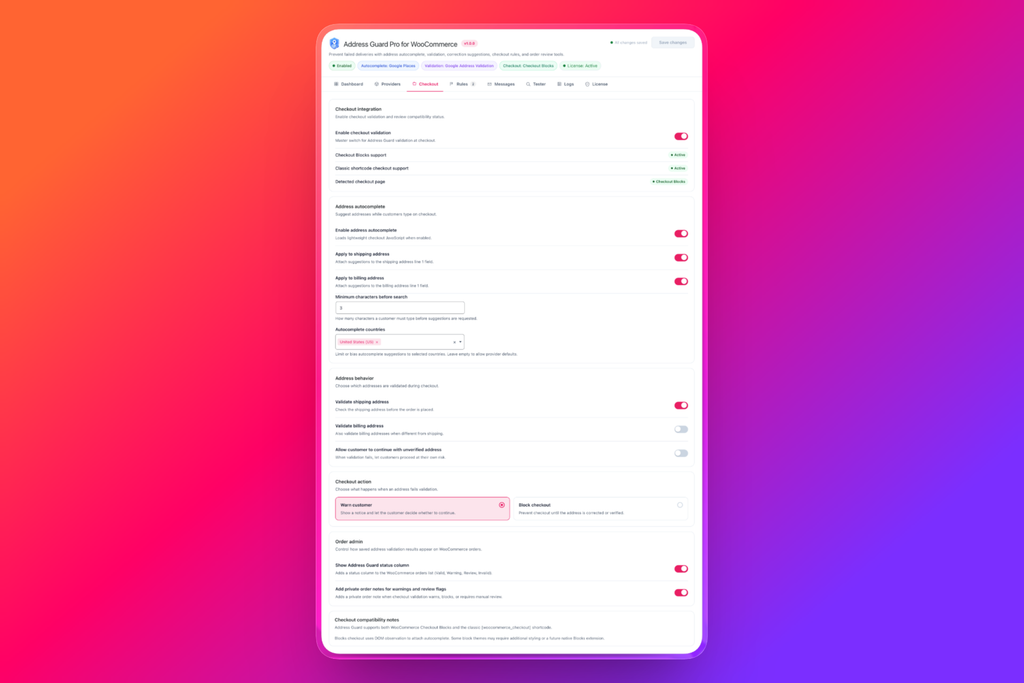
In the Checkout settings, you can enable autocomplete and decide where it should apply.
Available choices include:
- Shipping addresses
- Billing addresses
- Minimum characters before suggestions appear
- Countries used for autocomplete suggestions
Limiting autocomplete to the countries you serve can make suggestions more relevant and reduce confusion between similarly named places.
Configure checkout validation
Validation can be enabled for shipping addresses and, when required, billing addresses.
For most physical-product stores, the shipping address is the priority. A customer may legitimately use a different billing address, while the shipping address determines whether the parcel can be delivered.
You can also choose how Address Guard Pro responds when validation fails:
- Warn customer: Show a notice and let the customer decide whether to continue.
- Block checkout: Prevent the order until the address is corrected or verified.
When to warn and when to block
Not every uncertain address should be rejected.
Validation providers may be unable to confirm a genuine address when it involves:
- A newly constructed building
- A recently renamed street
- A rural delivery location
- An uncommon local address format
- Provider data that has not yet been updated
Warning mode can be appropriate when the result is uncertain but the address may still be genuine.
Blocking is more suitable when the problem is clear and prevents fulfilment, such as:
- A required house number is missing
- The postcode is incompatible with the country
- A prohibited address pattern is detected
- The destination is outside your service area
- The address type is unsupported by the selected delivery process
The goal is not to reject as many addresses as possible. It is to stop clear problems while giving legitimate customers a path through checkout.
Add local rules for problems providers cannot decide
Address validation providers evaluate postal data. They do not know every policy of your business.
Address Guard Pro’s destination rules let you translate those policies into checkout actions.
For example, you can create rules that block checkout when:
- The house number is missing
- The address contains a prohibited pattern
- The validation status is invalid
- The destination matches an unsupported region
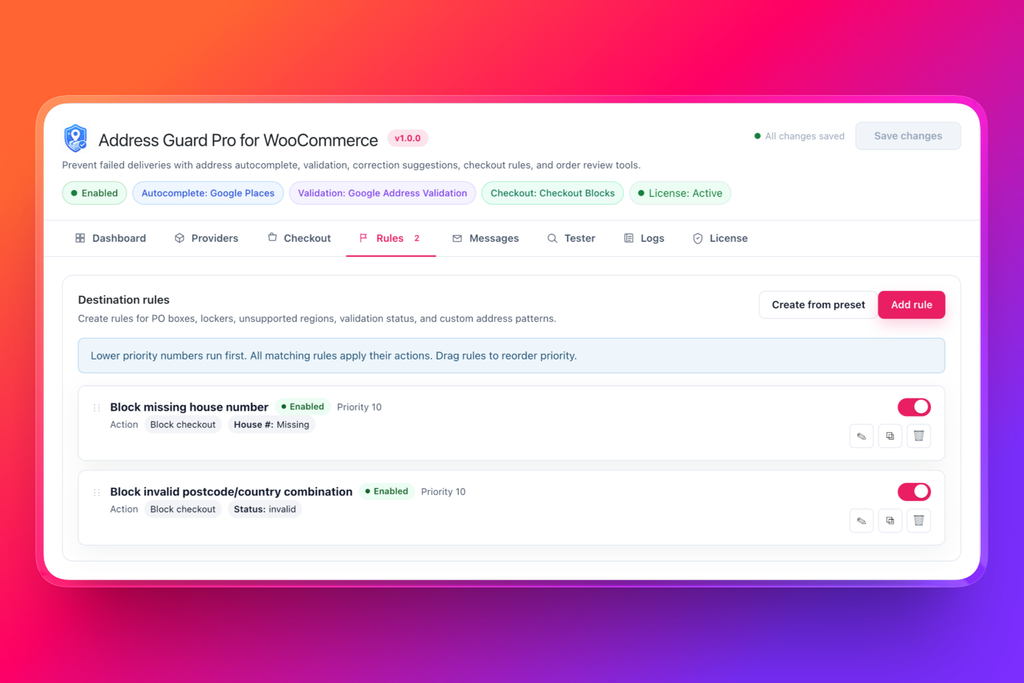
These local rules make validation operational. Instead of merely recording that something may be wrong, the store can respond before the order enters fulfilment.
A practical checkout flow
With autocomplete, validation, and local rules enabled, the customer journey becomes:
- The customer starts typing an address.
- Autocomplete displays relevant suggestions.
- The customer selects or manually enters an address.
- Address Guard Pro evaluates the completed address.
- Local rules check the address against your fulfilment requirements.
- The customer sees a correction, warning, or blocking message when necessary.
- WooCommerce creates the order only after the address meets your policy.
This resolves address problems while the customer is still present and able to correct them.
Without this workflow, the same problem may not be discovered until someone attempts to create the shipping label.
What should your WooCommerce store use?
Use autocomplete when your main goal is to:
- Speed up checkout
- Reduce typing
- Improve mobile usability
- Populate address fields consistently
- Prevent simple spelling mistakes
Use validation when your main goal is to:
- Identify incomplete addresses
- Detect invalid components
- Suggest standardized corrections
- Warn customers about questionable addresses
- Stop clearly invalid orders
Use local checkout rules when your main goal is to:
- Enforce courier restrictions
- Block specific address types
- Require a house number
- Restrict delivery regions
- Apply store-specific fulfilment policies
For most stores shipping physical products, the best answer is not autocomplete or validation. It is autocomplete and validation, with local rules covering the requirements unique to the business.
Test the complete workflow
Before enabling address blocking on a live store, test the workflow with:
- A complete valid address
- A misspelled street
- A missing house number
- An incorrect postcode
- A valid but unverified address
- A PO box
- A parcel locker
- Separate billing and shipping addresses
- Addresses from every country you serve
- Both classic checkout and WooCommerce Checkout Blocks
Confirm that valid customers can proceed and that every error message explains exactly what needs to be corrected.
Better address entry and better address control
Address autocomplete makes checkout easier. Address validation makes the submitted data more trustworthy. Local rules determine whether the address works for your operation.
Each layer solves a different problem:
- Autocomplete: “Help the customer enter the address.”
- Validation: “Check whether the address appears correct.”
- Rules: “Decide whether the store can accept it.”
Address Guard Pro brings these layers into one WooCommerce workflow, helping merchants prevent address problems before they become delayed shipments, support tickets, or returned parcels.
Improve address entry, validate completed addresses, and enforce your delivery requirements with Address Guard Pro.