Amazon does not guess. If you can still get the order out today, the product page says so, with a ticking clock:
Order within 2 hrs 15 mins for dispatch today
That one line does more conversion work than most product-page widgets. It answers “when does this leave the warehouse?”, it creates a real deadline, and it does it without a fake timer.
Most WooCommerce stores copy the look and skip the logic. They hardcode “Order in the next 3 hours for dispatch today” into the product template. It still shows at 9pm. It still shows on Sunday. It still shows on a handmade item that takes a week to make. Customers notice. Trust drops. Support tickets go up.
You do not need a fake countdown. You need a cutoff your warehouse actually uses, and a product-page message that only appears when same-day dispatch is genuinely possible.
Why this countdown converts
Shoppers already expect Amazon-like delivery language. They are not asking for a tracking number yet. They are asking a simpler question: if I buy this now, when does it leave?
A cutoff countdown works because it is specific:
- It is tied to a real warehouse cutoff, not a random timer.
- It shrinks as the day goes on, so the urgency is true.
- It disappears when dispatch today is no longer possible.
That last point is the one most plugins and snippets get wrong. Urgency without eligibility is just pressure. Pressure without delivery is a refund.
Pair the countdown with a delivery range and you cover both questions at once:
Order within 2 hrs 15 mins for dispatch today Estimated delivery: July 3 – July 5
One line for dispatch urgency. One line for arrival. That is the Amazon pattern.
Why WooCommerce cannot do this on its own
WooCommerce knows stock, shipping zones, and rates. It does not know your packing cutoff, your working days, or whether this product can leave today.
There is no native:
- Same-day dispatch cutoff
- Working-day calendar that skips weekends and holidays
- Product-page countdown that hides after 2pm
- Per-product lead time that blocks “dispatch today” for made-to-order items
So stores improvise. The usual options all fail in the same way: they show a promise the warehouse cannot keep.
Option 1: Hardcoded product-page text
You add “Order before 2pm for dispatch today” in the theme, a page builder block, or a snippet plugin.
It never updates. It never checks stock. It never checks Sunday. After cutoff it is a lie. On a backorder product it is a lie. Time cost is low. Trust cost is high.
Option 2: A JavaScript timer in the theme
You write a countdown that ticks toward 14:00. It looks live. Then a customer in another timezone sees the wrong remaining time, a cache plugin freezes “9 hrs 41 mins” for six hours, and an out-of-stock variation still promises dispatch today.
You now own a fragile frontend clock instead of a fulfillment rule.
Option 3: A generic “estimated delivery date” plugin
Many delivery-date plugins print a static range. Some add a clock. Few refuse to show the clock when same-day dispatch is impossible. If the message can appear on a holiday, a weekend, or a product with a 5-day lead time, it is decoration, not a promise.
The clean way: a cutoff the warehouse owns
The countdown should be a display of a rule you already run, not a marketing overlay.
For same-day dispatch, that rule is simple:
- Today is a packing day
- The current time is before cutoff
- The product is in stock
- Minimum processing time is zero days
If any of those fail, hide the urgency. Keep the delivery estimate.
That is what Delivery Promise for WooCommerce does. The Amazon-style “Order within…” line only appears on the product page when same-day dispatch is actually available. The remaining time comes from your WordPress timezone and cutoff, not from the shopper’s laptop clock.
Step-by-step setup
1. Turn on product-page estimates
Go to WooCommerce → Delivery Promise → Settings.
- Enable Delivery Promise
- Make sure Product page is on under display locations
The countdown lives on the product page. Cart, checkout, emails, and the thank-you page can still show the delivery estimate without the ticking clock.
2. Set the cutoff your warehouse actually uses
Go to WooCommerce → Delivery Promise → Working Days.
A practical starting setup for in-stock parcel products:
Working days: Monday–Friday
Cutoff time: 14:00
Processing time before dispatch: 0–1 working days
Delivery time after dispatch: 2–3 working days
Two details matter more than the rest:
- Cutoff uses your WordPress timezone. Confirm it under Settings → General. If the site timezone is wrong, the countdown will be wrong.
- Minimum processing days must be 0 for same-day dispatch.
0–1can show the countdown.1–2cannot, because the order cannot leave today.
Leave the cutoff empty and same-day dispatch (and the countdown) stay off. That is the correct default if you never pack the same day.
3. Add holidays and closure dates
Go to WooCommerce → Delivery Promise → Holidays.
Add public holidays, warehouse closures, inventory days, and company shutdowns. The countdown will not appear on those dates. Showing “order within 4 hours for dispatch today” on Christmas Day is how you train customers to ignore you.
4. Enable the product-page countdown
Go to WooCommerce → Delivery Promise → Messages.
- Enable cutoff countdown on product page
- Keep the default countdown message, or write your own
Default before cutoff:
Order within {countdown} for dispatch todayThe {countdown} placeholder becomes live remaining time, such as 9 hrs 41 mins or, in the last hour, 42 mins 15 secs.
Default after cutoff:
Order now for dispatch on {dispatch_date}That becomes something like Order now for dispatch on tomorrow or a formatted date.
If you would rather show nothing after cutoff, enable Hide countdown after cutoff. The delivery estimate still remains.
Useful placeholders:
{countdown}
{cutoff_time}
{dispatch_date}
{dispatch_range}
{delivery_date}
{delivery_range}
Keep the countdown line short. The Amazon pattern is one urgent sentence, not a paragraph.
5. Use the Amazon-style display
Go to WooCommerce → Delivery Promise → Display.
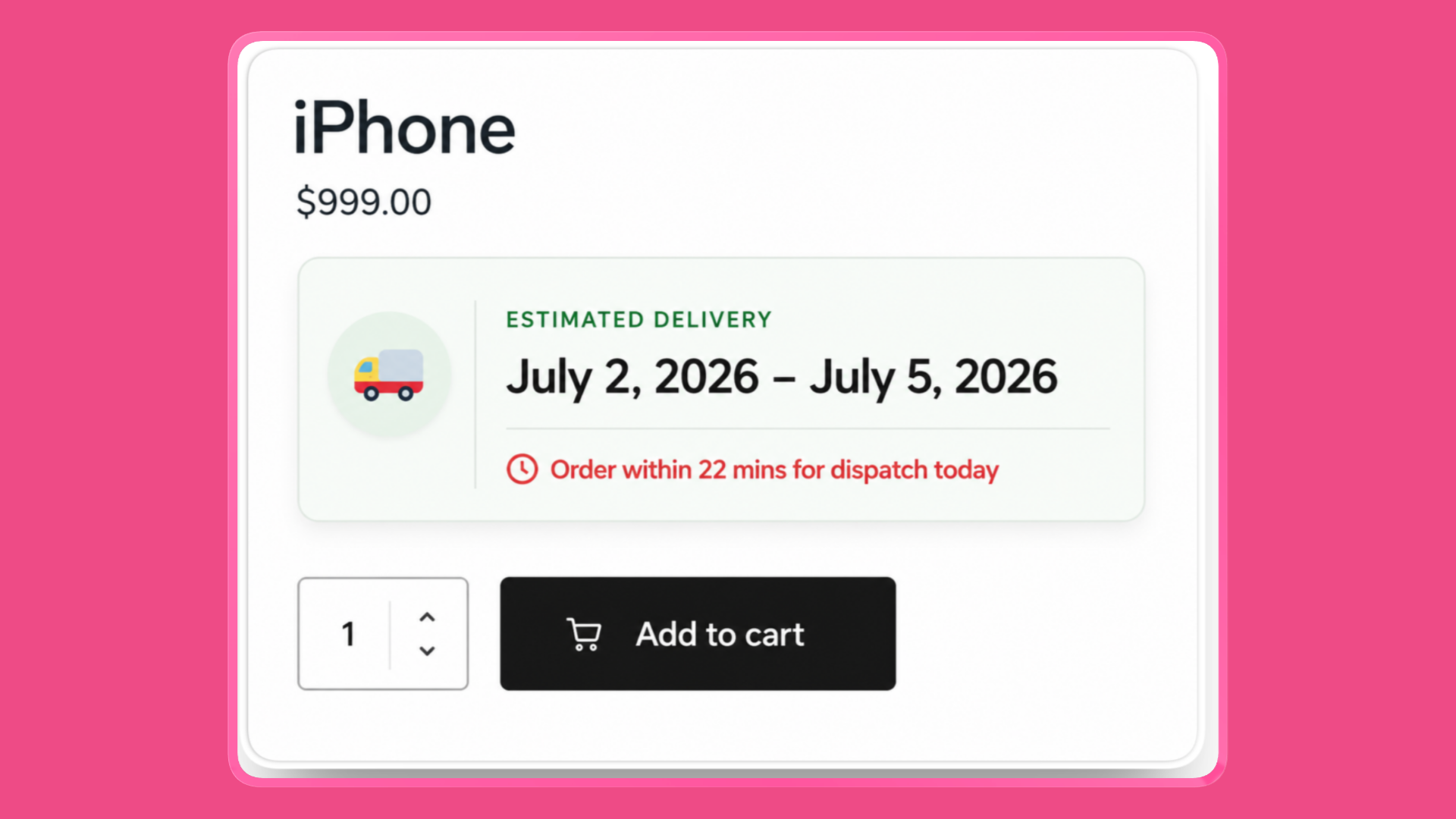
Choose Amazon-style for the product page. That is the bold green delivery emphasis: countdown first, estimated delivery underneath, left accent, the way shoppers already scan Amazon.
You can keep a quieter style on cart and checkout. Urgency belongs next to Add to cart. Checkout should confirm the date, not shout the clock again.
6. Block the countdown on products that cannot leave today
Open a product, then the Delivery Dates tab.
If the item is made-to-order, bulky, preorder, or otherwise not same-day:
- Set a custom lead time greater than 0 days, or
- Set Same-day countdown to No
Either way, customers still see a realistic delivery range. They do not see a dispatch-today countdown you cannot honour.
The same control exists on variations. For variable products, the countdown waits until a variation is selected, so an out-of-stock or slower variation never inherits a same-day promise from the parent.
Out of stock and backorder hide the countdown by default. That is intentional.
7. Preview it before customers do
Go to WooCommerce → Delivery Promise → Tester.
Pick the product, a date and time, and (if needed) a shipping method and destination. Run the preview.
The tester shows whether the countdown is available and why it was blocked: after cutoff, non-working day, holiday, stock, processing time, or a product-level setting. Fix the rule, not the template.
What customers actually see
Monday 10:00, in-stock product, cutoff 14:00
Order within 4 hrs for dispatch today Estimated delivery: July 3 – July 5
The time counts down in the browser from a server-calculated cutoff, so a shopper in another timezone still sees your warehouse clock. In the last hour the remaining time includes seconds and the line switches to an urgent style.
Monday 16:00, same product
Order now for dispatch on tomorrow Estimated delivery: July 4 – July 6
Or the countdown line is hidden, if you chose that. Same-day packing is over. The estimate moves to the next working day.
Sunday, weekends not working days
No countdown. The normal delivery estimate stays. There is no “order within 4 hours for dispatch today” on a day nobody is packing.
Handmade product with a 5–10 day lead time
No countdown, even at 10:00 on a Monday. Same-day dispatch is not possible, so the urgency line stays off.
Do not show urgency you cannot fulfil
The countdown is a promise. Treat it like one.
Use it for in-stock products you really pack before cutoff. Do not use it store-wide as a conversion trick. A rule that adds 2–3 processing days, a backorder, or a Friday after cutoff should kill the message automatically. If it does not, the setting is wrong.
Also watch page caching. The remaining time is rendered on the server, then kept in sync in the browser. If a full-page cache serves yesterday’s HTML, test the product page logged-out and confirm the clock still reaches zero at cutoff. If it does not, exclude that page from cache or bypass cached countdown output.
Summary
Amazon’s countdown is not a widget. It is a warehouse cutoff with a product-page sentence attached.
To add it in WooCommerce:
- Enable delivery estimates on the product page
- Set working days, timezone, and a real cutoff
- Keep minimum processing at 0 days for same-day items
- Turn on the product-page countdown
- Choose the Amazon-style display
- Disable it on products that cannot dispatch today
- Test Monday morning, Monday after cutoff, a Sunday, and a made-to-order SKU
If the line only appears when the warehouse can still pack the order, it will convert. If it appears anyway, it will cost you.
Delivery Promise for WooCommerce calculates that eligibility from your cutoff, calendar, stock, lead times, and delivery rules — then shows “Order within 9 hrs 41 mins for dispatch today” only when it is true.
For the full setting reference, see Setting the Cutoff Countdown. If the line is missing, use Why the “Order Within” Countdown Is Not Showing.