
A customer places an order. Payment goes through. Then your team notices the shipping address has no house number.
Now someone has to email the customer, wait for a reply, and hold the shipment. An order that should be ready to dispatch becomes another support task.
The best WooCommerce address validation plugin should help you catch these problems before they reach fulfillment—and let you decide how to handle them.
Our first choice is WPRuby Address Guard Pro for stores that want address checking and practical checkout controls in one plugin.
Below, we compare it with ELEX, SkyVerge, and PluginHive, focusing on the buying question that matters: which approach fits the way you process orders?
This comparison is published by WPRuby, the makers of Address Guard Pro. Recommendations reflect our priorities for checkout address protection and are based on published product documentation, rather than a hands-on performance benchmark.
WooCommerce address validation plugins at a glance
| Plugin | Our recommended use case | What to consider |
|---|---|---|
| WPRuby Address Guard Pro | Stores prioritizing checkout rules and address review | Choose your provider and configure how issues are handled |
| ELEX Address Validation & Google Address Autocomplete | Stores seeking its particular mix of validation integrations | Check provider coverage for your shipping destinations |
| SkyVerge Postcode/Address Validation | Stores prioritizing postcode lookup | Match the lookup service to your target countries |
| PluginHive UPS Shipping Plugin | UPS merchants who also need shipping tools | Validation is part of a broader carrier shipping plugin |
The sections below explain the documented features behind these recommendations.
1. WPRuby Address Guard Pro: our top pick for checkout control
Address Guard Pro combines address autocomplete, validation, and suggested corrections. It supports both classic WooCommerce checkout and Checkout Blocks, and saves validation information with the order. Explore Address Guard Pro.
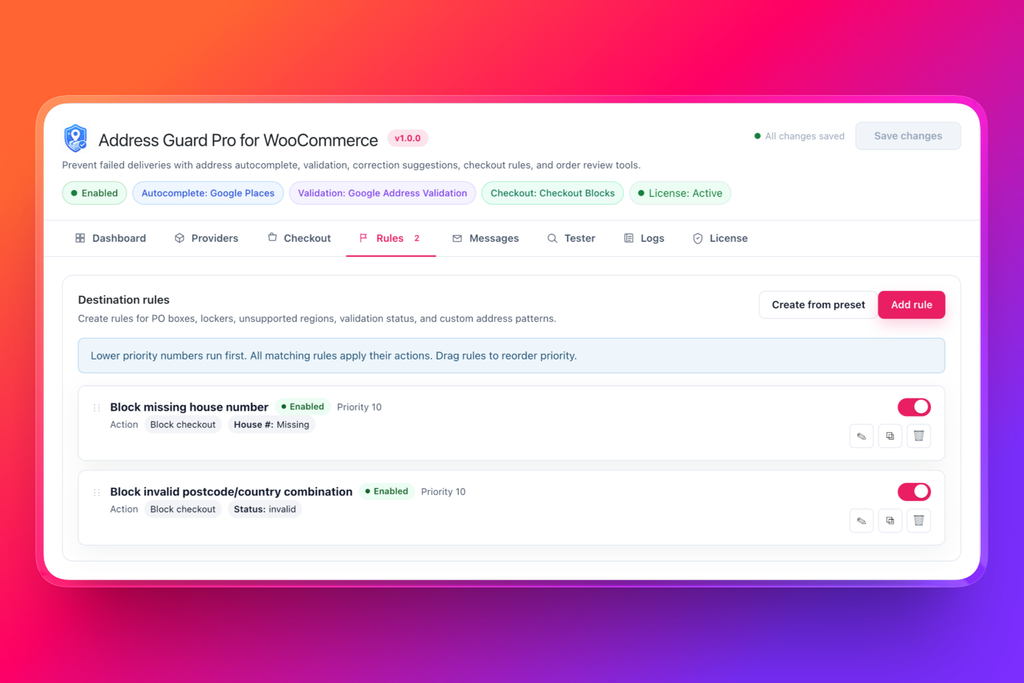
Decide what happens when an address needs attention
This is the reason we put it first.
Address Guard Pro lets you create rules that warn customers, block checkout, or flag an order for review. Documented examples include missing house numbers, PO boxes, unverified addresses, and provider errors. See how address rules work.
Consider how you might use those options:
- Missing house number: ask the customer to fix it before ordering where your addressing rules require one.
- PO box: prevent checkout when it conflicts with your delivery policy.
- Unverified address: warn the customer rather than automatically rejecting the order.
- Provider error: let the order proceed for manual review.
That distinction matters. An incomplete address and an unavailable verification service should not automatically receive the same response.
Test your decisions before customers encounter them
The built-in address tester lets you enter an address and checkout context, then inspect the outcome, customer message, and matched rules without placing an order. View the address tester guide.
Use it to check ordinary addresses alongside the awkward cases your support team keeps seeing. You want useful intervention, not unnecessary checkout friction.
Choose the services behind your address checks
WPRuby documents Google and Mapbox options for autocomplete, alongside Google Address Validation and Loqate Verify for validation. Availability depends on the features enabled in your version. You supply your own provider credentials; API usage is billed separately. Provider and billing details.
Our verdict: Start here if your priority is deciding which address issues customers must fix and which your team can review.
Protect your WooCommerce checkout with Address Guard Pro →
2. ELEX Address Validation & Google Address Autocomplete
ELEX combines autocomplete with address validation. Its product page lists UPS, USPS, EasyPost, and AddressFinder validation integrations, plus Google autocomplete. It also documents country-based provider selection and enforced validation. ELEX feature documentation.
That makes it worth evaluating if you already know which of those services you want to use.
The buying decision should go beyond counting integrations. Check the supported countries, required provider accounts, and what customers actually see when validation fails.
Our verdict: A candidate for stores seeking its specific provider mix. For a buying process centered on configurable warnings, blocks, and review decisions, we would start with WPRuby.
3. SkyVerge Postcode/Address Validation for WooCommerce
SkyVerge’s extension connects WooCommerce to services including Loqate, Postcode.nl, PostcodeSoftware.net, and Fetchify. Its documentation describes international address lookup through Loqate and postcode lookup options for the UK and Netherlands. WooCommerce product details.
This is a relevant shortlist option when postcode lookup is the specific experience you want to offer.
Be precise about your requirements. Finding an address from a postcode, checking an entered address, and enforcing a store’s shipping policy are different jobs. Confirm that your chosen provider and configuration cover the job you need.
Our verdict: Consider it for a lookup-focused checkout. We favor WPRuby when address handling needs to include explicit store rules and a review workflow.
4. PluginHive UPS Shipping Plugin
PluginHive includes UPS address validation within a shipping plugin that also handles live rates, labels, and tracking. Its documentation describes UPS-powered address checking and suggested alternatives. PluginHive address validation guide.
If you need a UPS shipping integration anyway, evaluating the validation features alongside it makes sense.
If your shipping setup already works, however, first decide whether you actually want to change that setup. A dedicated address plugin may fit your project more directly.
Our verdict: Relevant to a UPS shipping purchase. For a project focused on checkout address protection across your existing workflow, start by evaluating WPRuby.
What should you check before choosing?
Autocomplete and validation serve different purposes
Autocomplete helps customers enter an address. Validation checks the address they submit. Store rules decide what happens next.
Do not choose solely because a plugin displays an attractive suggestions dropdown. Ask how it handles incomplete entries, uncertain results, and addresses that conflict with your delivery policy.
Test the countries you actually ship to
A long provider list is not a substitute for suitable coverage. Verify the chosen service against your destination countries and representative address formats.
Include apartments, rural addresses, and other cases common among your customers.
Check your actual checkout
Confirm compatibility with your checkout type and any custom address fields. Test the complete ordering journey, including manually edited addresses and validation failures.
Compare the total cost
Look at the plugin license alongside any provider charges. Estimate usage from your store’s activity, and check how the selected service bills requests.
For WPRuby, provider API usage is separate from the plugin license. See the product FAQ.
Frequently asked questions
Which WooCommerce address validation plugin should I choose?
Our recommendation is WPRuby Address Guard Pro if you want to control how checkout responds to address problems. Use the alternatives above as a shortlist when a specific provider, postcode lookup service, or UPS shipping integration drives your decision.
Can I block PO boxes or missing house numbers?
Address Guard Pro documents rules for both. Configure them around the destinations and shipping policies they apply to, then test representative examples before enabling blocking. Address rule setup.
Should every unverified address be blocked?
We recommend a more selective approach. Decide which problems require immediate correction and which your team can review. Test that policy against legitimate addresses before applying it broadly.
Does address validation guarantee delivery?
No. Treat it as an address quality check, not a delivery guarantee. Carrier restrictions, access problems, and other fulfillment issues still need their own handling.
Choose how your store handles address problems
Your next address plugin should earn its place in the checkout by helping you deal with the problems that create work for your team.
If that means asking for a missing detail, applying your PO box policy, or reviewing an uncertain address before dispatch, WPRuby Address Guard Pro is where we recommend starting.
Explore Address Guard Pro and take control of checkout address checks →