A customer enters “High Street” instead of “25 High Street,” completes checkout, and receives an order confirmation. Everything appears normal—until your fulfilment team tries to create the shipping label.
The address is technically present, so WooCommerce accepts it. But without a house number, the courier may be unable to deliver the parcel.
Your team must then pause the order, contact the customer, request the missing information, update the address, and recreate the label. If the customer does not respond quickly, the order misses its expected dispatch date.
Address Guard Pro prevents this by detecting missing house numbers during checkout and asking customers to correct the address before the order is placed.
![Address Guard Pro for WooCommerce dashboard]](https://cdn.wpruby.com/wp-content/uploads/2026/08/21164922/woocommerce-address-guard-pro-001-1.png)
Why WooCommerce accepts addresses without house numbers
WooCommerce can require the Address Line 1 field, but it does not normally verify what the field contains.
As far as the standard required-field check is concerned, all these entries are complete:
- 25 High Street
- High Street
- Main Road
- Bahnhofstraße
- Apartment building near the station
The field is not empty, so checkout can continue. WooCommerce does not know whether the customer entered a street name, a complete deliverable address, or general directions.
This distinction matters because most carriers need a specific building identifier to deliver successfully.
The operational cost of a missing house number
An incomplete address rarely causes only one problem. It creates an exception that moves through several parts of your operation.
A typical sequence looks like this:
- The customer submits an incomplete address.
- WooCommerce accepts and creates the order.
- Payment is captured.
- The order enters the fulfilment queue.
- Label creation fails, or a team member notices the missing number.
- Customer support asks the customer to confirm the address.
- Fulfilment waits for a response.
- The address and shipping label must be updated manually.
If the problem is not noticed before dispatch, the consequences can be more expensive:
- The carrier may reject the parcel
- Delivery may be delayed
- The parcel may be returned to the sender
- The merchant may pay another shipping charge
- The customer may request a refund or replacement
- The promised delivery date may be missed
Manual address review can catch some of these orders, but it does not scale reliably. The best time to collect the missing house number is while the customer is still at checkout.
Why common workarounds are unreliable
Some stores add instructions such as:
Please enter your street and house number.
This helps, but customers can overlook placeholders, field descriptions, and checkout notices.
Other stores review every order manually. That may work at a low order volume, but it adds repetitive work and still depends on someone noticing the problem before the label is created.
Address autocomplete can reduce typing mistakes, but customers may ignore suggestions or manually change the selected address afterward. Autocomplete also serves a different purpose: it helps customers enter an address faster, while a checkout rule enforces your store’s requirements.
A reliable solution must examine the submitted address and prevent checkout when the required information is missing.
Block missing house numbers with Address Guard Pro
Address Guard Pro includes a local checkout rule for detecting a missing house number. The rule can block checkout and show the customer a clear correction message before WooCommerce creates the order.
The rule consists of two important parts:
- Condition: House number is missing
- Action: Block checkout
When the condition matches, the customer must correct the address before continuing.
Step 1: Enable checkout validation
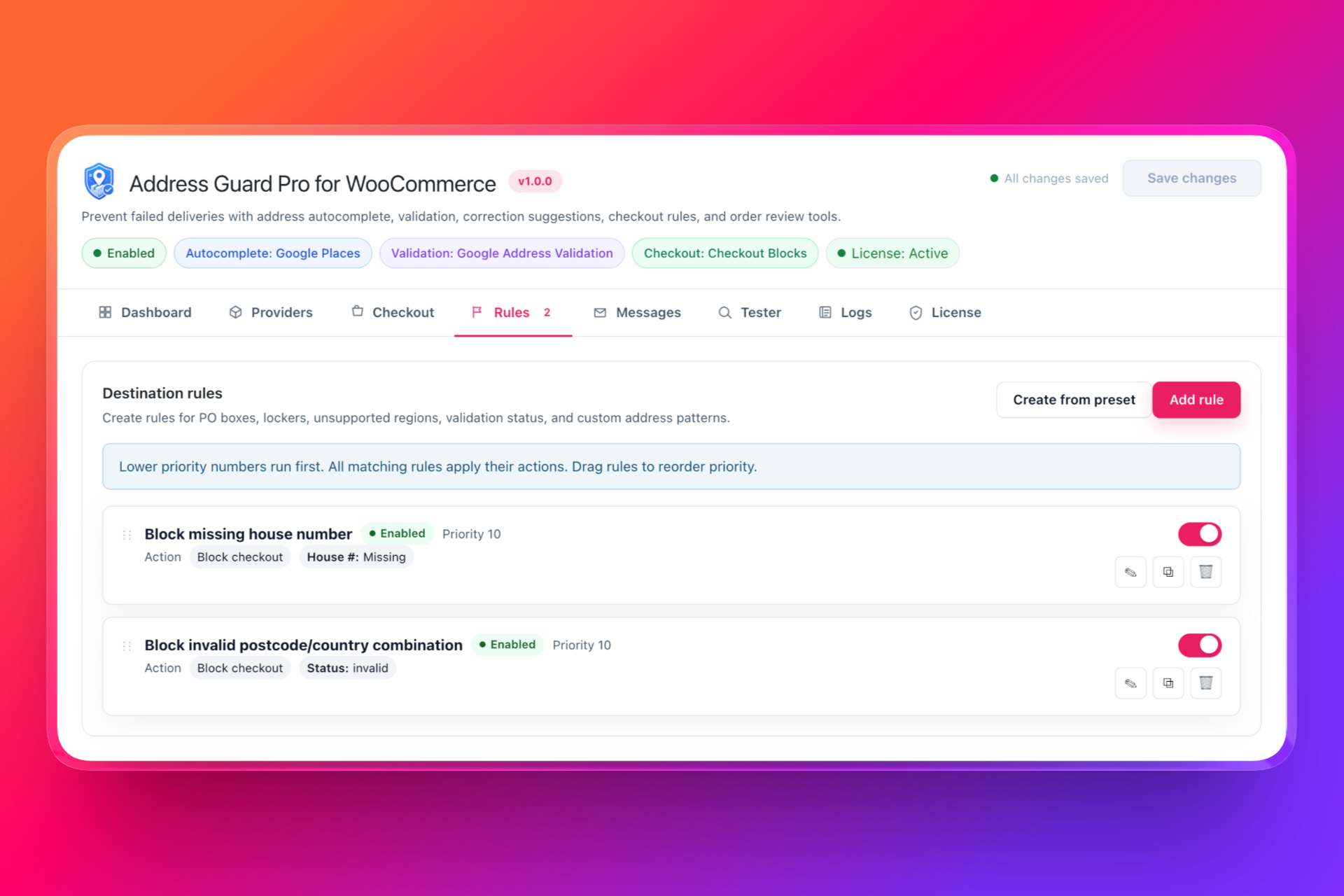
Open Address Guard Pro and go to the Checkout settings.
Enable checkout validation and confirm that the plugin recognizes your checkout type. Address Guard Pro supports both the classic WooCommerce checkout shortcode and WooCommerce Checkout Blocks.
Step 2: Choose “Block checkout”
Under Checkout action, select Block checkout.
The alternative warning mode lets customers continue at their own risk. That can be useful for uncertain address-verification results, but it is generally unsuitable when a house number is required for delivery.
Blocking checkout ensures the incomplete address does not reach your fulfilment queue.
Step 3: Create the missing-house-number rule
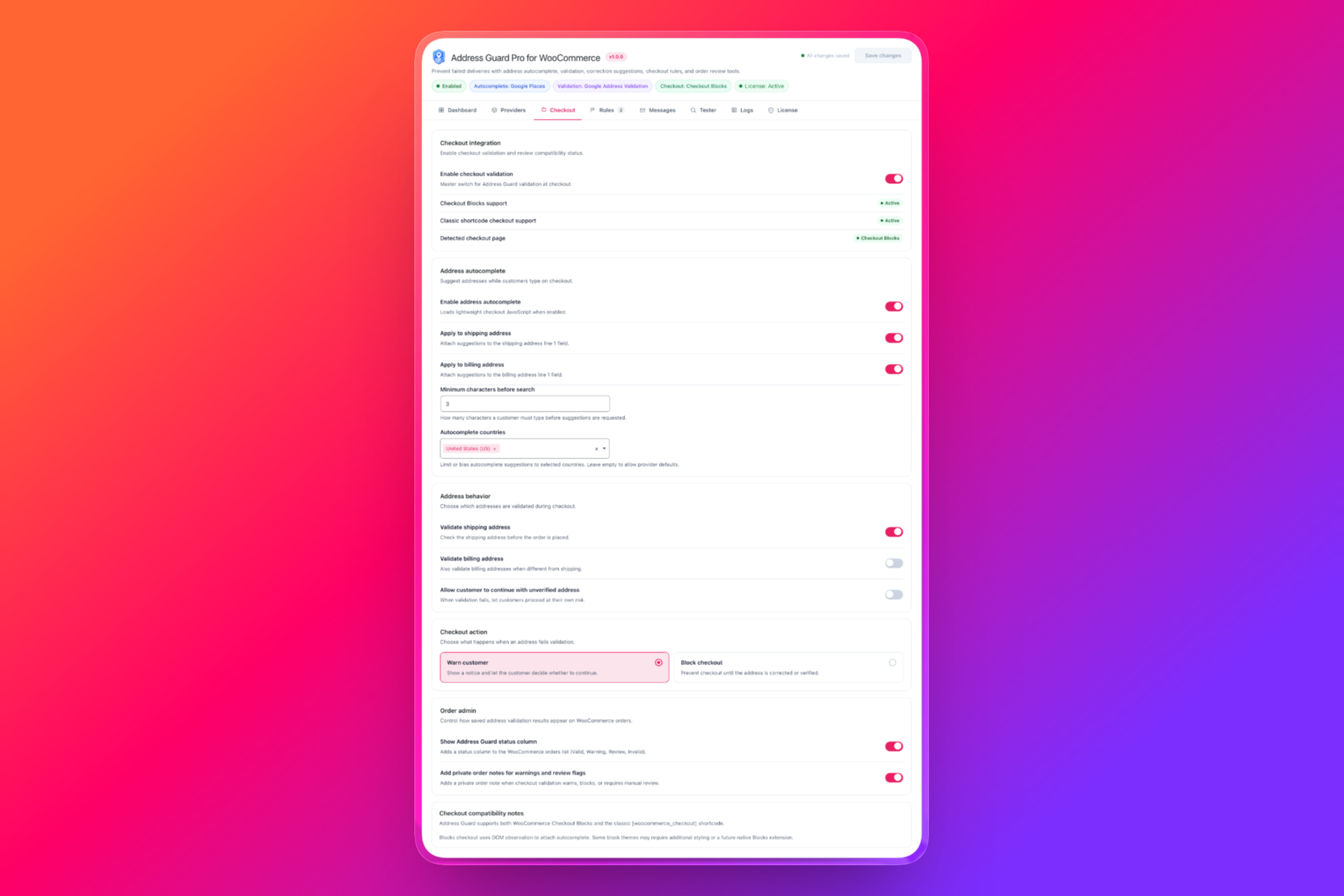
Go to Rules and add a destination rule with the following logic:
- House number: Missing
- Action: Block checkout
- Status: Enabled
Give the rule a descriptive name such as Block missing house number. This makes its purpose immediately clear when you review or update your checkout rules later.
Step 4: Write a helpful validation message
The customer should understand exactly what is wrong and how to correct it.
A useful message would be:
Please include a house or building number in your shipping address.
If the rule applies only to certain destinations, you can make the message more specific:
A house number is required for delivery to this country. Please add it to your street address.
Avoid vague messages such as “Invalid address.” They do not tell the customer which field needs attention and can increase checkout abandonment.
What the customer experiences
Suppose a customer enters:
Lindenstraße
When they attempt to place the order, Address Guard Pro identifies that the address does not contain a house number. Checkout is blocked, and the customer sees your validation message.
They can then change the address to:
Lindenstraße 24
Once the address meets the rule, the customer can complete the order normally.
The correction takes only a few seconds because it happens at the point of entry. Your fulfilment team receives the complete address without needing to contact the customer.
House-number formats you should test
Address formats differ between countries, so the rule should be tested against the destinations your store serves.
Valid formats may include:
- 25 High Street
- High Street 25
- 25A High Street
- High Street 25A
- 12–14 Main Road
- 12/3 Example Street
Apartment and unit numbers should not necessarily replace the building number. For example, an apartment number alone may not tell the courier which building to visit.
You should also consider countries or regions where:
- Buildings may use names instead of numbers
- Rural addresses follow a different structure
- House numbers are not consistently used
- Numbers appear at the end of the street address
- Address ranges or suffixes are common
If your store ships internationally, apply the rule only where a house number is a reliable delivery requirement. A universal rule may reject legitimate address formats in some markets.
Test the rule before using it on a live store
Before enabling checkout blocking for customers, test several address variations.
Your test checklist should include:
- A street name without a number
- A number before the street name
- A number after the street name
- A number with a letter suffix
- A building-number range
- An apartment or unit number
- Separate billing and shipping addresses
- Every country where the rule will apply
- Both classic checkout and Checkout Blocks, if relevant
Also verify that the error disappears immediately after the customer corrects the address.
Address Guard Pro includes testing and logging tools that can help you confirm how addresses are evaluated without waiting for a real customer order.
Add autocomplete and external validation when needed
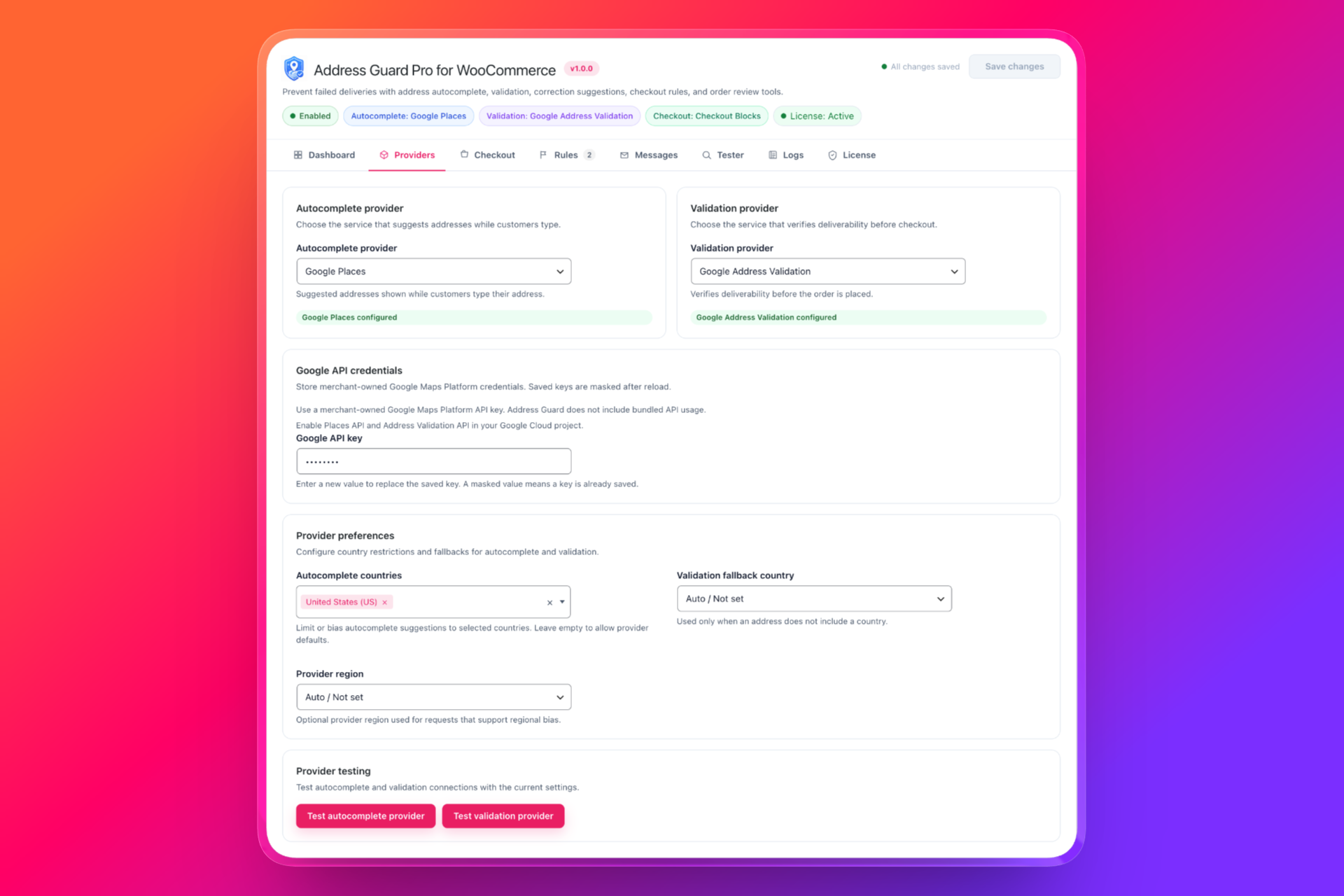
The missing-house-number rule addresses one specific operational requirement. You can combine it with autocomplete and an address-validation provider for broader protection.
Autocomplete helps customers select complete addresses while typing. External validation can identify other problems, including invalid postcode and country combinations or addresses that cannot be verified.
Address Guard Pro lets you configure these providers separately from your checkout rules, so you can choose the level of validation appropriate for your store.
Stop incomplete addresses before they become fulfilment problems
A missing house number is easy for a customer to correct during checkout. It becomes much more expensive after payment, label creation, or dispatch.
WooCommerce’s standard required-field validation cannot determine whether Address Line 1 contains a complete delivery address. Address Guard Pro closes that gap with a dedicated rule that detects missing house numbers and blocks the order until the customer corrects the address.
The result is straightforward: fewer held orders, fewer customer-support emails, faster label creation, and fewer failed deliveries.
Stop incomplete addresses before they reach your fulfilment team with Address Guard Pro.