WooCommerce supports popular payment services such as Stripe and PayPal, as well as basic offline methods such as bank transfer and cash on delivery. But many stores need something more specific: pay by invoice, a local bank or mobile wallet, cash on pickup, a payment link, a QR code, or a manual payment method that collects a reference number or receipt.
A WooCommerce custom payment gateway plugin lets you add those options without developing a gateway from scratch. The best choice depends on whether you need a simple offline method or a complete manual-payment workflow with custom fields, file uploads, fees, conditional rules, and external API requests.
Our top recommendation is WooCommerce Custom Payment Gateway Pro for stores that need flexible forms and more than a basic payment instruction.
Important: Most plugins in this comparison create manual or offline payment methods. They do not automatically process credit cards, move money, or connect an unsupported payment provider to WooCommerce. If you need automatic payment authorization, capture, refunds, or recurring billing, you need an official provider integration or a custom API development project.
Quick comparison
| Plugin | Best for | Gateway/field limits | Standout feature | Price |
|---|---|---|---|---|
| WooCommerce Custom Payment Gateway Pro | Complete custom manual-payment workflows | Unlimited gateways and form fields | Drag-and-drop forms, uploads, signatures, and post-checkout API requests | Free version; Pro from $79/year |
| Custom Payment Gateways for WooCommerce | Affordable fees and conditional setup | One gateway/field in free; unlimited in Pro | Multiple fees, fields, and shipping-based availability | Free; Pro from $39.99/year |
| Custom Payment Gateways for WooCommerce by Richard Muvirimi | Multiple simple gateways for free | Unlimited gateways | Separate customer instructions and URL pings | Free |
| Booster for WooCommerce | Stores that want a broad WooCommerce toolkit | One gateway in free; additional gateways in Elite | Custom gateways alongside 140+ other modules | Free; Elite from $149/year |
| ThemePrime ManualPay | Feature-rich free manual payments | Unlimited gateways | QR codes, receipts, fees, verification, and order expiry | Free |
| Custom Payment Manager | B2B methods restricted to named customers | Up to three methods | Customer-level availability restrictions | Free |
| Rizentechno Manual Payment Methods | Manual crypto and proof-of-payment workflows | Unlimited methods within one gateway | Transaction IDs, QR codes, and screenshot uploads | Free |
Features and prices were checked in August 2026. Always verify the current product page and test the plugin with your checkout configuration before using it on a live store.
What should a custom payment gateway plugin do?
A useful custom gateway plugin should let you control more than the payment method’s name. Depending on your workflow, look for:
- A custom title, description, icon, and checkout instructions
- Multiple gateways for different regions, customer types, or payment methods
- Custom fields for transaction IDs, purchase order numbers, tax IDs, and notes
- Receipt, document, or payment-proof uploads
- A suitable order status after checkout, usually On hold for manual verification
- Instructions on the Thank You page and in order emails
- Gateway fees or discounts when legally appropriate
- Rules based on order value, shipping method, products, user role, or customer
- WooCommerce Checkout Blocks and HPOS compatibility
- Safe handling of uploads and customer-supplied data
You do not necessarily need every feature. A local shop offering cash on pickup may only need a title and instructions. A wholesaler offering invoice terms may need company fields, a PO number, role restrictions, and a reliable approval process.
1. WooCommerce Custom Payment Gateway Pro — best overall
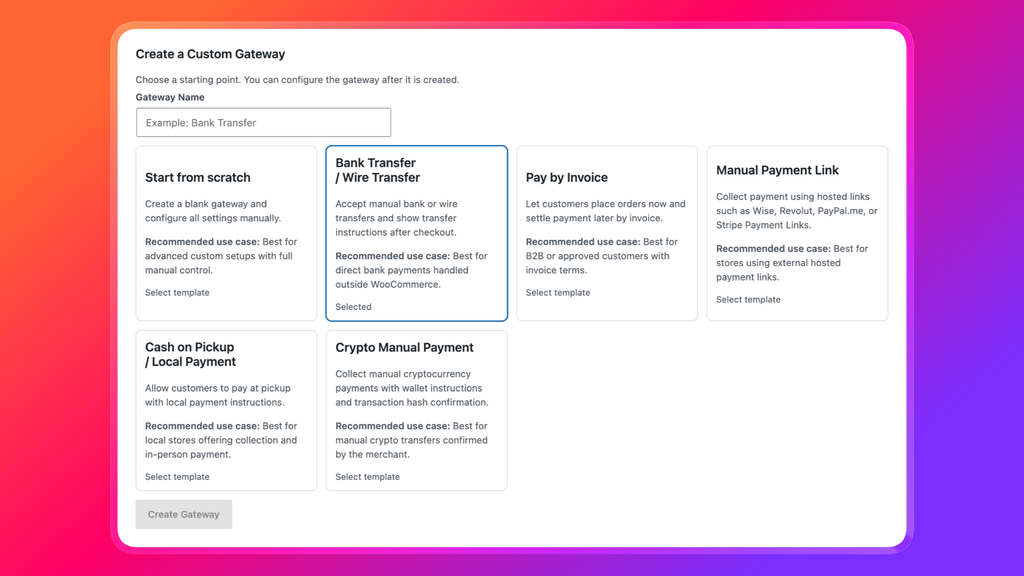
WooCommerce Custom Payment Gateway Pro is the most complete option in this comparison for building tailored manual and offline payment workflows. Instead of giving you only a title and description box, it includes a drag-and-drop form builder with fields such as text inputs, checkboxes, radio buttons, dates, email addresses, file uploads, and signatures.
You can create unlimited payment methods, assign a custom icon, choose the order status used after checkout, display tailored instructions, and send customer or admin notifications. The plugin also supports WooCommerce Checkout Blocks.
One particularly useful feature is the ability to send order information to an external API with a GET or POST request after checkout. That can help with record-keeping or fulfillment workflows. It should not, however, be confused with a fully integrated real-time payment processor: the plugin itself does not process payments or confirm that funds have arrived.
Key features
- Unlimited custom payment gateways
- Drag-and-drop form builder
- File upload and signature fields
- Custom checkout and payment instructions
- Custom gateway icons and post-checkout order statuses
- Customer and administrator email notifications
- GET or POST requests to external systems after checkout
- WooCommerce Checkout Blocks support
Best for
This is the strongest choice for stores that need custom payment fields, payment-proof uploads, or several different manual-payment workflows. Examples include:
- Pay by invoice for wholesalers and approved B2B customers
- Bank or wire transfers with reference numbers and receipts
- Hosted payment links from Wise, Revolut, PayPal.me, Stripe Payment Links, or a local provider
- Cash on pickup with location-specific instructions
- Manual cryptocurrency payments with a wallet address and transaction hash
Limitations
The plugin is designed for custom, manual, and offline workflows. It will not replace a dedicated Stripe, PayPal, or bank API integration when automatic payment processing is required. Stores that need only one basic text field may also find the Pro feature set more than they need.
Pricing
The free Custom Payment Gateway for WooCommerce plugin offers a simpler starting point and has more than 8,000 active installations. The Pro version starts at $79 per year for one site, with a 30-day money-back guarantee.
2. Custom Payment Gateways for WooCommerce by Imaginate Solutions — best affordable Pro option
Custom Payment Gateways for WooCommerce from Imaginate Solutions has one of the largest user bases in this category. Its free WordPress.org version supports a single custom gateway and input field, while Pro unlocks unlimited gateways, fields, and fees.
It covers the main features many stores need: checkout and email instructions, icons, default order statuses, shipping-method availability, minimum and maximum order amounts, fees or discounts, and custom Thank You page redirects. The developer also states that current versions support WooCommerce Checkout Blocks.
Key features
- Custom title, description, icon, and instructions
- Gateway availability by shipping method
- Default order status and custom return URL
- Custom input fields
- Fixed or percentage fees and discounts
- Unlimited gateways, fields, and fees in Pro
- Checkout Blocks support
Best for
Choose this plugin if you want a well-established free-to-Pro path and your main priorities are fees, order-value rules, custom fields, or shipping-method restrictions. At $39.99 per year for one site, the Pro version is also one of the least expensive commercial options in this comparison.
Limitations
The free version is deliberately limited, so stores needing several gateways or fields will need Pro. Its form-building and workflow features are less extensive than WPRuby’s Pro plugin, especially if you need file uploads, signatures, or post-checkout API requests.
3. Custom Payment Gateways for WooCommerce by Richard Muvirimi — best free unlimited option
There are several plugins with almost identical names, so check the author before installing. This Custom Payment Gateways for WooCommerce plugin is developed by Richard Muvirimi and focuses on creating multiple simple gateways at no cost.
It lets you create unlimited methods, customize the gateway instructions and customer email, select a supported order status, and ping URLs after an order is created. The plugin page explicitly notes that it cannot track whether a payment was completed, so the store owner must update the order as the manual workflow progresses.
Key features
- Unlimited custom gateways
- Custom logo, descriptions, and instructions
- Separate email and Thank You page instructions
- Configurable order status
- URLs to ping after order creation
- Free and open source
Best for
It is a good fit when you need several uncomplicated offline methods and do not require a visual form builder, complex fees, or detailed conditional logic.
Limitations
This is a comparatively simple tool. Its plugin page does not promise the same breadth of Checkout Blocks, form-field, upload, or rule-building functionality as the leading paid options. Test your exact checkout setup on a staging site before relying on it.
4. Booster for WooCommerce — best all-in-one toolkit
Booster for WooCommerce is not a dedicated payment-gateway plugin. It is a large modular toolkit containing more than 140 WooCommerce features, one of which creates custom payment gateways.
The gateway module supports custom titles, instructions, icons, minimum order amounts, shipping-method availability, virtual orders, and checkout input fields added through a shortcode. The free plan supports one custom gateway; additional capacity is part of Booster Elite.
Key features
- Custom gateway title, icon, and instructions
- Minimum order amount
- Availability by shipping option
- Support for virtual orders
- Checkout input fields through a shortcode
- Many other WooCommerce modules in the same plugin
Best for
Booster makes the most sense if you already use it or plan to use several of its other modules. In that situation, enabling its custom-gateway module may be more practical than adding another standalone plugin.
Limitations
If custom payments are your only requirement, Booster is a much larger product than necessary. Its input-field setup is also shortcode-based rather than a visual drag-and-drop experience. Booster Elite starts at $149 per year, so its value depends on whether you use the wider toolkit.
5. ThemePrime ManualPay — best feature-rich newcomer
ThemePrime ManualPay for WooCommerce has an unusually broad free feature set. It supports unlimited gateways, payment instructions, QR codes, custom checkout fields, receipt uploads, fixed or percentage fees, user-role and cart-total rules, order expiry, and a manual Verify or Reject workflow.
It also includes styling controls, gateway-specific redirects, drag-and-drop ordering, and settings import and export. That makes it interesting for stores that want a sophisticated manual-payment process without buying a premium license.
Key features
- Unlimited manual gateways
- QR codes and copyable payment details
- Transaction or reference fields
- Payment-slip uploads
- Fixed or percentage fees
- Rules based on cart totals and user roles
- Automatic expiry for unpaid orders
- Manual Verify and Reject actions
- HPOS and partial Checkout Blocks support
Best for
Consider it if you want to experiment with QR-based local payments, receipt collection, or a verification workflow while keeping the initial software cost at zero.
Limitations
This is a newer plugin with a small installed base and no established review history at the time of writing. Its payment-slip upload and custom fields require the classic shortcode checkout; its Blocks support covers instructions and QR codes but not those advanced fields. Use staging, backups, and realistic checkout tests before deploying it to an important store.
6. Custom Payment Manager for WooCommerce — best for selected B2B customers
Custom Payment Manager for WooCommerce is a lightweight plugin that creates up to three offline methods. Its differentiating feature is the ability to restrict a method to selected WooCommerce users.
That is useful when only approved customers should see “Pay by invoice,” “Net 30,” or another account-based option. Each method can have its own title, description, order status, Thank You page instructions, and email instructions.
Key features
- Up to three custom methods
- Availability restricted to selected users
- Custom order status
- Thank You page and email instructions
- Free and lightweight
Best for
This is a focused option for small B2B stores that want to offer manual invoice or account terms to named customers rather than everyone.
Limitations
It is a newer plugin with a small user base, a three-method limit, and no advanced form builder. The official page does not document Checkout Blocks support, so confirm compatibility with your checkout before launch.
7. Rizentechno Manual Payment Methods — best for manual crypto payments
Rizentechno Manual Payment Methods for WooCommerce is designed for payments that require a wallet or account address, QR code, transaction ID, and proof screenshot. It can be used for cryptocurrency, mobile banking, or regular transfers.
The plugin adds a Pending Verification order status and stores the submitted transaction details with the WooCommerce order. It is self-hosted and does not contact an external payment service.
Key features
- Unlimited manual methods within one gateway
- Wallet or account details for each method
- QR code images
- Transaction ID and sender-address fields
- JPG, PNG, WebP, and PDF proof uploads
- Pending Verification order status
- Payment details in order emails and admin
Best for
It suits merchants who manually confirm crypto, mobile-wallet, or bank-transfer payments and want the reference and proof kept with the order.
Limitations
The plugin does not validate blockchain transactions or confirm bank deposits. The merchant must verify every payment before fulfillment. It is also a new plugin with a limited adoption and review history, so it should be tested carefully before production use.
Which WooCommerce custom payment gateway plugin should you choose?
For most serious manual-payment workflows, WooCommerce Custom Payment Gateway Pro is the best overall choice. It combines unlimited gateways with the strongest form builder in this comparison, including file uploads and signatures, and it can send post-checkout data to another system.
Choose a different option when your requirements are narrower:
- Choose Imaginate Solutions for an affordable Pro plugin with fees, fields, and practical availability rules.
- Choose Richard Muvirimi’s plugin when you want several basic gateways for free.
- Choose Booster when you already need its wider collection of WooCommerce modules.
- Consider ThemePrime ManualPay when its free verification and QR features match your workflow and you are comfortable testing a newer plugin.
- Choose Custom Payment Manager when a method must be visible only to named B2B customers.
- Choose Rizentechno for manual crypto or mobile-wallet payments that require a transaction ID and proof upload.
Whichever plugin you select, test the complete order lifecycle: checkout visibility, field validation, customer emails, order status, stock behavior, refunds or cancellations, mobile display, and the administrator’s verification process.
Frequently asked questions
Can I create a custom WooCommerce payment gateway without coding?
Yes. A custom payment gateway plugin can add manual or offline methods with your own title, instructions, fields, icon, and order status. More advanced plugins also support uploads, fees, QR codes, and conditional rules.
Can these plugins connect any payment provider to WooCommerce?
No. They can present a provider’s instructions, QR code, or hosted payment link as a manual checkout method, but they do not automatically create a secure API integration. Automatic processing requires an official gateway plugin or custom development against the provider’s API.
Can I collect a transaction ID or proof of payment at checkout?
Yes. WooCommerce Custom Payment Gateway Pro, ThemePrime ManualPay, and Rizentechno Manual Payment Methods can collect transaction details and uploaded proof. Confirm supported file types, storage behavior, and compatibility with your checkout type before going live.
Does WooCommerce already include offline payment methods?
Yes. WooCommerce includes Direct Bank Transfer, Check Payments, and Cash on Delivery. A custom plugin is useful when you need additional methods, custom fields, multiple sets of instructions, proof uploads, special order statuses, or more control over who sees each option.
Do custom payment gateways support WooCommerce Checkout Blocks?
Support varies. WPRuby Pro and Imaginate Solutions document Checkout Blocks support. ThemePrime supports instructions and QR codes in Blocks, but its custom fields and payment-slip uploads require classic checkout. For any plugin that does not clearly document Blocks support, test it before changing your live checkout.
Is it safe to collect credit card details with a custom form field?
You should not collect or store raw credit card details through an ordinary custom checkout field. Use a PCI-compliant payment processor and its official WooCommerce integration for card payments. Custom gateways are best used for instructions, references, purchase order numbers, receipts, and other non-card manual-payment data.
Final verdict
The right plugin depends on what “custom payment” means for your store. If you simply want to rename an offline option and show instructions, a free plugin may be enough. If you need a branded workflow with several methods, custom forms, receipts, signatures, notifications, and external requests, WooCommerce Custom Payment Gateway Pro provides the most complete package.
Start by writing down exactly what the customer must see, what information they must submit, and how your team will verify the payment. That workflow—not the longest feature list—should determine the plugin you choose.