If you run both B2B and B2C in the same store, shipping is where things quietly break. Your wholesale customers log in and see retail shipping rates that kill their margins. Retail customers, meanwhile, spot cheap freight options meant for pallets and bulk orders and start asking uncomfortable questions. Every mistake costs you money, trust, or both.
WooCommerce doesn’t natively understand who the customer is when calculating shipping. It treats a wholesaler buying $5,000 of stock the same as a retail customer buying one item. That gap forces ugly compromises or constant firefighting.
Why This Problem Exists
WooCommerce shipping logic is cart-centric, not customer-centric. Rates are calculated based on zone, weight, and class, but not user role. That’s fine for simple stores. It fails the moment you introduce wholesale pricing, tiered customers, or B2B contracts.
Most “solutions” bolt wholesale logic onto pricing, not fulfillment. So even if a wholesaler sees the right product price, shipping is still wrong. Store owners try to duplicate shipping zones, clone methods, or rely on naming conventions like “Wholesale Shipping.” These hacks collapse as soon as you add another role, region, or exception.
In short: WooCommerce was built for retail-first checkout. Wholesale shipping is an afterthought.
The Manual / Hacky Solutions
Option 1: Do it manually
You email wholesale customers custom shipping invoices or refunds after checkout. This doesn’t scale. It’s slow, error-prone, and makes your checkout experience look amateur.
Option 2: Use a wholesale plugin
Most wholesale plugins stop at pricing. A few touch shipping, but only by duplicating methods or hiding everything except one flat rate. No conditional logic. No flexibility. One edge case and it breaks.
Option 3: Custom code
You hook into woocommerce_package_rates, check user roles, and mutate shipping methods. It works, until WooCommerce updates, another plugin conflicts, or you need to support Shopify later. Now you’re maintaining infrastructure instead of selling.
The Clean Solution with RuleHook
RuleHook treats customer role as a first-class shipping condition.
You define rules like:
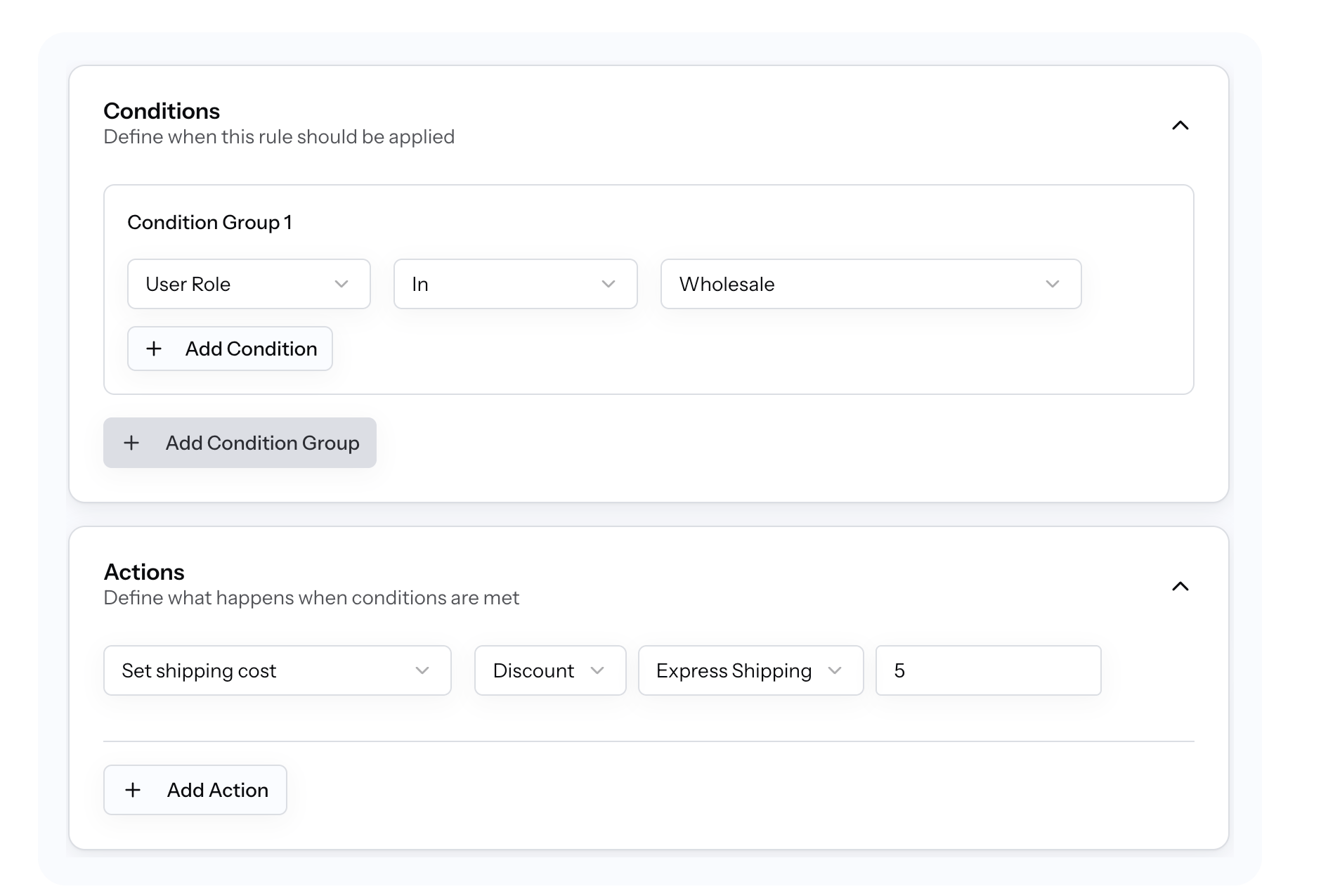
IF User Role = Wholesale
THEN Show “Wholesale Freight” and hide all retail methods
Or:
IF User Role = Retail
THEN Show flat-rate + free shipping, hide wholesale carriers
Step-by-step setup
- Create a new rule in RuleHook
- Add condition: Custom User Role → equals → Wholesale
- Add actions:
- Show specific shipping methods
- Hide all others
- Save and activate
What happens at checkout
- Wholesale users log in → only wholesale shipping appears
- Retail users → never see B2B freight options
- No duplicated zones
- No code
- No guessing
From the customer’s perspective, it feels intentional. From your side, it’s finally controllable.
Edge Cases to Consider
When this might not work
- If your “wholesale” customers aren’t assigned a distinct user role
- If checkout is allowed without login (role must be known)
Other conditions to combine
- User Role + Cart Total (e.g. wholesale freight only above €500)
- User Role + Shipping Country
- User Role + Weight or Pallet Count
RuleHook rules are deterministic, but only if your inputs are clean.
Summary
Wholesale and retail customers have different expectations. Showing them the same shipping options is lazy and expensive. With RuleHook, shipping finally adapts to who is buying, not just what they’re buying. Cleaner checkout. Fewer support tickets. Better margins.
Try RuleHook free for 7 days and take control of shipping logic without hacks.
Related scenarios: role-based pricing visibility, B2B minimum order shipping, region-specific wholesale freight.