“Standard Shipping.”
That single, generic label might be costing you more than you think.
When customers see vague shipping names, they make assumptions: cheap, slow, risky. If you’re shipping fragile products like glass or ceramics, “Standard Shipping” doesn’t communicate care, handling, or delivery expectations. That confusion leads to support tickets, abandoned carts, and post-purchase complaints like “I didn’t know this would take 7 days”.
WooCommerce’s native shipping system wasn’t built to communicate context. It shows static labels no matter what’s in the cart. And that’s exactly where the problem starts.
Why This Problem Exists
WooCommerce treats shipping method names as static strings. Once you define “Flat Rate” or “Standard Shipping,” that label stays the same for every product, every customer, every scenario.
But real-world shipping isn’t static.
A box of t-shirts and a box of wine glasses shouldn’t look identical at checkout. One requires extra packaging, careful handling, and clearer delivery expectations. Yet WooCommerce has no built-in way to say: “If the cart contains fragile items, rename this shipping method.”
Most store owners try to work around this by duplicating shipping methods, creating multiple zones, or writing conditional logic in the wrong place. These hacks scale poorly, break easily, and still fail to communicate clearly to the customer at checkout.
The Manual / Hacky Solutions
Option 1: Do it manually
You create multiple shipping methods like:
- “Standard Shipping”
- “Standard Shipping (Fragile)”
- “Standard Shipping (Glass Items)”
Now you’re managing pricing, zones, and visibility across all of them. One pricing change means updating everything. This approach doesn’t scale and invites mistakes.
Option 2: Use existing shipping plugins
Most shipping plugins focus on cost calculation, not presentation. They might adjust the price based on weight or class, but the label shown to the customer remains static. Some allow basic renaming but not conditionally, and not based on what’s actually in the cart.
Option 3: Custom code
Yes, you can hook into WooCommerce filters and rename shipping methods programmatically. But now you’re maintaining custom PHP logic, handling edge cases, and debugging conflicts every time WooCommerce updates. It’s powerful but brittle and expensive long-term.
The Clean Solution with RuleHook
RuleHook solves this at the right layer: rules + actions, not hacks.
You define when something happens and what should change.
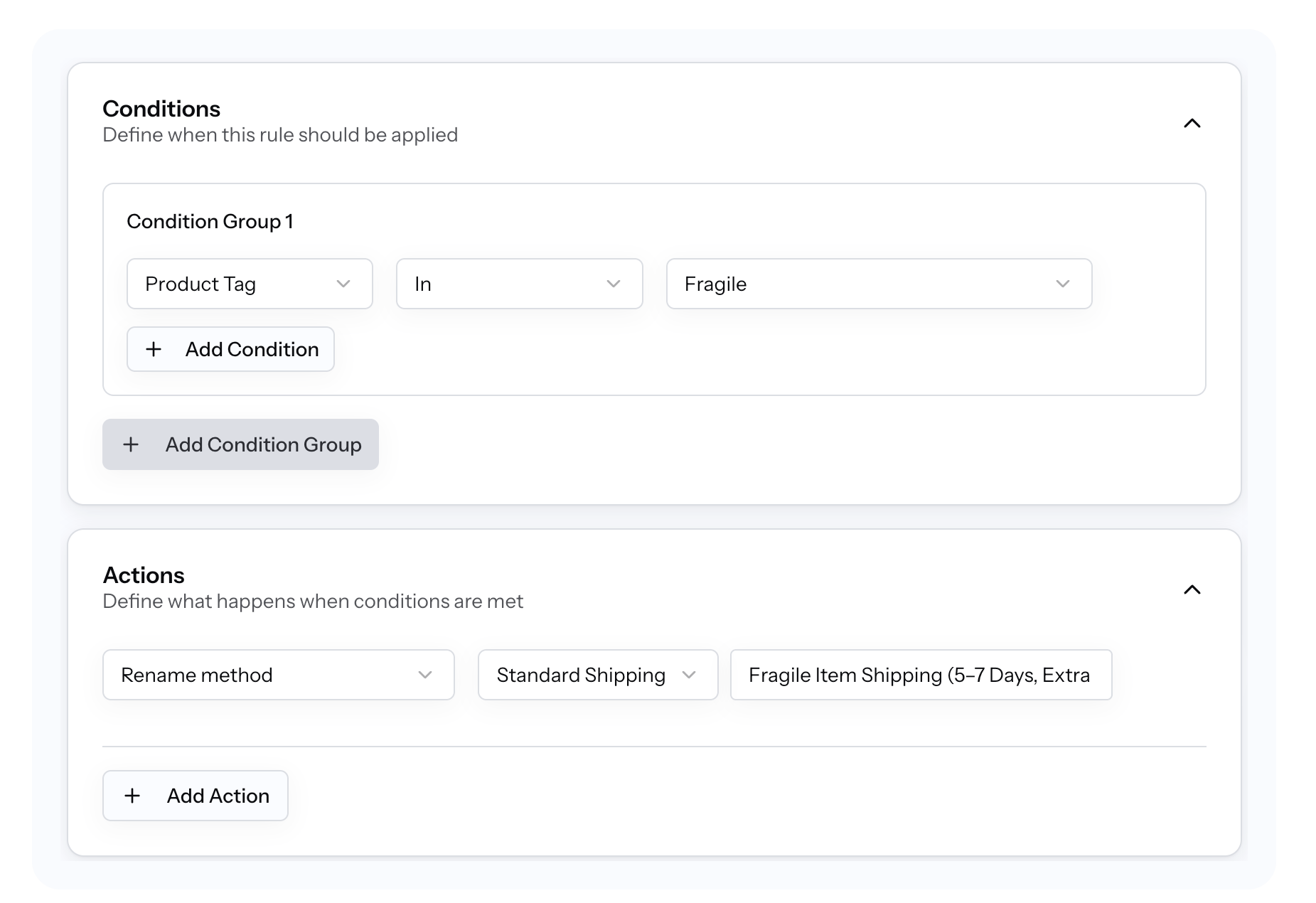
Step-by-step setup
- Create a new rule in RuleHook
- Condition: Product has tag =
fragile - Action: Rename shipping method
- From: “Standard Shipping”
- To: “Fragile Item Shipping (5–7 Days, Extra Care)”
That’s it.
What happens at checkout
When a customer adds a product tagged as fragile RuleHook intercepts the shipping calculation and dynamically renames the method in real time. No duplicate shipping methods. No extra zones.
The customer experience
Instead of a vague option, the customer now sees:
Fragile Item Shipping (5–7 Days, Extra Care)
This sets expectations, reduces anxiety, and increases trust without changing your actual shipping carrier or rate logic.
Edge Cases to Consider
When this might NOT work
- If your shipping carrier injects labels after checkout (rare, but possible with some APIs)
- If another plugin forcibly overrides method names at a later hook
Other conditions to combine
- Product category (e.g. “Glassware”)
- Cart contains X fragile items
- Destination country or zone
- Cart value thresholds
Testing checklist
- Test mixed carts (fragile + non-fragile)
- Test multiple shipping methods
- Test guest vs logged-in users
- Test mobile checkout
RuleHook includes a preview mode so you can validate behavior before going live.
Summary
Generic shipping names hide important details, and those details directly affect conversions, support load, and customer trust.
By dynamically renaming shipping methods based on what’s actually in the cart, you communicate clarity at the exact moment it matters: checkout.
No hacks. No duplicate methods. No custom code.
Try RuleHook free for 7 days and start turning shipping labels into clear, confidence-building messages.
Related scenarios:
– Add handling fees for fragile items
– Hide express shipping for oversized products
– Rename shipping methods based on delivery speed