Free shipping feels generous, but it’s quietly destroying your margins. Every time a customer enters a promo code and gets both a product discount and free shipping, you’re paying twice. What most store owners actually want is simple: discount shipping, not eliminating it.
“$5 shipping with SUMMER10” is very different from “Free shipping for everyone,” but WooCommerce doesn’t make that distinction easy. Native coupons barely touch shipping logic, and most plugins push you toward all-or-nothing outcomes. That’s how small promos turn into big losses, especially on heavy or international orders.
Why This Problem Exists
WooCommerce coupons were never designed to control shipping, only to discount products or toggle free shipping globally. There’s no native way to say:
“If coupon X is applied, reduce shipping by $5, but don’t make it free.”
Technically, shipping is calculated before coupons are fully resolved. That ordering breaks most logical use cases. As a result, store owners rely on fragile hacks: free-shipping coupons combined with minimum thresholds, duplicated shipping zones, or conditional shipping classes.
These workarounds fail fast. They conflict with other rules, don’t scale across regions, and collapse the moment you add a second promo. The more complex your shipping setup becomes, the more brittle these hacks get.
The Manual / Hacky Solutions
Option 1: Do it manually
Create temporary shipping zones or flat rates every time you run a promo.
Cost: time, errors, and forgotten cleanups.
Reality: You will forget to revert something and pay for it.
Option 2: Use a coupon or shipping plugin
Most plugins only support:
- Free shipping (on/off)
- Fixed product discounts
They can’t modify an existing shipping rate conditionally. You end up choosing between “free” or “nothing.”
Option 3: Custom code
Yes, you can hook into woocommerce_package_rates and write conditional logic.
But:
- It’s fragile
- It breaks on updates
- Every new promo adds more technical debt
What starts as 20 lines becomes an unmaintainable mess.
The Clean Solution with RuleHook
RuleHook treats shipping like logic, not a checkbox.
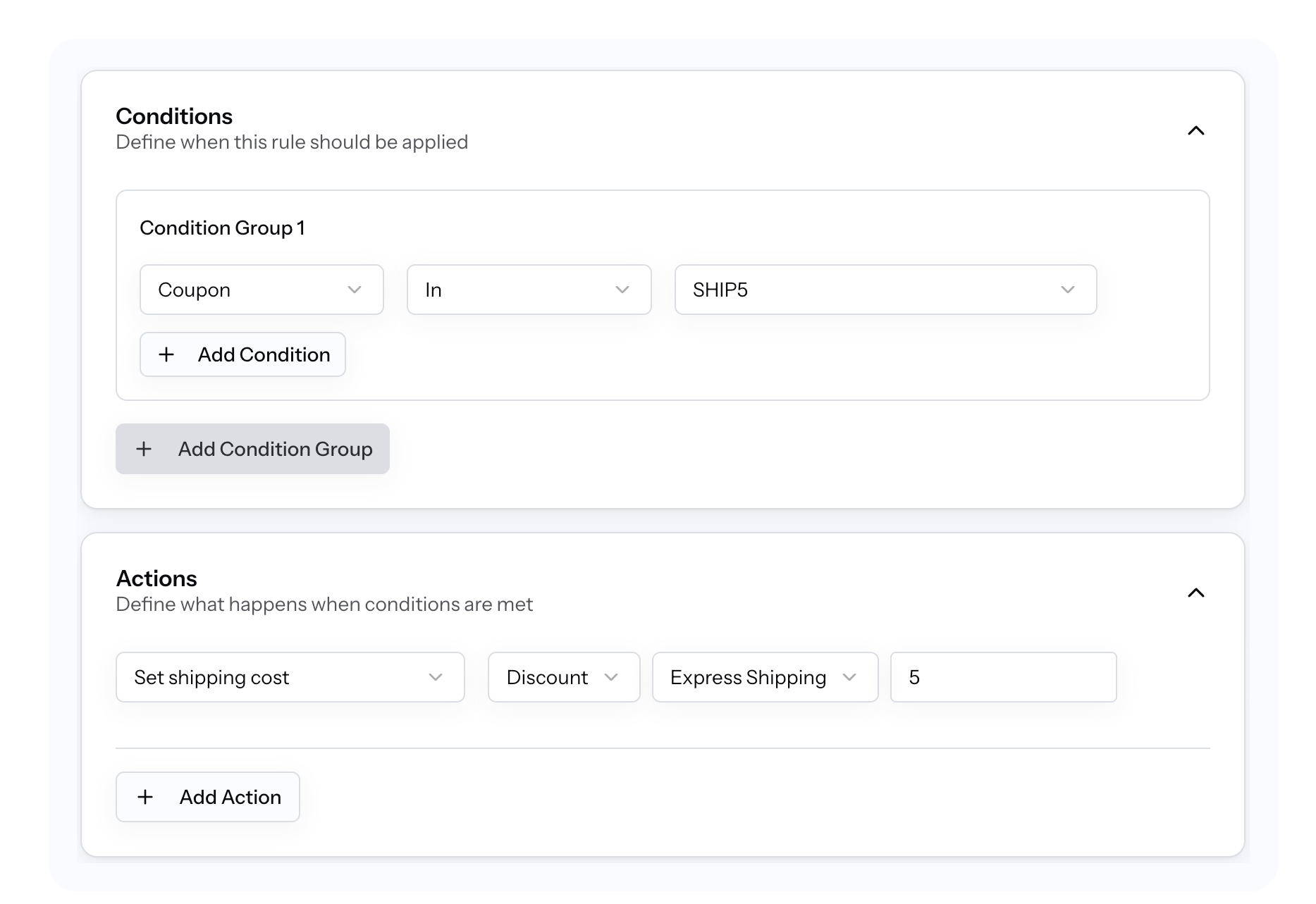
Instead of bending coupons to do shipping’s job, you define a rule:
Condition: Coupon code =
SHIP5
Action: Reduce shipping cost by $5
Step-by-step setup
- Create a new rule in RuleHook
- Add a Coupon Code condition
- Choose Modify Shipping Cost as the action
- Set a fixed discount (e.g.
- $5) or percentage - Save and activate
What happens at checkout
- Customer enters the coupon code
- Shipping rates are calculated normally
- RuleHook intercepts the rates
- The discount is applied only to shipping
No free shipping. No hacks. No surprises.
Customer experience
The customer sees:
- A valid promo applied
- A clearly reduced shipping cost
- Full transparency at checkout
You protect margins and improve conversion.
Edge Cases to Consider
When this might NOT work
- If your payment gateway recalculates shipping after checkout (rare but possible)
- If another plugin force-overrides shipping totals after rules run
Other conditions to combine
- Coupon + cart total (e.g. only discount shipping over $50)
- Coupon + location (exclude remote zones)
- Coupon + shipping method (only standard, not express)
RuleHook makes testing predictable because rules are explicit, not implicit.
Summary
Discounted shipping is a strategy, not a giveaway. When done right, it increases conversion without bleeding profit. The problem was never your promo idea; it was the tooling.
RuleHook gives you precise control: apply shipping discounts only when it makes business sense, tied to the exact coupon you choose.
Free shipping kills margins. Controlled shipping discounts grow revenue.
👉 Try RuleHook free for 7 days
Explore related scenarios:
- Time-based shipping promos
- Location-specific shipping discounts
- Handling fees tied to coupons